

Salesforce Logger

Overview
Read Apex debug logs for the logged-in Salesforce session, with auto-refresh, SOQL highlighting, and readable errors.
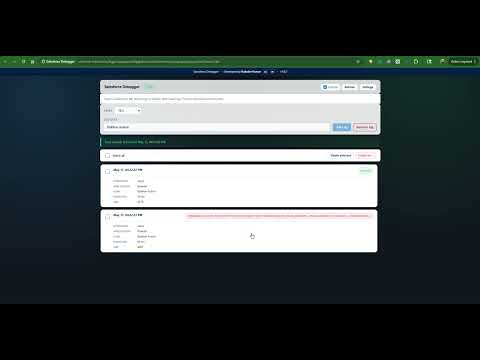
Inspect Apex debug logs from your logged-in Salesforce session with automatic refresh, trace-flag controls, SOQL-aware viewing, structured error navigation, and optional AI-assisted analysis. Salesforce Debugger — Your Essential Salesforce Debugging Tool Salesforce Debugger is a Manifest V3 Chrome extension for Salesforce developers, admins, and QA engineers who need fast access to Apex debug logs and trace setup directly from the browser—without leaving their Lightning or Setup workflow. 🎯 KEY FEATURES ✓ Apex debug log explorer Browse recent Apex logs returned via Salesforce Tooling queries against ApexLog (respecting your chosen log-user scope). Configurable fetch limit (up to 200 logs per refresh). Click any log row to open a dedicated detail viewer with reload and raw-log copy. ✓ Automatic refresh & session-aware loading Optional auto-refresh intervals (10s–60s) or manual-only refresh. Resolves API host and session from typical Salesforce URLs (production, sandbox, Lightning, and Setup-related hosts). ✓ Log user filtering & trace management Search and pick a Log User from your org context. Create trace flags (“Set Log”) using defaults you configure—trace duration (minutes) and category debug levels (Apex Code, Profiling, Callout, Database, System, Validation, Visualforce, Workflow). Remove active USER_DEBUG traces when you’re done (“Remove log”). ✓ Bulk log housekeeping Select-all and delete selected Apex logs, or delete all logs visible under your current query scope. ✓ Rich log detail viewer Summary chips for total lines, SOQL-related events, and surfaced errors—with quick navigation between matching rows. Toggle “Optimize log” for a grouped table view per code unit, or switch off for full chronological text with line numbers. Category visibility toggles for Debug (USER_DEBUG), Exceptions, Queries (SOQL), and Variable assignment. SOQL rows use distinct styling and extracted query text for faster scanning. ✓ Error & SOQL navigation Dedicated controls to jump Previous / Next among highlighted errors or SOQL lines inside the filtered view. ✓ Optional AI log analysis “Analyze with AI” summarizes or drills into the open log using providers you choose in Settings—including Chrome Built-in AI (Gemini Nano) when available, plus BYO-key options such as Claude, OpenAI Codex / ChatGPT, Cursor-compatible endpoints, and Salesforce-hosted paths where configured. ✓ Full-tab mode & persistent settings Open the same UI as a normal browser tab when you prefer more screen space. Chrome storage remembers limits, refresh defaults, trace defaults, AI preferences, and UI choices. 🔐 SECURITY & PRIVACY Uses your existing Salesforce browser session—credentials are not sent through an intermediate logging server operated by this extension. Extension settings and any API keys or endpoints you enter for AI features are stored locally in Chrome (extension storage). Core log fetch, delete, and trace operations use official Salesforce REST / Tooling API endpoints against your org. Optional AI analysis calls third-party or Salesforce-hosted endpoints only when you explicitly configure those providers. No third-party analytics are included in this extension’s core Salesforce log flows. 💼 PERFECT FOR Salesforce developers debugging Apex, triggers, flows, or integrations. QA engineers reproducing failures and correlating logs with steps. Admins troubleshooting validation rules, workflows, or user-context issues. Teams that want quicker trace setup without hopping through Setup for every iteration. ⚙️ REQUIREMENTS Active Salesforce organization (production or sandbox). Logged into Salesforce in a tab whose host maps to your My Domain API host (Lightning / Setup tabs supported per manifest). Org user with permission to query Apex logs and manage Tooling-accessible trace resources. This build uses Salesforce REST API version v60.0 for the Tooling paths it calls. 📝 HOW TO GET STARTED Pin Salesforce Debugger and open Lightning or Setup on your org. Open the popup—logs load using your active session. Optionally set auto-refresh, pick a Log User, and use Set Log / Remove log as needed. Open a log for summaries, filters, SOQL/error navigation, Optimize log toggles, and AI analysis. Use Settings for fetch limits, default refresh, trace duration, debug level defaults, and AI provider configuration. 🚀 BUILT FOR DEVELOPERS, BY DEVELOPERS Built for day-to-day Salesforce debugging—fast lists, readable logs, and controls that stay where you already work. Developed by: Baibahv Kumar Version: 1.0.0 Category: Developer Tools
0 out of 5No ratings
Details
- Version1.1.0
- UpdatedAugust 24, 2026
- Offered byBaibhav kumar
- Size75.13KiB
- LanguagesEnglish
- Developer
Email
bony.jaiswal@gmail.com - Non-traderThis developer has not identified itself as a trader. For consumers in the European Union, please note that consumer rights do not apply to contracts between you and this developer.
Privacy

Salesforce Logger has disclosed the following information regarding the collection and usage of your data. More detailed information can be found in the developer's privacy policy.
Salesforce Logger handles the following:
This developer declares that your data is
- Not being sold to third parties, outside of the approved use cases
- Not being used or transferred for purposes that are unrelated to the item's core functionality
- Not being used or transferred to determine creditworthiness or for lending purposes