

Salesforce JWT Quick Login

Overview
One-click Salesforce login via JWT Bearer OAuth 2.0. Credentials protected by zero-knowledge AES-256-GCM vault.
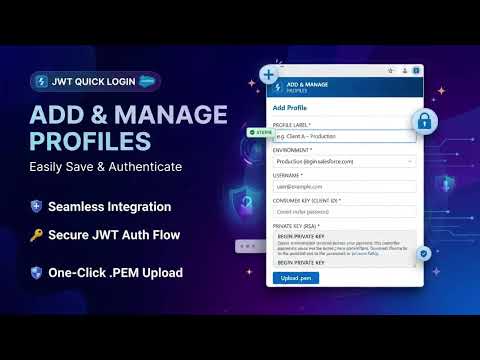
Streamline your daily Salesforce development and administration workflow. JWT Quick Login enables instant, one-click authentication into multiple Salesforce environments using the OAuth 2.0 JWT Bearer Token Flow—eliminating repetitive password entries while keeping your private keys strictly on your machine. Key Features Instant JWT Authentication: Save your Username, Consumer Key (Client ID), and RSA Private Key to launch authenticated Salesforce sessions in a single click. Multi-Environment Management: Organize and switch between Production (login.salesforce.com), Sandbox (test.salesforce.com), and Custom Domain orgs with built-in profile search. One-Click PEM Upload: Paste your private key directly or upload .pem certificate files (supports both PKCS#8 BEGIN PRIVATE KEY and PKCS#1 BEGIN RSA PRIVATE KEY formats). Encrypted Backup & Restore: Safely export and import your profiles across devices using password-encrypted backups or plaintext JSON files. Zero-Knowledge Security AES-256-GCM Vault Encryption: Every credential and private key is encrypted locally using a Master Password that you control. 100% Local & Offline: No external backend, no telemetry, and no cloud sync—your Master Password and RSA keys never leave your device. Configurable Auto-Lock: Set custom vault lock timeouts with optional sliding expiry (timer reset on each login action) to prevent unauthorized access when idle.
0 out of 5No ratings
Details
- Version1.2.1
- UpdatedNovember 18, 2026
- Size37.81KiB
- LanguagesEnglish
- DeveloperWebsite
Email
contact@cenk.dev - Non-traderThis developer has not identified itself as a trader. For consumers in the European Union, please note that consumer rights do not apply to contracts between you and this developer.
Privacy

This developer declares that your data is
- Not being sold to third parties, outside of the approved use cases
- Not being used or transferred for purposes that are unrelated to the item's core functionality
- Not being used or transferred to determine creditworthiness or for lending purposes