

Salesforce Admin Jump

Overview
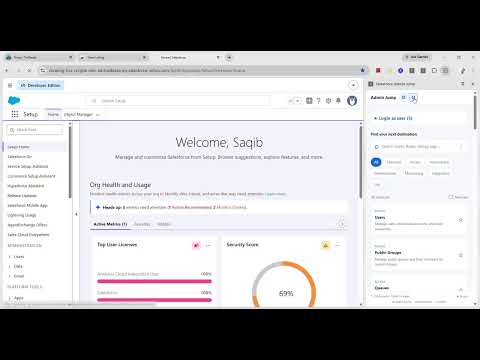
Search Salesforce admin and developer shortcuts in a side panel scoped to the tab you click.
Salesforce Admin Jump helps Salesforce administrators and developers move through Setup faster from a searchable Chrome side panel that stays connected to the Salesforce tab and org where it was opened. Search built-in shortcuts and org-specific destinations for Users, Flows, Object Manager, Permission Sets, Public Groups, Queues, Apex Classes, Debug Logs, Deployment Status, and more. Save the Salesforce pages you use most, keep notes for each org, and return to your work without rebuilding your setup every time. KEY FEATURES • Search all shortcuts by name or keyword, including saved tabs and indexed org content. • Select one or more categories to browse the shortcuts relevant to your current task. • Star frequently used links and customize each header shortcut with a title, an icon, or both. • Save the current Salesforce page, including its filters and URL details, as an org-specific shortcut. • Open the dedicated Saved Tabs view from the header and find saved pages through search. • Keep reminders, setup details, and useful references in notes stored separately for each org. • Browse remembered Salesforce orgs and quickly switch back to a recent production org or sandbox. • Discover Setup menu items loaded by Salesforce and add them to the searchable shortcut list for that org. • Build a local object index and search by label or API name. • Jump from an indexed object to its fields, page layouts, validation rules, Lightning record pages, details, edit page, or records. • Index flows and search by flow name, API name, type, or status, then open Flow Builder or flow details and versions. • Import visible Salesforce users into an org-specific directory, open user details or edit pages, and use Login As when Salesforce provides an authorized login link. • Switch between Notes, Users, Objects, and Flows from a compact tool bar above the results. • Choose whether destinations—including orgs, objects, flows, users, and Login As—open in the connected tab or a new tab. • Navigate quickly with keyboard controls and automatic light or dark styling. BUILT FOR MULTI-ORG WORK Salesforce Admin Jump recognizes Lightning, My Domain, sandbox, Classic instance, and Salesforce Setup domains. Saved pages, notes, imported users, object and flow indexes, and discovered Setup links are kept separate by Salesforce domain so each org retains its own workspace. The panel stays bound to the tab where you opened it, helping reduce accidental navigation in the wrong org. LOCAL STORAGE AND PRIVACY Favorites, preferences, remembered org domains, saved pages, notes, and imported indexes are stored locally in Chrome. Salesforce Admin Jump does not use analytics, external services, remote code, or the Salesforce API. It does not store passwords, cookies, or session tokens. The extension uses your existing Salesforce login and permissions. It cannot grant access to Setup pages, objects, flows, users, or Login As. Optional page access is requested when features such as Setup discovery and user, object, or flow indexing need to read a Salesforce page. If you decline access, the built-in navigation shortcuts remain available. IMPORTANT LOGIN AS NOTE Salesforce shares its login session across browser tabs. Using Login As changes the Salesforce user context across those tabs, even when the destination opens in a new tab. Use Salesforce's logout action to return to your administrator session. Created by Saqib Ashraf. Website: https://orgwithai.com LinkedIn: https://www.linkedin.com/in/ashrafsaqib/ Salesforce Admin Jump is an independent product and is not affiliated with, endorsed by, or sponsored by Salesforce.
0 out of 5No ratings
Details
- Version6.0.0
- UpdatedNovember 24, 2026
- Offered bySaqib Ashraf
- Size4.97MiB
- LanguagesEnglish (United States)
- DeveloperSaqib Ashraf
h#194 ahmad block alhafeez garden phase 1 Lahore 54000 PKEmail
linktosaqib@gmail.comPhone
+92 320 1430963 - TraderThis developer has identified itself as a trader per the definition from the European Union and committed to only offer products or services that comply with EU laws.
Privacy

This developer declares that your data is
- Not being sold to third parties, outside of the approved use cases
- Not being used or transferred for purposes that are unrelated to the item's core functionality
- Not being used or transferred to determine creditworthiness or for lending purposes
Support
For help with questions, suggestions, or problems, please open this page on your desktop browser