

Safe Privacy Mask — Keep personal information out of AI chats

Overview
Mask private data in ChatGPT, Gemini & Claude locally. Free, no sign-up. Custom masks and rules for 40+ countries/regions.
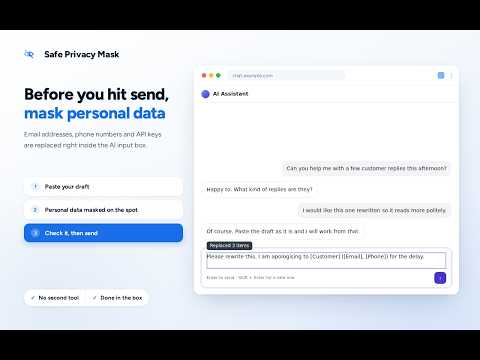
Safe Privacy Mask is a free Chrome extension for masking personal information in ChatGPT, with no account required. It also supports Gemini and Claude. Mask email addresses, phone numbers and API keys in the input field before sending. Register customer, company and project names to replace confidential terms, too. Detection and masking happen in your browser: your text is not sent to an external server for masking, and you do not need to paste it into a separate masking website. For work, everyday questions, and helping family members and loved ones use AI. MASK IN THE INPUT FIELD • Replaces text matching standard detection rules, including email addresses, phone numbers and API keys. • Add names and business-specific terms under “Your own masks”, along with the text to replace them with. Example: Fictional Company A → [Customer]. • When send review is enabled, a send that changes text is paused. Check the result, then send again. CHOOSE WHEN TO MASK • “Mask it all when you send” is the default for new installations. Replacements happen when you click Send, press Enter or submit a form. Text remains unchanged while typing. If review is on, sending pauses after replacement. • “Mask automatically as you type” replaces text while you type, so you can write while seeing the result. WORK AND FAMILY Hide contact details before asking AI to summarize or edit emails. Replace registered names before summarizing or translating customer inquiries. Mask API keys and tokens matching the rules when investigating code or logs. This is not a system that understands meaning and automatically identifies every confidential detail. Register names and work-specific terms beforehand. Set it up together with family members or people you support, and help build a habit of checking messages before sending. “Try it with a made-up sample” lets you test it without entering real information. HOW TO USE 1. Type as usual in a supported AI chat. 2. With masking on send, detected information is replaced in the field when you send. 3. If review is enabled and anything was replaced, sending pauses. Check the text and send again. “Undo masking” in the review panel undoes replacements made by that send. It cannot undo typing-time replacements or restore text after the panel is closed. SETTINGS AND PRIVACY Choose masking timing and whether to review on send. Custom rules support words and regular expressions. On websites beyond supported AI chats, register a target input field to use the extension. It does not work on every page or field. Detection and replacement run in your browser. Input text and detection results are not sent to external servers for masking. There are no ads or analytics, and browsing history is not collected. Settings and registered rules stay on your device. Page access is used to detect and replace text in target input fields. BEFORE YOU USE IT Detection relies on text formats and registered rules. It can miss information or flag harmless text: always check what you send. No replacements does not mean the text is safe. Complete anonymization or prevention of every information leak is not guaranteed. With masking on send, the original text remains in the field until you send. Neither mode prevents the website or AI service from reading unmasked input or saving drafts. Turning review off allows the replaced text to be sent without a review opportunity. In send mode, Shift+Enter does not trigger replacement, but in some fields even an ordinary Enter used for a line break may trigger processing. Follow your organization's rules at work. This extension does not replace organization-wide information protection. Changes to websites or AI services may affect operation. PRODUCT AND SUPPORT Safe Privacy Mask: https://legacy-tools.dev/safe-privacy-mask Legacy Tools: https://legacy-tools.dev/ Bug reports and requests: https://legacy-tools.dev/support
5 out of 53 ratings
Details
- Version2.1.1
- UpdatedNovember 5, 2026
- Size1.75MiB
- Languages45 languages
- DeveloperWebsite
Email
support@legacy-tools.dev - Non-traderThis developer has not identified itself as a trader. For consumers in the European Union, please note that consumer rights do not apply to contracts between you and this developer.
Privacy

Safe Privacy Mask — Keep personal information out of AI chats has disclosed the following information regarding the collection and usage of your data. More detailed information can be found in the developer's privacy policy.
Safe Privacy Mask — Keep personal information out of AI chats handles the following:
This developer declares that your data is
- Not being sold to third parties, outside of the approved use cases
- Not being used or transferred for purposes that are unrelated to the item's core functionality
- Not being used or transferred to determine creditworthiness or for lending purposes
Support
For help with questions, suggestions, or problems, visit the developer's support site