


Overview
Swaps client data for placeholders before it reaches AI chat, stops passwords, keys and client files, and shows you the real values.
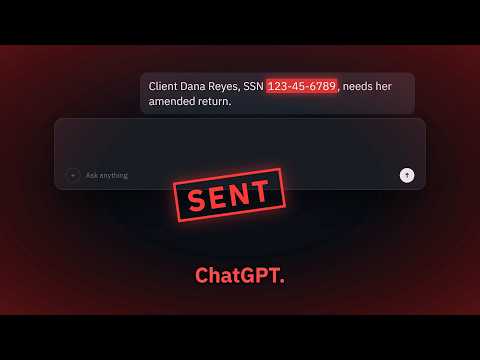
Safe-Desk lets staff at regulated firms keep using AI chat with their own accounts without sending client data to it. It works on the major AI chat sites; the current list is at https://desk.sophiaxt.com/docs/install-extension This extension requires a Safe-Desk account from your firm. It does nothing on its own until you sign in with Safe-Desk. WHAT IT DOES When you paste or send a message on a supported AI chat site, the extension checks the text with your firm's Safe-Desk rules first. Client details such as Social Security numbers, account and routing numbers, card numbers and names are swapped for placeholders like [SSN_1], and the placeholder version is what goes into the chat. It stays out of your way: a small mark by the chat box says how many items were protected, then fades. Passwords, API keys and other secrets are stopped. The message stays in the chat box so you can remove them, and nothing is sent. Client files are stopped too. A file you choose, drop or paste onto the chat is held back with a short notice, unless your firm allows uploads. Plain-text files are checked like a paste and added as protected text instead. Answers keep their placeholders on the page. Click a placeholder to see the real value in a small Safe-Desk tooltip for up to 10 seconds. Your firm's owner can switch this to hover, and until the owner sets it you can choose hover yourself in the Safe-Desk side panel (on an AI chat site) or popup (on any other tab). Real values are shown only in the Safe-Desk panel and its tooltip, which the chat page's own scripts cannot read. Copying an answer puts the text with the real values on your clipboard, ready for Word or Outlook. The chat page and the AI provider only ever have the placeholders. Click the Safe-Desk icon on a chat to open the side panel: whether the chat is protected, the placeholders in it by kind, what was stopped, and today's counts. Press Reveal to see a value for 10 seconds. If your firm uses strict mode, messages with identifiers such as SSNs, card and account numbers are stopped, and email addresses and phone numbers are removed and not put back. Names, addresses and dates follow your firm's setting: set to Protect, they are removed and not put back; set to Flag, they are sent as written and reported to the owner. SETTING IT UP 1. Add the extension to Chrome. 2. Click the Safe-Desk icon and press Sign in with Safe-Desk. 3. Sign in to Safe-Desk in the window that opens and allow Safe-Desk for Chrome. A connection code from Settings on desk.sophiaxt.com works too. While the extension is not connected, its icon shows OFF and chat pages show a notice saying messages are not being checked. WHAT YOUR FIRM SEES Every 5 minutes the extension tells your firm's Safe-Desk account that this browser is protected, with its version and the sites it covers, so the owner can see which staff browsers are covered. When a file is stopped, or let through with a reminder, the firm sees the site, the file type and a rough size, never the file's name or contents. The firm sees when you sign out. WHAT IT CANNOT DO Voice input is not checked. It cannot stop someone typing client data into another website, another browser or another app. Safe-Desk works best alongside a written AI policy at your firm. Names, addresses and dates without a client list to match against are detected from context. That is a best effort, and your firm chooses how strictly to treat them. If the Safe-Desk server cannot be reached, or your sign-in has been removed, pastes and messages are held back with a notice instead of going out unchecked. AI sites change their pages from time to time. If the extension cannot find the chat box, it tells you it is not checking that page rather than breaking the site. PRIVACY The extension talks to one server, desk.sophiaxt.com, and loads no remote code. The Safe-Desk server checks your text in memory and does not write it, the answers or the values it catches to disk or a log. It keeps the digits from your last few sends in memory for up to 30 minutes to catch a number sent in pieces. Your firm's owner sees a log of who ran a check, when, and what kind of data was caught, never the values. Full policy: https://desk.sophiaxt.com/privacy.html Safe-Desk helps a firm meet its confidentiality duties. It does not make a firm compliant with any law on its own. Made by SOPHIA XT LLC. Questions: contactus@sophiaxt.com
0 out of 5No ratings
Details
- Version1.2.1
- UpdatedSeptember 26, 2026
- Size136KiB
- LanguagesEnglish (United States)
- DeveloperWebsite
Email
Contactus@sophiaxt.com - Non-traderThis developer has not identified itself as a trader. For consumers in the European Union, please note that consumer rights do not apply to contracts between you and this developer.
Privacy

Safe-Desk: Client Data Guard for AI Chat has disclosed the following information regarding the collection and usage of your data. More detailed information can be found in the developer's privacy policy.
Safe-Desk: Client Data Guard for AI Chat handles the following:
This developer declares that your data is
- Not being sold to third parties, outside of the approved use cases
- Not being used or transferred for purposes that are unrelated to the item's core functionality
- Not being used or transferred to determine creditworthiness or for lending purposes
Support
For help with questions, suggestions, or problems, visit the developer's support site