

Auto Clicker & Cookie Clicker: Multi Target, Scroll, Refresh, Swipe

Overview
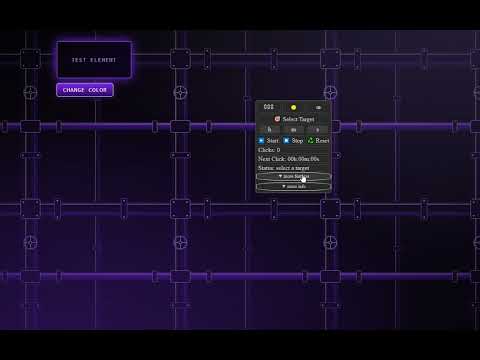
Auto-click any element, several targets at once, auto-scroll, auto-refresh and touch-swipe, with full user control.
Auto Clicker & Cookie Clicker adds a small floating control panel to any web page. Use it to click elements automatically, scroll, reload a page or swipe on a timer, and stop whenever you want. Everything runs locally in your browser. No account, no data collection, no ads. HOW TO USE 1. Open a page and click the extension icon to show the panel. 2. Press Select Target and click the element you want to automate. 3. Set the interval (hours, minutes, seconds) and press Start. 4. Press Stop to end the run, or Reset to clear the counters. MODES Auto Click Clicks the selected element at the interval you set. Shows a click counter and a countdown to the next click. Multi-Target Clicking Click several targets in one run. Add elements, drag out a zone (clicks at random points inside it), or press Alt+Shift+X to add a point at the cursor. Sequential order clicks one target per interval in rotation; Parallel order clicks every target each interval. Choose the mouse button (left, right, middle), single or double click, and repeat either until you press Stop or for a set number of full passes over all targets. This page has its own Start, Stop and Reset. Cookie Clicker For Cookie Clicker and other clicker games. Enter how many clicks (1-1000) to spread across the interval, for example 10 clicks every 1 second. It repeats until you press Stop. Auto Scroll Scrolls up or down at a speed in pixels per second. It scrolls the scrollable block at the center of the screen (a chat, a feed, a pop-up) and moves on to the page itself when that block reaches its end. Auto Refresh Reloads the page on a timer (minimum 3 seconds) and keeps going after each reload. An optional Hard refresh adds a cache-busting parameter to the address; it is a best-effort option and not the same as Ctrl+Shift+R. Auto Swipe Simulates a touch swipe (up, down, left or right) with a distance in pixels and a duration in milliseconds, optionally repeated every N seconds. It swipes from the center of the page, or from an element you pick with Select Target. Some sites ignore synthetic touch events, so it may not work everywhere. PANEL - Drag it anywhere; its position is remembered per site. - Hide it without stopping a running automation. - Light and dark theme. - Short built-in help next to each mode. - Keyboard accessible, with labels for screen readers. GOOD TO KNOW - The extension clicks, scrolls, reloads and swipes. It does not type text into fields. - Your selected target lasts for the current page session; after a reload of the page, select it again. - It needs access to the pages you visit to show the panel and click the elements you choose. It does not use your browsing history, bookmarks or passwords. - Settings are stored in your browser only. Removing the extension removes them. - Please use it in line with the terms of the sites and games you automate. The extension is free. An optional Support page inside the panel has a way to contribute and a link to leave a review.
3.2 out of 59 ratings
Details
- Version5.3.13
- UpdatedSeptember 28, 2026
- Size150KiB
- LanguagesEnglish (United States)
- DeveloperWebsite
Email
autorefreshtasks@gmail.com - Non-traderThis developer has not identified itself as a trader. For consumers in the European Union, please note that consumer rights do not apply to contracts between you and this developer.
Privacy

This developer declares that your data is
- Not being sold to third parties, outside of the approved use cases
- Not being used or transferred for purposes that are unrelated to the item's core functionality
- Not being used or transferred to determine creditworthiness or for lending purposes
Support
For help with questions, suggestions, or problems, visit the developer's support site