

Safe Auto Clicker — Smart Mouse Click Automation for Any Website

Overview
Auto-click anything on any website. Smart, safe, user-controlled clicker for forms, games, Salesforce, eBay, Amazon.
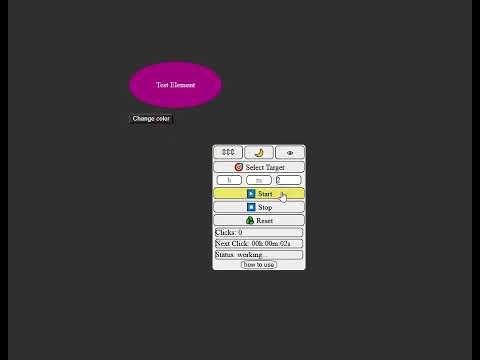
Last updated: 07/04/2026 New Cookie Clicker mode – enter the number of clicks per second and automate clicking for Cookie Clicker and similar browser games. Safe Auto Clicker is a lightweight, privacy-first Chrome extension that automates mouse clicks on any website. Whether you need an auto clicker for productivity, testing, repetitive tasks, or browser games, it provides fast and reliable click automation with no setup required. Select any page element and configure custom click intervals in seconds, minutes, or hours. Use the movable control panel to Start, Stop, or Reset automation at any time. Features Cookie Clicker mode (clicks per second) Custom click intervals Click any selected element Draggable control panel Works on most websites and web applications Lightweight and fast Fully local operation — no data is collected or transmitted No ads, no tracking Accessibility (a11y) Perfect for: Cookie Clicker and similar browser games Repetitive clicking Form automation QA testing Productivity workflows Everyday web tasks Compatible with regular websites as well as complex web applications such as Salesforce, Amazon, eBay, dashboards, internal tools, and more. Ready to use in seconds — select an element, choose your settings, and start clicking automatically.
3.2 out of 59 ratings
Details
- Version4.3.10
- UpdatedJuly 4, 2026
- Size129KiB
- LanguagesEnglish (United States)
- DeveloperWebsite
Email
autorefreshtasks@gmail.com - Non-traderThis developer has not identified itself as a trader. For consumers in the European Union, please note that consumer rights do not apply to contracts between you and this developer.
Privacy

This developer declares that your data is
- Not being sold to third parties, outside of the approved use cases
- Not being used or transferred for purposes that are unrelated to the item's core functionality
- Not being used or transferred to determine creditworthiness or for lending purposes
Support
For help with questions, suggestions, or problems, visit the developer's support site