

SabLearning: YouTube Notes,Transcripts,AI & Playlist Tracker

Overview
Turn YouTube videos into courses: timestamped notes, AI summaries, transcripts with translation, focus mode, and playlist tracking.
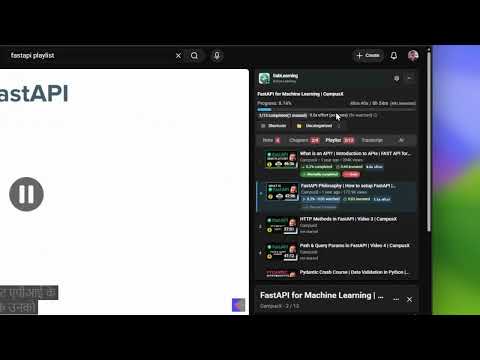
SabLearning is a free YouTube learning Chrome extension that turns scattered videos and playlists into structured, trackable courses. Take timestamped notes, read interactive transcripts with translation, track real progress with dual-effort metrics, and use AI summaries — all directly on YouTube. 90% of people never finish the YouTube tutorials they start. SabLearning fixes this by combining smart note-taking, automatic progress tracking, transcripts, and AI in one lightweight sidebar. 🔑 Key Features 📝 Timestamped Notes – Rich-text YouTube note-taking linked to exact video moments 🎬 Interactive Transcripts – Click-to-seek captions with translation. Filter by chapter or time range, then copy a targeted transcript slice for notes or LLM prompts. 📚 Chapter Notes – Auto-extract chapters and organize notes by section 🤖 AI Summaries – Embed YouTube AI chat summaries directly into your notes 🎯 Focus Mode – Hide comments and recommendations for distraction-free learning 📊 Progress Tracking & Manual Completion – Auto-tracks watched time, invested time (pauses + note-taking), and effort multiplier. Force-mark videos complete when you've already watched them elsewhere. 📈 Playlist Progress – Track playlists with completion percentage and time spent 🗂️ Categories – Auto-detect or assign categories to organize your learning library 📤 Export Notes – Markdown / Plain Text export, plus one-click AI analysis prompts 🖥️ Dashboard – Popup overview of all tracked videos and playlists 💾 Offline & Private – IndexedDB storage, no account required, optional encrypted sync 🌟 Why SabLearning? Whether you're learning to code, studying for exams, following video courses, or building a personal knowledge base — SabLearning is the ultimate YouTube study tool that turns passive watching into active, structured learning without ever leaving YouTube.
0 out of 5No ratings
Details
- Version1.2.8
- UpdatedAugust 25, 2026
- Size675KiB
- LanguagesEnglish
- Developer
- Non-traderThis developer has not identified itself as a trader. For consumers in the European Union, please note that consumer rights do not apply to contracts between you and this developer.
Privacy

SabLearning: YouTube Notes,Transcripts,AI & Playlist Tracker has disclosed the following information regarding the collection and usage of your data. More detailed information can be found in the developer's privacy policy.
SabLearning: YouTube Notes,Transcripts,AI & Playlist Tracker handles the following:
This developer declares that your data is
- Not being sold to third parties, outside of the approved use cases
- Not being used or transferred for purposes that are unrelated to the item's core functionality
- Not being used or transferred to determine creditworthiness or for lending purposes
Support
For help with questions, suggestions, or problems, please open this page on your desktop browser