


Overview
Rust player intelligence for BattleMetrics and Steam: hours, aliases, connections, archives, activity, notes, and ban signals.
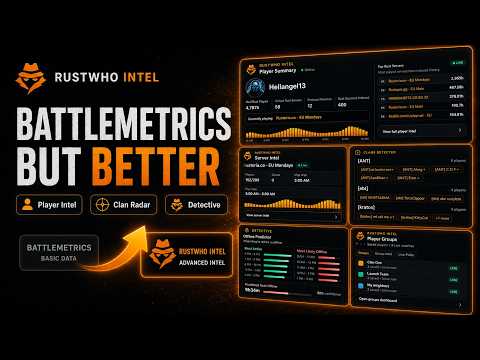
RustWho Intelligence brings Rust player information into BattleMetrics and Steam, so you can check a player without jumping between sites. On BattleMetrics, see Rust hours, recent activity, previous names, top servers, server-ban signals, and the player’s last recorded server. Search the visible server roster, organize players into groups, and keep private notes for later. Player profiles open on the Servers tab, where RustWho’s tools are available. You can return to Overview whenever you want. Name history starts collapsed, and notes and groups stay tucked away until you need them. The standard tools use available BattleMetrics page data. You can optionally connect your own BattleMetrics API token for more detailed history and lookups, subject to your token’s permissions. Missing or incomplete data is identified, and activity estimates are labelled. On public Steam Community profiles, RustWho shows available total game hours, Rust hours, Rust activity over the past two weeks, and public game count. Copy the SteamID or open SteamDB and RustWho directly from the profile. Detective users can also look for a matching BattleMetrics profile. Optional Steam investigation tools let you explore public aliases, friends, groups, archived profiles, and community reputation sources. These results are research leads, not proof that accounts are connected or that a player has done anything wrong. Availability varies by source, and some lookups require your own provider key. For In-Game Informer, connect Rust+ through Steam and return automatically to your RustWho dashboard—no copying page source. The extension also supports starting from a direct Rust+ login link. After connecting your account, pair your server in Rust to use Informer. Use RustWho to check players before teaming up, recognize previous names, follow server activity, and keep your research organized. Available plans: - Free includes BattleMetrics page tools, local player groups and private notes, and public Steam profile information. Server-ban checks require sign-in and are subject to account limits. - Wipe Pass, Strategist, and Detective include the Rust+ Informer connection flow. - Detective adds deeper player intelligence, including game-ban checks, activity patterns, estimated active and quiet windows, and same-day server movement. - With a personal BattleMetrics API token, Detective also supports inactivity-break analysis and available linked-account signals. Results depend on the history and permissions available. - Group activity tools, including heatmaps and activity overlap, require a personal BattleMetrics API token. Plan access is checked against your RustWho account. Refresh open pages after changing your plan. Your groups and private notes are stored locally in your browser and are not sent to RustWho. Personal BattleMetrics API tokens are optional, stored locally, and sent only to BattleMetrics. They are never sent to RustWho. Personal-token API responses are cached temporarily in memory and are not uploaded to RustWho. You can remove your token through the extension. Features that contact RustWho may send the player or server IDs needed for a lookup, a public SteamID, account authentication and subscription information, or your Rust+ token when connecting Informer. On supported Steam profiles, the public SteamID may also be sent to rustplayerlookup.com to retrieve a public-hours snapshot. Optional Steam investigation tools send the relevant public profile identifiers to the selected provider when you use those tools. Optional provider API keys are stored locally and sent only to their corresponding provider, never to RustWho. Private or unavailable information remains unavailable. RustWho does not bypass access controls on BattleMetrics, Steam, or Facepunch. RustWho is not affiliated with or endorsed by BattleMetrics, Facepunch, Valve, or Steam.
4.2 out of 55 ratings
Details
- Version1.5.9
- UpdatedOctober 18, 2026
- FeaturesOffers in-app purchases
- Size346KiB
- LanguagesEnglish
- DeveloperWebsite
Email
hello@rustwho.com - Non-traderThis developer has not identified itself as a trader. For consumers in the European Union, please note that consumer rights do not apply to contracts between you and this developer.
Privacy

RustWho Intelligence has disclosed the following information regarding the collection and usage of your data. More detailed information can be found in the developer's privacy policy.
RustWho Intelligence handles the following:
This developer declares that your data is
- Not being sold to third parties, outside of the approved use cases
- Not being used or transferred for purposes that are unrelated to the item's core functionality
- Not being used or transferred to determine creditworthiness or for lending purposes
Support
For help with questions, suggestions, or problems, visit the developer's support site