


Overview
Rust player intelligence for BattleMetrics and Steam: check hours, name history, servers, activity, groups, notes, and ban signals.
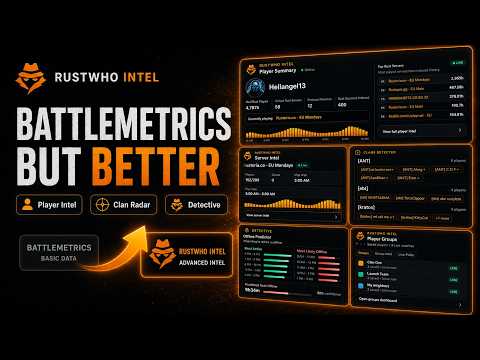
RustWho Intelligence adds useful Rust player context to BattleMetrics and Steam without getting in the way. On BattleMetrics player and server pages, RustWho puts Rust hours, recent activity, name history, top servers, active roster search, server-ban signals, player groups, and private notes beside the profile you are already checking. The BattleMetrics tools read the pages available to your browser and do not use the BattleMetrics API or a shared token. AI calculations may be slightly inaccurate. On public Steam Community profiles, RustWho adds a compact Steam check with total public hours, Rust hours, recent Rust activity, and public game count whenever Steam exposes them. Quick actions let you copy the SteamID or open SteamDB and RustWho. Detective users can also look for a matching BattleMetrics profile when available. Use RustWho to review a player before teaming up, recognize previous names, follow server activity, and keep useful context close to the page. Plans - Free includes the BattleMetrics page tools, local player groups and notes, and public Steam profile intelligence. - Wipe Pass, Strategist, and Detective include the supported Rust+ Informer connection flow. - Detective adds deeper player intelligence and OSINT checks, including game-ban and linked-account signals, behavior reads, activity heatmaps, offline timing, and same-day server movement. - If a plan changes or expires, access updates after account revalidation. Privacy Player groups and private notes are stored locally in your browser and are not sent to RustWho. Data is sent only when a supported feature requires it and may include BattleMetrics player or server IDs, RustWho sign-in and plan state, a public SteamID, derived Rust activity metrics, or the Rust+ Informer token during the supported linking flow. On supported Steam profiles, the public SteamID may also be sent to rustplayerlookup.com for the public-hours snapshot. RustWho does not bypass access controls on BattleMetrics, Steam or Facepunch. RustWho is not affiliated with or endorsed by BattleMetrics, Facepunch, Valve, or Steam.
4 out of 54 ratings
Details
- Version1.2.2
- UpdatedJuly 23, 2026
- FeaturesOffers in-app purchases
- Size233KiB
- LanguagesEnglish
- DeveloperWebsite
Email
hello@rustwho.com - Non-traderThis developer has not identified itself as a trader. For consumers in the European Union, please note that consumer rights do not apply to contracts between you and this developer.
Privacy

RustWho Intelligence has disclosed the following information regarding the collection and usage of your data. More detailed information can be found in the developer's privacy policy.
RustWho Intelligence handles the following:
This developer declares that your data is
- Not being sold to third parties, outside of the approved use cases
- Not being used or transferred for purposes that are unrelated to the item's core functionality
- Not being used or transferred to determine creditworthiness or for lending purposes
Support
For help with questions, suggestions, or problems, visit the developer's support site