


Overview
Your AI agent in the browser -- automate tasks, monitor pages for changes, schedule recurring runs, all in one click.
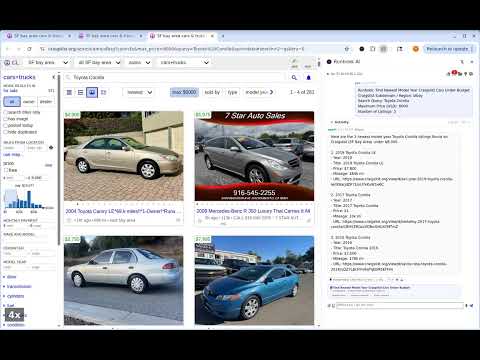
Your browser, on autopilot, with you in control. Runbook AI is an AI agent that lives in your Chrome side panel. Tell it what you want in plain language and watch it work: navigating, clicking, filling forms and reading pages in real time, right in the browser you are already signed in to. No scripts, no brittle selectors, no handing over your passwords. Watch it and steer it: • See every step as it happens, with a short line for each one in the side panel. • Step in any time: pause, do a step yourself (a login, a captcha, a 2FA code), then resume. Or stop it, type a correction, and it carries on with what it learned. • It asks first: before payments, orders, sending messages, deleting things or changing security settings, it stops and asks for your OK. On a login or a form value it does not know, it waits for you instead of guessing. Do it once, reuse it: • Save as runbook: turn a run that went right into a reusable task with parameters (a city, a price limit, a date) and rerun it with new values. • Improve runbook: after a run, tell it what to change and review the suggested edit before it is applied. • Discover and share runbooks at runbookai.net. What it does: • Automates real workflows: multi-step tasks across tabs and pages, including searches, form fills, data extraction and following links, even inside shadow DOM and iframes. • Works with a site's own data: it can find the API a page uses and call it with your signed-in session, so pulling rows from a dashboard is fast and exact. • Works on a schedule: "check HN's top 5 every morning", "email me a stock-price report twice a day". • Watches pages for changes: plain code polls the page and wakes the agent only when something actually changes, such as a new email, a PR turning green or a new item in a queue. • Learns skills: site know-how it picks up while working, saved only after you approve it. • Keeps a local vault for passwords and card numbers. • Delegates to your CLI: hands self-contained sub-tasks to Claude Code and other coding agents on your machine without leaving the chat. • Plugs into your tools: Claude Code and other MCP clients can hand whole web tasks to your browser through runbook-ai-mcp (https://github.com/runbook-ai/runbook-ai-mcp). Get started free, no API key needed. Or bring your own key: OpenAI, Anthropic, Gemini, local Ollama, or any OpenAI-compatible endpoint. Private by design: • The agent runs in your own browser, on your machine. • The only server it talks to is the LLM provider you choose[1]. • No remote-loaded code: the extension ships everything it runs. • Your tasks, runbooks and vault stay on your device unless you choose to share a runbook, and are deleted when you remove the extension. [1]: Note that send-photos-by-phone feature goes through runbookai.net server for transport only with nothing stored; voice-input feature uses Google Chrome Speech API. Join the Discord community (https://discord.gg/SDtXkAKK2B) to share feedback and follow development.
5 out of 52 ratings
Details
- Version1.55
- UpdatedNovember 26, 2026
- Size298KiB
- LanguagesEnglish (United States)
- DeveloperWebsite
Email
runbook.ai@gmail.com - Non-traderThis developer has not identified itself as a trader. For consumers in the European Union, please note that consumer rights do not apply to contracts between you and this developer.
Privacy

This developer declares that your data is
- Not being sold to third parties, outside of the approved use cases
- Not being used or transferred for purposes that are unrelated to the item's core functionality
- Not being used or transferred to determine creditworthiness or for lending purposes
Support
For help with questions, suggestions, or problems, please open this page on your desktop browser