

RTL Text Fixer
29 ratings
)
Overview
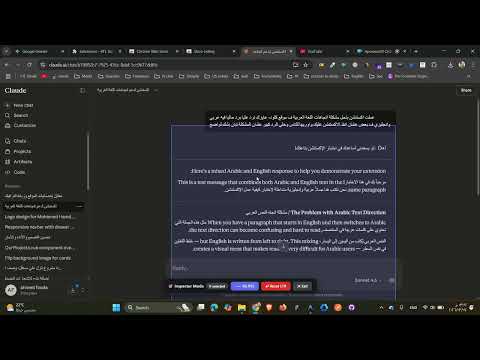
A dedicated RTL Element Inspector (Ctrl+Shift+E) and popup tool to fix Arabic & RTL text.
Tired of Arabic text appearing reversed or broken on sites like ChatGPT, NotebookLM, Claude ai, or Linkedin? RTL Text Fixer gives you an instant way to fix text direction on any website. ✦ THE WAYS TO FIX: ① Enter CTRL + SHIFT + E and the inspector will appear to fix any element in the page. ② Click the extension icon and the popup will appear to enter the text you need to fix. ✦ KEY FEATURES: - Works on any website — ChatGPT, NotebookLM, Gemini, Claude ai, and more - Surgical precision — changes the element you target, or the whole page - One-click reset to undo all changes on the current tab - Zero data collection — fully offline, nothing is ever sent anywhere - Lightweight — no background processes, no impact on browser speed ✦ PERFECT FOR: - Arabic, Hebrew, Persian, and Urdu speakers using AI tools - Anyone reading RTL content on sites that default to LTR layout - Students using NotebookLM or other AI research tools - Developers testing RTL layouts ✦ PRIVACY: This extension does not collect, store, or transmit any data. All changes are local to your browser tab and reset when you reload the page. No account or sign-in required.
4.9 out of 529 ratings
Details
- Version4.2.0
- UpdatedMarch 15, 2026
- Offered bya7madfouda3
- Size26.06KiB
- LanguagesEnglish
- DeveloperAhmed Hamdy Mabrouk Fouda
El Lebeny Axis, Nazlet Al Batran Al Haram, الجيزة 3523031 EGEmail
a7madfouda3@gmail.com - Non-traderThis developer has not identified itself as a trader. For consumers in the European Union, please note that consumer rights do not apply to contracts between you and this developer.
Privacy

This developer declares that your data is
- Not being sold to third parties, outside of the approved use cases
- Not being used or transferred for purposes that are unrelated to the item's core functionality
- Not being used or transferred to determine creditworthiness or for lending purposes