


Overview
Free Google Maps™ route optimization for up to 500 stops.
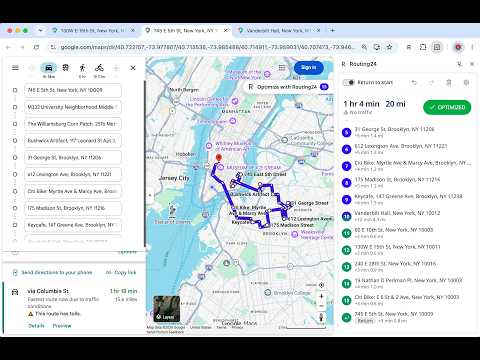
Optimize Google Maps™ routes with Routing24 route optimization. Break past the 10-stop limit and optimize multi-stop routes with up to 500 stops for free. No account. No sign-in. Google Maps™ allows only 10 stops per route and does not optimize their order. Routing24 puts route optimization in a side panel beside your map, listing the stops from the route you have open. Spend less time sorting stops and get your route ready to navigate. Choose what matters to your day: optimize for time, distance, or a balance of both. Plan a round trip or an open-ended route. Drag a stop to fix its position and watch the totals update. Need to reverse a change? Use Undo. Your optimized route opens back in Google Maps™ for navigation as consecutive 10-stop legs. Keep navigating with the map you know, without limiting your whole route to 10 stops. Need more than a single route? Routing24 is a separate paid service for planning across several vehicles, with capacity, time windows, driver shifts and breaks, pickup and delivery, and more. Open your route in Routing24 for several vehicles. One click from the panel carries your stops into a Routing24 plan. Your Google account, email, and browsing history are not read. Only stop coordinates are sent to Routing24 to get travel times. Stop names stay in your browser. Google Maps™ is a trademark of Google LLC. Routing24 is not affiliated with or endorsed by Google. Questions or problems: support@routing24.com
5 out of 520 ratings
Details
- Version0.1.2 (4234924d+)
- UpdatedSeptember 19, 2026
- Size539KiB
- Languages7 languages
- DeveloperRoutinghub LLCWebsite
16192 Coastal Hwy Lewes, DE 19958-3608 USEmail
support@routing24.comPhone
+1 626-879-3690 - TraderThis developer has identified itself as a trader per the definition from the European Union and committed to only offer products or services that comply with EU laws.
- D-U-N-S119579085
Privacy

Google Maps™ Route Optimizer by Routing24 has disclosed the following information regarding the collection and usage of your data. More detailed information can be found in the developer's privacy policy.
Google Maps™ Route Optimizer by Routing24 handles the following:
This developer declares that your data is
- Not being sold to third parties, outside of the approved use cases
- Not being used or transferred for purposes that are unrelated to the item's core functionality
- Not being used or transferred to determine creditworthiness or for lending purposes
Support
For help with questions, suggestions, or problems, please open this page on your desktop browser