


Overview
Image rotator for Chrome. Rotate webpages, photos, PDFs and videos 90°, 180° or 270° in one click, and zoom into any image.
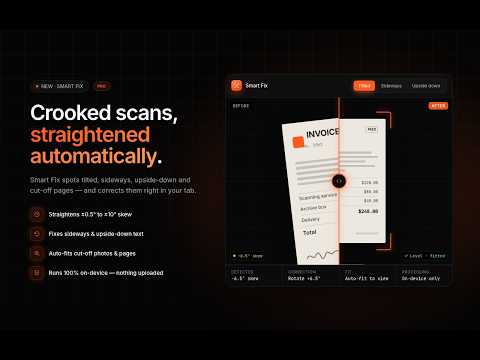
Rotate any webpage, image, PDF, or video in Chrome with one click. RotateX is the fastest, cleanest image rotator and page rotation extension designed to fix sideways photos, crooked scans, upside-down documents, and rotated video feeds instantly — without leaving your browser or uploading your private files. Ever had a phone photo load on its side? A scanned receipt open at 90 degrees? A PDF invoice render upside down? Instead of downloading files, opening external photo editors, and re-uploading, simply click RotateX or press Ctrl+Q to get it perfectly upright in milliseconds. ━━━━━━━━━━━━━━━━━━━━━━━━━━━━━━━━━━━━ ✨ WHAT’S NEW IN VERSION 2.4 ━━━━━━━━━━━━━━━━━━━━━━━━━━━━━━━━━━━━ • Sleek Modern Dark UI: Redesigned from the ground up for maximum speed and elegance. • Smart Fix (Pro): Automatic document analyzer that detects tilt, sideways orientation, and scan contrast issues with 1-click auto-correction. • Interactive Image Zoom: Smooth scroll-to-zoom, drag-to-pan, and 50%–200% magnification viewer. • Single-Key Cycle Rotation (Ctrl+Q): Effortlessly cycle 0° → 90° → 180° → 270° with a single keystroke. • Enhanced Element Inspector: Isolate and rotate any specific image, video player, or container independently. ━━━━━━━━━━━━━━━━━━━━━━━━━━━━━━━━━━━━ 🆓 100% FREE FEATURES — NO SIGN-UP REQUIRED ━━━━━━━━━━━━━━━━━━━━━━━━━━━━━━━━━━━━ • 1-Click Page & Content Rotation: Instant 90° clockwise, 180°, 270°, and reset. • Single-Key 4-Side Cycle: Press Ctrl+Q (Mac Control+Q) to cycle through all 4 orientations quickly. • Built-In Interactive Image Zoom Viewer: – Zoom images from 50% to 200% with intuitive + and − controls – Scroll-to-zoom over any image with your mouse wheel or trackpad – Double-click to instantly snap to 200% detail – Smooth drag-to-pan navigation across zoomed high-resolution images – "Fit to Screen" and "Actual Size (100%)" presets • Right-Click Context Menu: Rotate entire page, rotate individual image, or open image zoom right from the context menu. • Per-Tab Memory: Tabs automatically remember their own individual rotation and zoom states. • Keyboard Shortcuts: Full keyboard control without needing to open the toolbar popup. ━━━━━━━━━━━━━━━━━━━━━━━━━━━━━━━━━━━━ ⭐ ROTATEX PRO — $4.99 LIFETIME (UP TO 3 DEVICES) ━━━━━━━━━━━━━━━━━━━━━━━━━━━━━━━━━━━━ Upgrade once for lifetime access. No subscriptions, no recurring fees. • Smart Fix: Our intelligent inspection tool analyzes your open document or photo to identify crooked orientation, tilted alignment, or washed-out scan contrast. Apply the recommended fix in one click with full undo support. • 360° Custom Angle Slider: Fine-tune rotation with 1° angle precision, plus dedicated ±1° and ±5° micro-steppers — ideal for crooked document scans and tilted camera shots. • Flip & Mirror: Instant 1-click horizontal flip and vertical mirror (great for mirrored selfies, reversed scans, and inverted webcams). • Element Inspector: Select and rotate any single image, HTML5 video, canvas, or iframe on the page while keeping the rest of the website upright. • Document & Scan Filters: – High Clarity: Boosts contrast and sharpens blurry text for easier reading. – Dark Scan: Inverts bright scans for comfortable reading in low light. – Grayscale: Strips yellowed or tinted paper backgrounds for crisp monochrome viewing. • Extended Zoom Precision: Full-page zoom (40%–250%) and fine 1% precision image zoom (40%–250%). • Export Rotated Image/View: Save any rotated image or capture the transformed page view as a high-resolution PNG. • Automatic Domain Rules: Set and save custom rotation, zoom, flip, and filter presets that automatically apply every time you visit a specific URL. ━━━━━━━━━━━━━━━━━━━━━━━━━━━━━━━━━━━━ 📌 COMMON USES & COMPATIBILITY ━━━━━━━━━━━━━━━━━━━━━━━━━━━━━━━━━━━━ • Smartphone Photos: Fix portrait/landscape orientation tags that browsers display sideways. • Scanned Invoices, Receipts & Legal Contracts: Straighten and enhance crooked or illegible scans. • PDF Viewing in Chrome: Rotate PDF pages directly inside Chrome's built-in PDF viewer. • Web Videos & Feeds: Rotate embedded video players (YouTube, Vimeo, Twitter/X, TikTok, MP4s). • Vertical / Pivot Monitors: Read wide web layouts or code documentation effortlessly in portrait view. • Web Design & QA: Test responsive page breakpoints and CSS transformations on the fly. ━━━━━━━━━━━━━━━━━━━━━━━━━━━━━━━━━━━━ ⌨️ DEFAULT KEYBOARD SHORTCUTS ━━━━━━━━━━━━━━━━━━━━━━━━━━━━━━━━━━━━ • Ctrl+Q (Win: Control+Q) — Cycle through all 4 sides (0° → 90° → 180° → 270°) • Ctrl+Shift+1 (Mac: Control+Shift+1) — Rotate 90° Clockwise • Ctrl+Shift+2 (Mac: Control+Shift+2) — Rotate 180° • Ctrl+Shift+0 (Mac: Control+Shift+0) — Reset Rotation Customize or add shortcuts anytime at chrome://extensions/shortcuts. ━━━━━━━━━━━━━━━━━━━━━━━━━━━━━━━━━━━━ 🔒 100% PRIVATE & SECURE ━━━━━━━━━━━━━━━━━━━━━━━━━━━━━━━━━━━━ Your data and documents never leave your device. • Zero data collection, zero browsing history tracking, and zero advertising trackers. • 100% client-side: All rotations, image zoom, CSS transformations, and filters run entirely in your local browser. • Safe for sensitive legal, financial, medical, and personal documents. • External network access is strictly limited to verifying Pro license activations via Dodo Payments. ━━━━━━━━━━━━━━━━━━━━━━━━━━━━━━━━━━━━ 💬 SUPPORT & FEEDBACK ━━━━━━━━━━━━━━━━━━━━━━━━━━━━━━━━━━━━ • Official Website: https://rotatex.app • Documentation & Guides: https://rotatex.app/docs • Support Contact: contact@codesec.me • Crafted with precision by CodeSec Agency (https://codesec.me).
4.5 out of 58 ratings
Details
- Version2.4.1
- UpdatedSeptember 18, 2026
- Size181KiB
- LanguagesEnglish
- DeveloperWebsite
Email
contact@codesec.me - Non-traderThis developer has not identified itself as a trader. For consumers in the European Union, please note that consumer rights do not apply to contracts between you and this developer.
Privacy

This developer declares that your data is
- Not being sold to third parties, outside of the approved use cases
- Not being used or transferred for purposes that are unrelated to the item's core functionality
- Not being used or transferred to determine creditworthiness or for lending purposes
Support
For help with questions, suggestions, or problems, please open this page on your desktop browser