

Rolltape: Screen Recorder

Overview
Record a tab, a window or your whole screen. Crop, trim, show clicks, pick the file type and folder. Nothing is uploaded.
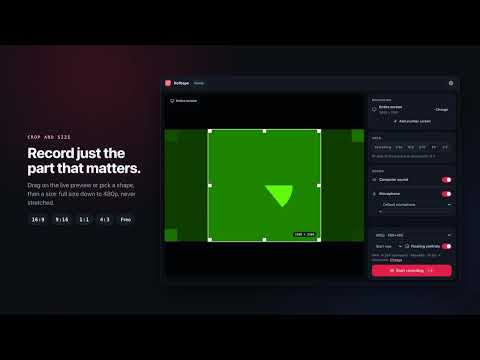
Record a browser tab, any window or your whole screen, and save a real video file to your computer. No account, no upload, no watermark, no time limit. RECORD WHAT YOU NEED • This tab in one click from the toolbar, with no picker. Or any window, or a whole screen. • Several screens at once: side by side in one video, or a file for each. • Crop to just the part that matters: drag on the live preview, or pick 16:9, 9:16, 1:1 or 4:3. • Full size (a 5120×1440 screen records at 5120×1440) or 4K, 1440p, 1080p, 720p or 480p, always in its own shape, never stretched. 15, 24, 30 or 60 fps. SOUND AND CAMERA • Tab or computer sound and your microphone, mixed with level meters and mute, or as separate tracks. • Noise suppression and echo cancellation switches. • Your camera as a round bubble, in the corner and size you choose. SHOW WHAT YOU'RE DOING (TAB RECORDINGS) • Rings where you click, the pointer, and keyboard shortcuts as you press them. • Optional zoom towards clicks. • Shortcuts only: plain typing is never shown, and nothing in a password box. ALWAYS CLEAR THAT IT'S RECORDING • REC badge on the toolbar button, and a red frame around the recorded tab that never appears in the video. • Optional floating controls that stay on top: a small bar, or a big preview shaped like your recording, with time, Pause, Mute and Stop. • Pause and resume with no gap in the file. Alt+Shift+R to start or stop, Alt+Shift+P to pause. TRIM, CROP AND SAVE YOUR WAY • Review before saving: trim with thumbnails, crop again, name it. • MP4, WebM, MKV, MOV or GIF. Repackaged without re-encoding when it can be, so saving is quick. • Save to Downloads or a folder you choose once. • Or skip the review and save straight away. NEVER LOSE A RECORDING • Written to your computer every second as you record. • If Chrome crashes or the window closes, Rescue brings back everything up to the last second. LIGHT ON YOUR COMPUTER • Uses your graphics chip's video encoder (H.264, HEVC, AV1 or VP9) and shows which ones your computer has. • "Sharp text" or "smooth motion", and a steady frame rate for video editors. PRIVATE BY DESIGN • Your recordings never leave your computer. Rolltape makes no network requests at all. • No account, no sign-in, no watermark, no time limit, no subscription. • Nothing runs on websites unless you start recording a tab, and then only on that tab. • Light and dark mode.
0 out of 5No ratings
Details
- Version0.1.0
- UpdatedNovember 24, 2026
- Offered bySonar Systems
- Size384KiB
- LanguagesEnglish (United Kingdom)
- DeveloperSONAR SYSTEMS LIMITED
Unit 9 Dalton House, 60 Windsor Avenue LONDON SW19 2RR GBEmail
support@sonarsystems.co.ukPhone
+44 7725 365957 - TraderThis developer has identified itself as a trader per the definition from the European Union and committed to only offer products or services that comply with EU laws.
- D-U-N-S219247732
Privacy

This developer declares that your data is
- Not being sold to third parties, outside of the approved use cases
- Not being used or transferred for purposes that are unrelated to the item's core functionality
- Not being used or transferred to determine creditworthiness or for lending purposes