

RocketPen Website to Figma
1 rating
)
Overview
Free website to Figma converter: capture any webpage or HTML element as editable Figma designs.
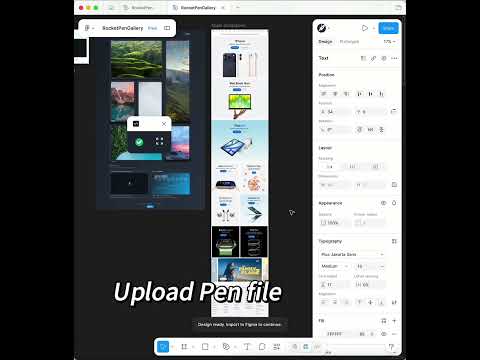
RocketPen Website to Figma Converter is a free Chrome extension that helps you capture any website, webpage, or selected HTML element and convert it into fully editable Figma designs. It also supports private pages, dashboards, and web apps that require login, so you can import real product screens into Figma for redesign, inspiration, UI reference, and rapid prototyping. Core Value: Turn existing websites into editable Figma files instead of rebuilding every layout, component, image, and text layer from scratch. Use it as a free website to Figma, HTML to Figma, webpage to Figma, and UI reference capture tool to speed up design workflows. RocketPen Figma Plugin: https://www.figma.com/community/plugin/1517507029425218071 Important Notice: Please note before operating: This Chrome extension is a free companion tool for the RocketPen Figma plugin and requires the Figma plugin to be installed first. RocketPen is an AI Figma plugin that helps users create, import, and edit UI designs faster. RocketPen is an AI-powered Figma plugin designed for rapid creation of high-quality UI designs. Operating Steps: 1. Launch Extension: Click the RocketPen extension icon in the Chrome toolbar 2. Select Content: Choose the webpage, section, or HTML element you want to convert 3. Start Conversion: Press `Enter` or click the "Download" button 4. Import to Figma: After download completion, open Figma and launch the `RocketPen plugin` 5. Load File: Select or drag the generated `.pen` file into the plugin to get an editable Figma design
5 out of 51 rating
Details
- Version0.2.5
- UpdatedMay 6, 2026
- Offered bydigisymphony
- Size213KiB
- LanguagesEnglish (United States)
- Developer
Email
digisymphonyrock@gmail.com - Non-traderThis developer has not identified itself as a trader. For consumers in the European Union, please note that consumer rights do not apply to contracts between you and this developer.
Privacy

This developer declares that your data is
- Not being sold to third parties, outside of the approved use cases
- Not being used or transferred for purposes that are unrelated to the item's core functionality
- Not being used or transferred to determine creditworthiness or for lending purposes