

Roam-highlighter
31 valoraciones
)

Descripción general
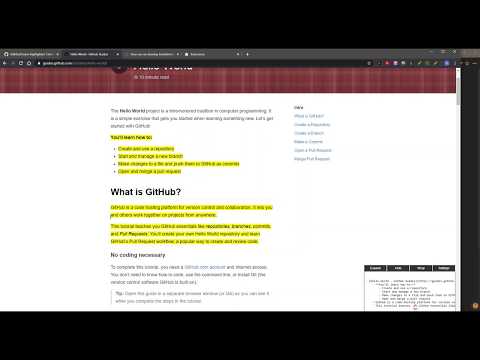
Highlight text on page to copy to Roam
This Highlighter extension is meant for use with Roam Research note taking application to help "clip" web pages by highlighting all the areas you want to save in Roam and then easily copying/pasting into Roam in a Roam friendly format. You also are able to Double Bracket words / phrases with the extension so that they create Page/Link references when pasted into Roam. For full instructions, How To's, and Demos please visit: https://github.com/GitMurf/roam-highlighter#roam-highlighter BASIC INSTRUCTIONS: [ALT + X] - Activate Extension and Show/Hide Side Window [Ctrl + X] - Highlights selected text - To remove part of a highlight, select text and press [Ctrl + X] [Alt + Click] - Removes an entire highlight [ALT + Q] - Remove all highlights on the page [ALT + A] - Makes selected highlighted a "header"; highlights following will nest until another highlight is selected as a "header" [Double-Click] a Single Word (has to be highlighted already) - Adds [[Double Brackets]] for Roam "Page Linking" [ALT + Z] (must already be highlighted) - Adds [[Double Brackets]] around selection for Roam "Page Linking" If you have any Issues, Questions or Feedback for improving the Instructions or the Extension, please open a GitHub Issue and post your thoughts: https://github.com/GitMurf/roam-highlighter/issues/new Thanks and enjoy!
4,5 de 531 valoraciones
Detalles
- Versión2.1.1
- Actualizado1 de noviembre de 2020
- Ofrecido porshawnpmurphy8
- Tamaño52.83KiB
- IdiomasEnglish (United States)
- Desarrollador
Correo electrónico
murf.dev@gmail.com - No operadorEste desarrollador no se ha identificado como operador. Los consumidores residentes en la Unión Europea deben tener en cuenta que los derechos de los consumidores no son aplicables a los contratos que suscriban con este desarrollador.
Privacidad
Ayuda
Si tienes alguna pregunta, sugerencia o problema, abre esta página en tu navegador para ordenadores