


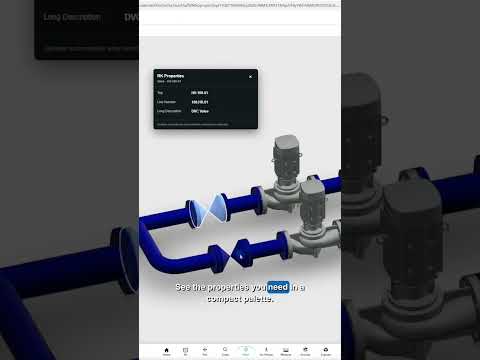
Overview
Shows selected ACC and Autodesk Viewer properties and opens the component in Plant 3D, interactive P&ID, or an external link.
RKCadTools ACC Bridge connects Autodesk Construction Cloud (ACC) and Autodesk Viewer with AutoCAD Plant 3D and RKCadTools. Works with ACC Model Coordination, ACC Docs Files, and shared models opened in Autodesk Viewer. Right-click a component in a supported viewer to: • RK Properties – show a movable, resizable palette with only the properties you choose, such as Tag, Line Number, and Long Description. It updates automatically when you select another component. • Open P&ID in Plant 3D – open the P&ID drawing and zoom to the matching component. • Open 3D in Plant 3D – open the 3D drawing and zoom to the matching component. • Find in Interactive HTML – jump to the tag in a locally exported RKCadTools interactive P&ID and reuse the same viewer tab. • External Link (optional) – open a configurable web link using a selected component property. RK Properties can open automatically when the viewer's properties are available. You can turn this option off in the extension settings. Use the toolbar popup to configure properties, navigation, and external links, or open the settings in a larger, resizable window. How it works • Reads component properties from the Autodesk viewer's property panel. RK Properties follows your selection automatically while open; navigation commands also read properties when used. • Connects to the RKCadTools plugin running on your own computer through an authenticated local connection. Pair the extension once using the connection key from RKCadTools. • Plant 3D integration is for navigation only. The extension never writes to ACC models or Plant 3D project data. • Settings and the pairing key are stored locally in your browser. No extension analytics or tracking, and no component or project data uploaded to RKCadTools. • If you configure an External Link, the selected property value is sent to your chosen website when you open that link. Requirements • Access to a supported ACC viewer at acc.autodesk.com or acc.autodesk.eu, or a model at viewer.autodesk.com. Autodesk share links are supported after they open in Autodesk Viewer. • RK Properties and interactive HTML navigation work without the Plant 3D desktop plugin. • For Plant 3D navigation: AutoCAD Plant 3D running on Windows with a compatible RKCadTools version installed, a valid RKCadTools licence, and the relevant project open. • To pair with Plant 3D: open RKCadTools Settings → Overview → Browser connection, click Copy key, then paste the key into the extension and click Pair. • For interactive P&ID navigation: configure your locally exported HTML file and enable "Allow access to file URLs" in the extension's details page. • Component navigation requires a Tag property on the selected object. RKCadTools is an independent product and is not affiliated with or endorsed by Autodesk.
0 out of 5No ratings
Details
- Version0.9.0
- UpdatedOctober 5, 2026
- FeaturesOffers in-app purchases
- Size35.29KiB
- LanguagesEnglish
- Developer
- TraderThis developer has identified itself as a trader per the definition from the European Union and committed to only offer products or services that comply with EU laws.
- D-U-N-S306401312
Privacy

RKCadTools ACC Bridge has disclosed the following information regarding the collection and usage of your data. More detailed information can be found in the developer's privacy policy.
RKCadTools ACC Bridge handles the following:
This developer declares that your data is
- Not being sold to third parties, outside of the approved use cases
- Not being used or transferred for purposes that are unrelated to the item's core functionality
- Not being used or transferred to determine creditworthiness or for lending purposes
Support
For help with questions, suggestions, or problems, visit the developer's support site