

Right-Click Prompt (RCP): AI Prompt Manager

Overview
Save your best AI prompts and access them in two clicks. Sync across devices. Distribute prompt libraries to your whole team.
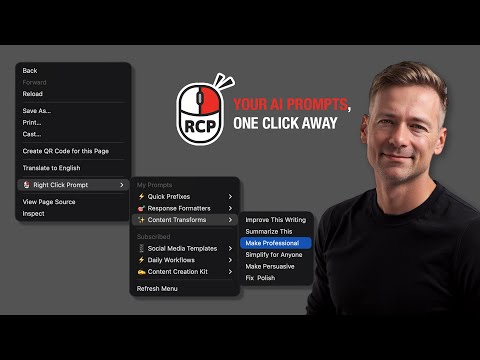
Right-Click Prompt: Your Best Prompts, One Click Away You've written the perfect prompt. Used it once. Now it's buried in a doc, lost in your clipboard history, or gone forever. RCP fixes that. Save your best prompts, organize them into folders, and access them instantly. Right-click any text field, pick your prompt, done. No tab switching. No digging through notes. Just two clicks from idea to AI. WHY PEOPLE USE RCP Stop Retyping, Start Reusing That prompt you spent 20 minutes perfecting? Save it once, use it forever. Build a personal library of prompts that actually work. Access From Anywhere You Type Right-click any text field on any website. Your prompts follow you across every tab, every tool. Sync Across All Your Devices Edit prompts on the web dashboard, use them from the extension. Everything stays in sync automatically. FOR TEAMS: DISTRIBUTE PROMPTS, NOT CHAOS When everyone prompts AI differently, you get wildly different results. Same question, ten answers, zero consistency. RCP lets you distribute prompt libraries to your entire team: - Create a shared folder with your best prompts - Generate a share code and send it to your team - Everyone subscribes and gets the same prompts instantly - Update a prompt once, everyone gets the change automatically No training docs. No "check the wiki." Just prompts that work, deployed to everyone who needs them. FEATURES - Quick Access Menu: Your top prompts in the right-click menu - Folders and Organization: Group prompts by project, client, or workflow - Version History: Restore previous versions of any prompt - Full-Text Search: Find any prompt instantly - Web Dashboard: Manage everything at rightclickprompt.com - Usage Analytics: Track time saved and see which prompts you use most - Import and Export: Migrate from other tools or back up your library - Auto-Paste: Insert prompts directly into text fields (optional) - Trash and Recovery: Accidentally deleted? Restore it WORKS EVERYWHERE Any AI assistant, any website. If it has a text field, RCP works there. PRIVACY-FIRST Your prompts live in your browser. Cloud sync is optional and secure. No tracking, no ads, no selling your data. Install now. Right-click. Prompt smarter.
4.8 out of 518 ratings
Details
- Version1.99.88
- UpdatedJanuary 13, 2026
- Size1.4MiB
- LanguagesEnglish (United States)
- DeveloperAI Adopters ClubWebsite
530 Ocean Dr apt 101 Miami Beach, FL 33139-6616 USEmail
aiadoptersclub@gmail.com - Non-traderThis developer has not identified itself as a trader. For consumers in the European Union, please note that consumer rights do not apply to contracts between you and this developer.
Privacy
Right-Click Prompt (RCP): AI Prompt Manager has disclosed the following information regarding the collection and usage of your data. More detailed information can be found in the developer's privacy policy.
Right-Click Prompt (RCP): AI Prompt Manager handles the following:
This developer declares that your data is
- Not being sold to third parties, outside of the approved use cases
- Not being used or transferred for purposes that are unrelated to the item's core functionality
- Not being used or transferred to determine creditworthiness or for lending purposes
Support
For help with questions, suggestions, or problems, visit the developer's support site