

Right-Click Magic: Open Tabs, View or Download Images, Hover Zoom, Search

Overview
Your custom right-click rules. Open links, view or download hi-res images, zoom on hover, search selected text, copy text & paste.
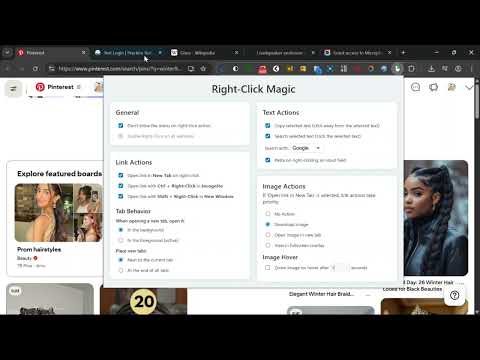
Imagine browsing, researching, and shopping without ever reaching for your keyboard. With Right-Click Magic, you can. Effortlessly fill forms, copy text between pages, search for ideas, and download images—all with a simple, powerful right-click. Work faster and easier, with fewer clicks and keystrokes. ✨ This extension transforms your right-click into a customizable, one-click shortcut for your most common actions, saving you time and effort on every page you visit. What Can You Do with It? 🚀 🔗 Link Actions: • Open Links Instantly: Simply right-click any link to open it in a new tab. No more "Right-click → Find menu item → Click". • Powerful Modifiers: Need more control? Use Ctrl + Right-Click to open a link in an Incognito window, or Shift + Right-Click for a New Window. • Tab Control: Customize whether new tabs open in the background or immediately become active, and where they are placed. 🖼️ Image Actions: • Hover Zoom 🔎: Simply hover your mouse over an image to see a beautiful, full-screen preview. Perfect for quickly viewing images on shopping sites, galleries, and social media. • One-Click Actions: Set your default right-click action on any image: View Image: Open a stunning, full-screen overlay to see every detail. Download Image 💾: Instantly save the image—no keyboard shortcuts needed. It intelligently finds the highest resolution version available! Open Image: Open the image directly in a new tab. • Works Everywhere: Our smart detection finds the image even if it's hidden under a transparent link or overlay. ✍️ Text Actions: • Smart Selection Actions: Right-clicking with text selected is now context-aware! - Search Instantly 🌐: Right-click directly on selected text to search for it using your favorite engine (Google, DuckDuckGo, etc.). Link Search Override 🔍: Need to look up the words inside a link? Highlighting a link and right-clicking it will now smartly search the selected text instead of opening the URL! - Copy Effortlessly 📋: Right-click anywhere else to instantly copy the selection. Perfect for moving info from one page to another without touching Ctrl+C. • Quick Paste: Right-click inside any text field to instantly paste. Effortlessly fill out forms using the text you just copied. Fully Customizable for You ✅ You are in complete control. Use the simple settings panel to enable, disable, and combine features to create your perfect workflow. • Enable only the features you need. • Choose your preferred search engine. • Fine-tune the hover zoom delay. • Your settings are always saved and will not be reset when the extension is updated!
0 out of 5No ratings
Details
- Version1.1.0
- UpdatedMay 7, 2026
- Size22.82KiB
- LanguagesEnglish
- Developer
- Non-traderThis developer has not identified itself as a trader. For consumers in the European Union, please note that consumer rights do not apply to contracts between you and this developer.
Privacy

This developer declares that your data is
- Not being sold to third parties, outside of the approved use cases
- Not being used or transferred for purposes that are unrelated to the item's core functionality
- Not being used or transferred to determine creditworthiness or for lending purposes
Support
For help with questions, suggestions, or problems, please open this page on your desktop browser