


Overview
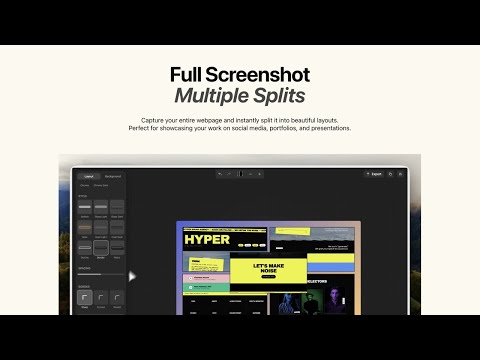
Beautiful full-page screenshots with customizable layouts
Riftshot - Turn Your Full-Page Screenshots Into Stunning Split Layouts Capture entire web pages with one click and transform them into beautiful, share-ready images with customizable split layouts. PERFECT FOR: • Developers showcasing their web projects • Designers presenting portfolio pieces • Marketers creating social media content • Anyone who wants to make their screenshots stand out KEY FEATURES: 🖼️ SPLIT LAYOUTS Transform a single full-page screenshot into multiple stunning layouts: - 1x2, 2x1 horizontal/vertical splits - Asymmetric layouts (1+2, 2+1) - Bento grid for modern presentations - Quincunx (5-panel) for maximum impact 🎨 PROFESSIONAL STYLING - 9 frame styles (Glass, Liquid, Inset, Retro, and more) - Browser frames (Safari/Chrome, Light/Dark) - Custom shadows, borders, and effects - 40+ curated background presets 📐 FLEXIBLE CANVAS - Multiple aspect ratios (16:9, 1:1, 4:5, 9:16, etc.) - Custom dimensions for any platform - Up to 8K resolution export ⚡ SEAMLESS WORKFLOW - One-click full-page capture - Real-time preview with undo/redo - Export as PNG or JPEG - Copy directly to clipboard Make your web projects shine. Download Riftshot today.
0 out of 5No ratings
Details
- Version1.1.0
- UpdatedFebruary 25, 2026
- FeaturesOffers in-app purchases
- Size12.32MiB
- LanguagesEnglish (United States)
- DeveloperWebsite
Email
cejewe2002@gmail.com - Non-traderThis developer has not identified itself as a trader. For consumers in the European Union, please note that consumer rights do not apply to contracts between you and this developer.
Privacy

This developer declares that your data is
- Not being sold to third parties, outside of the approved use cases
- Not being used or transferred for purposes that are unrelated to the item's core functionality
- Not being used or transferred to determine creditworthiness or for lending purposes
Support
For help with questions, suggestions, or problems, please open this page on your desktop browser