

Riffloop - AI Stem Splitter, Chords, Vocal Remover & Looper for YouTube

Overview
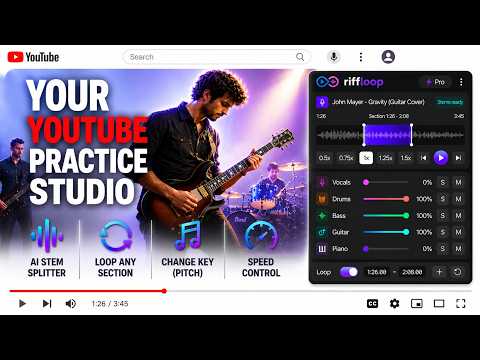
AI stem splitter & chord finder for YouTube: isolate any instrument, remove vocals, guitar chords, loop, change key & slow down.
Turn Any YouTube Video Into an AI Music Practice Studio 🎵 Riffloop adds a practice toolbar directly beneath the video player: isolate instruments with AI, loop difficult sections, change the key, and adjust playback speed. No file uploads. No downloads. No separate app. Whether you're learning a solo, transcribing by ear, making a karaoke track, or rehearsing with an isolated rhythm section, everything you need is right on the page. 🎚️ AI STEM SPLITTER Separate any song into individual stems - vocals, drums, bass, guitar, piano, and lead - then mute or solo any part. Separation runs entirely in your browser, so nothing is uploaded and you never leave the page. Solo the part you're studying, extract the bass or drums, remove the vocals, or build a custom mix of just the parts you want to hear. 🔁 A-B LOOPING Set point A and point B and repeat any section until you've nailed it - a tricky riff, a fast fill, a whole chorus, or a single phrase. Your loop plays seamlessly while you play along. 🎹 CHANGE THE KEY - PITCH SHIFT & TRANSPOSE Shift the key of any song up or down by up to ±12 semitones without changing the tempo. Match your vocal range, play along with a capo or alternate tuning, or transpose for Bb, Eb, and F instruments. ⏱️ SPEED CONTROL Slow difficult passages down to hear every note, or speed them up as your playing improves. The pitch stays correct at any speed. 🎸 CHORD DETECTION - AI CHORD FINDER, KEY & BPM Press "Separate" and Riffloop also detects the chords of the song. The chord progression appears under the waveform, in sync with the audio, with the current chord highlighted as the song plays - click any chord to jump straight to it. Riffloop finds the key and the tempo (BPM) of your section too, and the chord names follow along when you change the key, so what you see always matches what you hear. Switch to the chord view for guitar chord diagrams: the chord you're on, plus the ones just before and after it, in easy or barre voicings. The chord names work for any instrument - guitar, piano, ukulele, or bass - so you can learn the chords of any YouTube song without hunting for tabs or chord sheets. There's a built-in metronome too, and its click locks to the song's own beats. 💾 SAVED SESSIONS Your loops and settings are saved automatically for every video. Create a free account to sync them with Riffloop Studio and pick up where you left off on any device. 🚀 GETTING STARTED 1) Install the extension and open any music video. The Riffloop toolbar appears below the player. 2) Drag the A and B markers to set a section, adjust key and speed, and start playing along. 3) Press "Separate" to split the audio into stems, then mute or solo any of them. 4) Chords, key, and tempo are detected automatically when you separate. Read them under the waveform, or switch to the chord view for guitar chord diagrams. * Your settings for each video are remembered automatically, so tomorrow's session starts exactly where today's ended. ❓ FAQ 🎬 Does it work on any video? Yes - anything with music in it: official releases, live performances, lessons, covers, backing tracks, or old concert bootlegs. 👤 Do I need to create an account? No. The core tools work immediately after install. An account is only needed to sync saved sessions across the extension and the studio. 🎚️ Can I isolate a single instrument from a song? Yes - run the separation, then mute everything except the stem you want. It works as an instrument isolator for any of the six stems. 🎸 Can it show me the chords of a song? Yes - press "Separate" and the chords appear under the waveform in time with the music, together with the key and tempo. Open the chord view for guitar chord diagrams. It works as a chord finder for any YouTube video - covers, live versions, and lessons included. 🎤 Can I use it for singing? Absolutely. Mute the vocal stem to create an instant karaoke version, or transpose the song into a comfortable range first. 🔒 Does it change the actual video or audio file? No. Everything is processed live in your browser during playback. Nothing is modified, saved, or re-uploaded. 🚀 WHY RIFFLOOP? Traditional stem splitters and vocal removers make you download audio and upload it to external servers. Riffloop works where the music already is. Open a video, isolate the part you want to hear, slow it down, loop it - and master it faster.
4.5 out of 517 ratings
Details
- Version1.2.7
- UpdatedOctober 17, 2026
- FeaturesOffers in-app purchases
- Size168MiB
- Languages8 languages
- DeveloperWebsite
Email
riffloopapp@gmail.com - Non-traderThis developer has not identified itself as a trader. For consumers in the European Union, please note that consumer rights do not apply to contracts between you and this developer.
Privacy

Riffloop - AI Stem Splitter, Chords, Vocal Remover & Looper for YouTube has disclosed the following information regarding the collection and usage of your data. More detailed information can be found in the developer's privacy policy.
Riffloop - AI Stem Splitter, Chords, Vocal Remover & Looper for YouTube handles the following:
This developer declares that your data is
- Not being sold to third parties, outside of the approved use cases
- Not being used or transferred for purposes that are unrelated to the item's core functionality
- Not being used or transferred to determine creditworthiness or for lending purposes
Support
For help with questions, suggestions, or problems, visit the developer's support site