

RewritePal: AI Sentence Rewriter & Grammar Checker

Overview
Rewrite sentences, paraphrase text, and adjust your tone with AI. Fix supported English issues locally as you write.
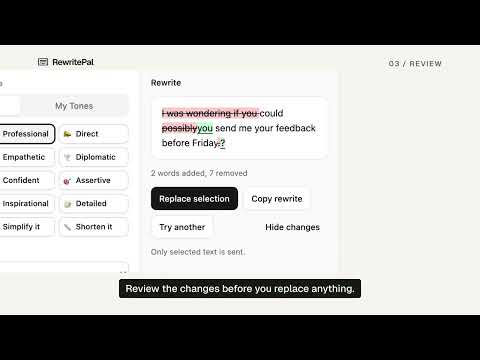
Rewrite sentences without losing your voice. Use RewritePal to paraphrase sentences, shorten drafts, and find the right tone for emails, messages, and posts. This AI sentence rewriter and grammar checker works in a popup or with selected text in compatible website editors. Inline Fix checks supported English spelling, grammar, and style issues locally on your device. ➤ Rewrite selected text in place Select text in a supported writing field and choose RewritePal to open the rewrite card. Pick your tones and role, then press Rewrite, Fix grammar, or Shorten. Review the result before replacing or copying it. • Keep writing on the page instead of copying text into another tab • Choose a Tone and Role for the selected text • Review every result before it changes your writing • Send only the selected text after you press Rewrite, Fix grammar, or Shorten in the card ➤ Paraphrase and polish a draft Turn a rough draft into a version that fits the moment. Choose a tone, custom tone, role, voice, and output language. Review the result, edit it, and copy it when it is ready. • Reword a sentence or rewrite a longer draft with more clarity • Adjust wording for a professional, friendly, direct, or custom tone • Keep control of the final text by reviewing and editing every result • Use the popup when a website editor is not supported ➤ Fix supported English issues locally Enable website tools, then keep Inline Fix on to underline supported English spelling, grammar, and style issues in supported text fields and web editors. Inline Fix checks text locally with Harper and applies a correction only after you choose it. • Review a suggestion before it changes your writing • Turn Inline Fix off without disabling Selection Rewrite • Pause both website tools on a site whenever you need to • Remove website access everywhere at any time • Keep the popup available for rewriting from anywhere in Chrome ➤ How it works 1. Open RewritePal and enter or paste your text. 2. Choose the writing controls you need, then select Rewrite Text. 3. Review, edit, and copy the AI result. 4. Enable website assistance to use local English checks and Selection Rewrite in supported fields. ➤ Your data, your choice Inline Fix text stays on your device and is not sent to RewritePal's servers. Selecting text and opening the rewrite card do not send it. Selected text is sent for AI processing only after you press Rewrite, Fix grammar, or Shorten in the card. Popup text is sent only when you choose Rewrite Text or Explain changes. Start with the anonymous daily allowance and sign in when you need more AI usage. Support For questions or feedback, contact hello@rewritepal.com.
5 out of 55 ratings
Details
- Version1.5.1
- UpdatedNovember 5, 2026
- Size10.05MiB
- LanguagesEnglish
- DeveloperWebsite
Email
hello@rewritepal.com - Non-traderThis developer has not identified itself as a trader. For consumers in the European Union, please note that consumer rights do not apply to contracts between you and this developer.
Privacy

RewritePal: AI Sentence Rewriter & Grammar Checker has disclosed the following information regarding the collection and usage of your data. More detailed information can be found in the developer's privacy policy.
RewritePal: AI Sentence Rewriter & Grammar Checker handles the following:
This developer declares that your data is
- Not being sold to third parties, outside of the approved use cases
- Not being used or transferred for purposes that are unrelated to the item's core functionality
- Not being used or transferred to determine creditworthiness or for lending purposes
Support
For help with questions, suggestions, or problems, visit the developer's support site