


Overview
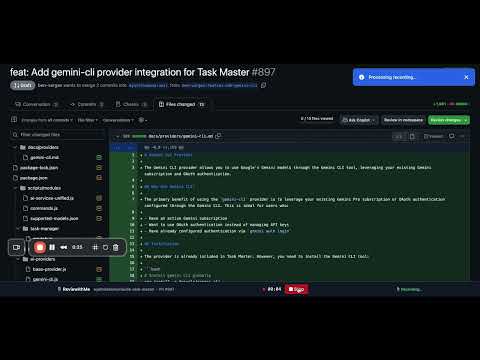
Record and share audio code reviews of GitHub PR files with synchronized scrolling and playback.
🎯 End Code Review Hell! Transform Your Code Reviews Into Interactive Experiences! Tired of lengthy written code review that you need to read and crack yourself? ReviewithMe lets you record audio explanations while scrolling through GitHub pull requests, creating engaging code walkthroughs that your team will actually want to watch! • Explain complex changes and design decisions • Richer collaboration than text comments - (perfect for remote teams) • Anyone who wants to reduce back-and-forth in code review discussions 🚀 HOW IT WORKS (60 seconds to your first recording): 1. Open any GitHub pull request files page 2. Click the ReviewithMe extension icon and sign in 3. Hit "Start Recording" and explain your code while scrolling 4. Share the synchronized audio+scroll playback with your team 5. Watch together as reviewers follow your exact scroll path with perfect audio sync 💡 WHY DEVELOPERS LOVE IT: • They can explain WHY they wrote this code, not just what it does • Code reviews became 10x faster - no more endless comment threads • New team members understand our codebase so much better • It's like pair programming - but asynchronous 🔒 PRIVACY-FIRST DESIGN: ✅ Only records when YOU choose to start recording ✅ Audio only - no screen recording or visual capture ✅ Automatic 14-day deletion protects your privacy ✅ Works only on GitHub PR pages - nowhere else ✅ Secure authentication and enterprise-grade storage ✅ You control who can access your recordings 🎁 FREE TO START: • It's also FREE for the whole BETA time • 10 minutes of recording time per month • 5-minute session limit • Perfect for trying it out and small teams • Upgrade available for power users ⚡ TECHNICAL HIGHLIGHTS: • Built with modern web technologies (React, TypeScript) • Secure Firebase backend with user-scoped access control • GDPR compliant with full consent management • Works seamlessly with GitHub's interface • No installation required - just add the extension 🎯 IDEAL FOR: • Software development teams of any size • Open source maintainers explaining complex PRs • Code reviewers who want to provide richer feedback • Companies wanting to improve their code review process • Remote teams needing better asynchronous collaboration 🔥 START RECORDING BETTER CODE REVIEWS TODAY Install ReviewithMe and transform your next GitHub pull request into an engaging, interactive experience that your team will love.
0 out of 5No ratings
Details
- Version1.2.1
- UpdatedJuly 16, 2025
- FeaturesOffers in-app purchases
- Size472KiB
- LanguagesEnglish
- DeveloperWebsite
Email
ofershap@gmail.com - Non-traderThis developer has not identified itself as a trader. For consumers in the European Union, please note that consumer rights do not apply to contracts between you and this developer.
Privacy

ReviewithMe has disclosed the following information regarding the collection and usage of your data. More detailed information can be found in the developer's privacy policy.
ReviewithMe handles the following:
This developer declares that your data is
- Not being sold to third parties, outside of the approved use cases
- Not being used or transferred for purposes that are unrelated to the item's core functionality
- Not being used or transferred to determine creditworthiness or for lending purposes
Support
For help with questions, suggestions, or problems, please open this page on your desktop browser