


Overview
AI-powered code review sidebar for GitHub
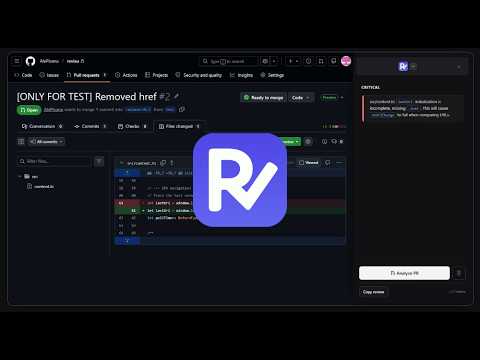
WHAT'S NEW IN v0.2.0: - Added OpenRouter integration! You can now connect your favorite models using your OpenRouter API key. Revieu adds an AI-powered sidebar directly to GitHub Pull Request pages, so you can get a structured code review in seconds without copying diffs, switching tabs, or pasting prompts. How it works Open any GitHub PR, click the Revieu tab on the right side of the page, and hit "Analyze PR". The extension extracts the diff and sends it to your chosen AI provider, which streams a review back in real time. Features - Three AI providers: use Claude (Anthropic), Gemini (Google) or OpenRouter, with model selection for each - Review modes: Diff only for a fast scan, or Full context to send the complete file content alongside the diff - Review tones: Balanced, Strict (assume bugs exist), or Security-focused (highlight vulnerabilities and unsafe data handling) - Structured output: reviews are categorized into Critical, Improvements, and Minor sections for easy scanning - Large diff handling: when a PR is too big, a file selector lets you pick which files to analyze - Copy review: copy the full review as Markdown with one click Privacy First: your keys, your calls, your data. Revieu makes no calls to any server owned or operated by us. There is no backend, no proxy, no analytics, and no telemetry of any kind. The only network requests the extension makes are: - Anthropic API (api.anthropic.com): only if you choose Claude and enter your own Anthropic API key - Google Gemini API (generativelanguage.googleapis.com): only if you choose Gemini and enter your own Google API key - OpenRouter API (openrouter.ai): only if you choose OpenRouter and enter your own OpenRouter API key - GitHub API (api.github.com): only to fetch PR diffs and file contents, using your own GitHub token if provided Your API keys are stored locally in Chrome's sync storage and are never transmitted anywhere other than directly to the respective provider. Your code never leaves your browser except to go to the AI provider you explicitly configured. Setup 1. Click the Revieu icon in the Chrome toolbar 2. Enter your Anthropic, Google Gemini or OpenRouter API key 3. Open any GitHub PR and click the Revieu tab Works with public and private repositories (private repos require a GitHub token for full context mode). --------------------------------- This is an Open Source Project, you can find the code here: https://github.com/AlePisanu/revieu
5 out of 51 rating
Details
- Version0.2.0
- UpdatedJune 10, 2026
- Size522KiB
- LanguagesEnglish
- DeveloperWebsite
Email
revieuinfo@gmail.com - Non-traderThis developer has not identified itself as a trader. For consumers in the European Union, please note that consumer rights do not apply to contracts between you and this developer.
Privacy

Revieu has disclosed the following information regarding the collection and usage of your data. More detailed information can be found in the developer's privacy policy.
Revieu handles the following:
This developer declares that your data is
- Not being sold to third parties, outside of the approved use cases
- Not being used or transferred for purposes that are unrelated to the item's core functionality
- Not being used or transferred to determine creditworthiness or for lending purposes