Reverse Image Search: изображение логотипа

Reverse Image Search

Рекомендованные
3,3(

14 оценок

)
РасширениеИнструменты5 000 пользователей
Значок видео о продукте
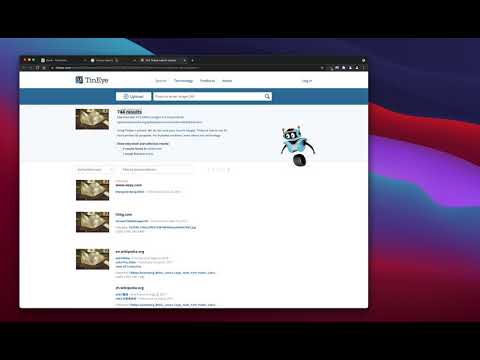
Мультимедийный объект 2 (скриншот) для сервиса "Reverse Image Search"

Обзор

мощный инструмент обратного поиска изображений, построенный на базе движков TinEye/Google Images

"Reverse Image Search" extension helps you to find similar images or the original image source and its name. This is a useful tool to find for instance the actual image name or detect whether this image is unique or is just a copy or a modified copy of an already existed image on the web. In most cases, images are embedded in the background page and hence it is not straightforward to find the actual source of them to be passed to a reverse image search engine. Also, the image you are looking for maybe just part of a video stream. This extension solves these problems by providing a capturing tool in the right-click context menu. Simply select the item and capture a portion of the screen. The captured image is automatically sent to either "TinEye" or "Google Images" search engine, and after a successful upload, a new page with the matching results is displayed. This extension adds three items to the context menu of your browser: 1. Google Images (Image URL) 2. Tineye (Image URL) 3. Google Images (Capture) The first two items are added to the image context menu, and the third one is added to the page context to activate the capturing tool. Instead of the third option, you can alternatively press the browser action button. Links: FAQs Page: https://add0n.com/reverse-image-search.html GitHub Page: https://github.com/schomery/reverse-image-search/

Подробности

  • Версия
    0.3.0
  • Обновлено
    10 августа 2021 г.
  • Автор:
    chYer
  • Размер
    129KiB
  • Языки
    Поддерживаемых языков: 12
  • Разработчик
    Электронная почта
    chyer.webstore@yahoo.com
  • Не продавец
    Разработчик не указал для себя статус продавца. Просим клиентов из Европейского союза обратить внимание, что на сделки между вами и этим разработчиком не распространяются законы о защите прав потребителей.

Конфиденциальность

Управляйте расширениями и узнавайте, как они используются в вашей организации.
Разработчик сообщил, что продукт не собирает и не использует ваши данные.

Этот разработчик утверждает, что ваши данные:

  • Не продаются третьим лицам, за исключением разрешенных вариантов использования
  • Не используются и не передаются в целях, не связанных с работой основных функций продукта
  • Не используются и не передаются для определения платежеспособности или в целях кредитования

Поддержка

Сообщить об ошибках в работе приложения, задать вопрос или поделиться идеями можно на сайте разработчика.

Похожие

Fast Image Research

4,4

Right click any image to instantly get reverse image search results from Google, TinEye, Yandex, Bing, or a combination.

Обратный поиск изображений

3,3

Поиск изображений в вашем браузере одним щелчком мыши.

Search It All

3,9

Search across multiple search engines with one click - no retyping needed

Omni - Meta Search Engine

4,5

One search box. Many buttons.

Search by Image

4,1

A powerful reverse image search tool, with support for various search engines, such as Google, Bing, Yandex, Baidu and TinEye.

TinEye Reverse Image Search

4,5

This is the official TinEye Chrome extension. Find out where an image came from, how it's used, or find higher resolution versions.

RevEye Reverse Image Search

4,1

Perform a search by image. Choose between the image search engines Google, Bing, Yandex, TinEye, or user-defined engines.

Reverse Image Search

4,4

Добавляет опцию в контекстное меню для обратного поиска изображения на различных сервисах

Поиск по картинке

3,6

Поиск похожих картинок с помощью всех популярных поисковых систем

Reverse Image Search

4,0

Right click on an image and find it's origin in Google image search.

Поиск изображений через Яндекс

4,5

Поиск похожих изображений в Яндекс с открытым исходным кодом, без рекламы и аналитики.

Reverse Image Search

3,7

Search similar images in the WEB from context menu

Fast Image Research

4,4

Right click any image to instantly get reverse image search results from Google, TinEye, Yandex, Bing, or a combination.

Обратный поиск изображений

3,3

Поиск изображений в вашем браузере одним щелчком мыши.

Search It All

3,9

Search across multiple search engines with one click - no retyping needed

Omni - Meta Search Engine

4,5

One search box. Many buttons.

Search by Image

4,1

A powerful reverse image search tool, with support for various search engines, such as Google, Bing, Yandex, Baidu and TinEye.

TinEye Reverse Image Search

4,5

This is the official TinEye Chrome extension. Find out where an image came from, how it's used, or find higher resolution versions.

RevEye Reverse Image Search

4,1

Perform a search by image. Choose between the image search engines Google, Bing, Yandex, TinEye, or user-defined engines.

Reverse Image Search

4,4

Добавляет опцию в контекстное меню для обратного поиска изображения на различных сервисах

Приложения Google