Εικόνα λογότυπου του στοιχείου για Reverse Image Search

Reverse Image Search

Επιλεγμένα
3,3(

14 αξιολογήσεις

)
μικρογραφία βίντεο στοιχείου
Μέσο στοιχείου 2 (στιγμιότυπο οθόνης) για Reverse Image Search

Επισκόπηση

ένα ισχυρό εργαλείο αντίστροφης αναζήτησης εικόνων που βασίζεται στις μηχανές TinEye/Google Images

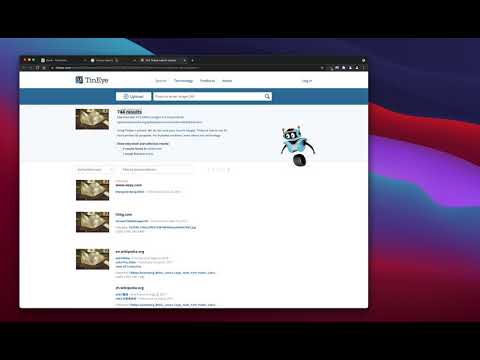
"Reverse Image Search" extension helps you to find similar images or the original image source and its name. This is a useful tool to find for instance the actual image name or detect whether this image is unique or is just a copy or a modified copy of an already existed image on the web. In most cases, images are embedded in the background page and hence it is not straightforward to find the actual source of them to be passed to a reverse image search engine. Also, the image you are looking for maybe just part of a video stream. This extension solves these problems by providing a capturing tool in the right-click context menu. Simply select the item and capture a portion of the screen. The captured image is automatically sent to either "TinEye" or "Google Images" search engine, and after a successful upload, a new page with the matching results is displayed. This extension adds three items to the context menu of your browser: 1. Google Images (Image URL) 2. Tineye (Image URL) 3. Google Images (Capture) The first two items are added to the image context menu, and the third one is added to the page context to activate the capturing tool. Instead of the third option, you can alternatively press the browser action button. Links: FAQs Page: https://add0n.com/reverse-image-search.html GitHub Page: https://github.com/schomery/reverse-image-search/

Λεπτομέρειες

  • Έκδοση
    0.3.0
  • Ενημέρωση
    10 Αυγούστου 2021
  • Προσφέρεται από
    chYer
  • Μέγεθος
    129KiB
  • Γλώσσες
    12 γλώσσες
  • Προγραμματιστής
    Ηλεκτρονικό ταχυδρομείο
    chyer.webstore@yahoo.com
  • Μη επαγγελματίας έμπορος
    Αυτός ο προγραμματιστής δεν έχει αυτοπροσδιοριστεί ως έμπορος. Εάν είστε καταναλωτές στην Ευρωπαϊκή Ένωση, λάβετε υπόψη ότι τα δικαιώματα των καταναλωτών δεν ισχύουν για συμβάσεις ανάμεσα σε εσάς και σε αυτόν τον προγραμματιστή.

Απόρρητο

Διαχειριστείτε τις επεκτάσεις και μάθετε πώς χρησιμοποιούνται στον οργανισμό σας
Ο προγραμματιστής αποκάλυψε ότι δεν θα συλλέγει ούτε θα χρησιμοποιεί τα δεδομένα σας.

Αυτός ο προγραμματιστής δηλώνει ότι τα δεδομένα σας

  • Δεν πωλούνται σε τρίτα μέρη, με εξαίρεση τις εγκεκριμένες περιπτώσεις χρήσης
  • Δεν χρησιμοποιούνται ούτε μεταφέρονται για σκοπούς που δεν σχετίζονται με τη βασική λειτουργία του στοιχείου.
  • Δεν χρησιμοποιούνται ούτε μεταφέρονται για τον καθορισμό της πιστοληπτικής ικανότητας ή για λόγους δανειοδότησης.

Υποστήριξη

Για να λάβετε βοήθεια σχετικά με ερωτήσεις, προτάσεις ή προβλήματα που αντιμετωπίζετε, επισκεφτείτε τον ιστότοπο υποστήριξης

Σχετικά

Fast Image Research

4,4

Right click any image to instantly get reverse image search results from Google, TinEye, Yandex, Bing, or a combination.

Αντίστροφη αναζήτηση εικόνων

3,3

Αναζήτηση εικόνων στο πρόγραμμα περιήγησής σας με ένα μόνο κλικ.

Search It All

3,9

Search across multiple search engines with one click - no retyping needed

Omni - Meta Search Engine

4,5

One search box. Many buttons.

Search by Image

4,1

A powerful reverse image search tool, with support for various search engines, such as Google, Bing, Yandex, Baidu and TinEye.

TinEye Reverse Image Search

4,5

This is the official TinEye Chrome extension. Find out where an image came from, how it's used, or find higher resolution versions.

RevEye Reverse Image Search

4,1

Perform a search by image. Choose between the image search engines Google, Bing, Yandex, TinEye, or user-defined engines.

Reverse Image Search

4,4

Adds an option to the context menu to reverse search an image on various services

Image Search

3,6

Find similar images in popular search engines

Reverse Image Search

4,0

Right click on an image and find it's origin in Google image search.

Search image with Yandex

4,5

Search for similar images in Yandex with open source code, without advertising and analytics.

Reverse Image Search

3,7

Search similar images in the WEB from context menu

Fast Image Research

4,4

Right click any image to instantly get reverse image search results from Google, TinEye, Yandex, Bing, or a combination.

Αντίστροφη αναζήτηση εικόνων

3,3

Αναζήτηση εικόνων στο πρόγραμμα περιήγησής σας με ένα μόνο κλικ.

Search It All

3,9

Search across multiple search engines with one click - no retyping needed

Omni - Meta Search Engine

4,5

One search box. Many buttons.

Search by Image

4,1

A powerful reverse image search tool, with support for various search engines, such as Google, Bing, Yandex, Baidu and TinEye.

TinEye Reverse Image Search

4,5

This is the official TinEye Chrome extension. Find out where an image came from, how it's used, or find higher resolution versions.

RevEye Reverse Image Search

4,1

Perform a search by image. Choose between the image search engines Google, Bing, Yandex, TinEye, or user-defined engines.

Reverse Image Search

4,4

Adds an option to the context menu to reverse search an image on various services

Εφαρμογές google