Logobild des Artikels für Reverse Image Search

Reverse Image Search

Empfohlen
3,3(

14 Bewertungen

)
ErweiterungTools5.000 Nutzer
Videominiaturansicht des Artikels
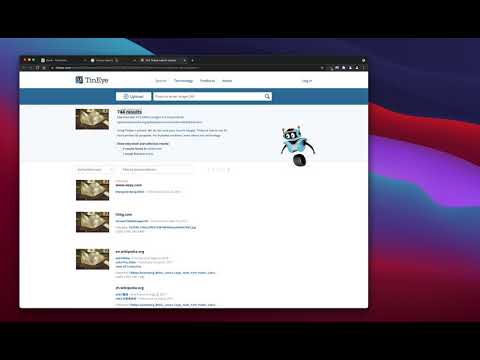
Medienelement 2 (Screenshot) für Reverse Image Search

Übersicht

uein leistungsfähiges Tool für die umgekehrte Bildsuche, das auf den Suchmaschinen von TinEye/Google Images aufbaut

"Reverse Image Search" extension helps you to find similar images or the original image source and its name. This is a useful tool to find for instance the actual image name or detect whether this image is unique or is just a copy or a modified copy of an already existed image on the web. In most cases, images are embedded in the background page and hence it is not straightforward to find the actual source of them to be passed to a reverse image search engine. Also, the image you are looking for maybe just part of a video stream. This extension solves these problems by providing a capturing tool in the right-click context menu. Simply select the item and capture a portion of the screen. The captured image is automatically sent to either "TinEye" or "Google Images" search engine, and after a successful upload, a new page with the matching results is displayed. This extension adds three items to the context menu of your browser: 1. Google Images (Image URL) 2. Tineye (Image URL) 3. Google Images (Capture) The first two items are added to the image context menu, and the third one is added to the page context to activate the capturing tool. Instead of the third option, you can alternatively press the browser action button. Links: FAQs Page: https://add0n.com/reverse-image-search.html GitHub Page: https://github.com/schomery/reverse-image-search/

Details

  • Version
    0.3.0
  • Aktualisiert
    10. August 2021
  • Angeboten von
    chYer
  • Größe
    129KiB
  • Sprachen
    12 Sprachen
  • Entwickler
    E-Mail
    chyer.webstore@yahoo.com
  • Kein Händler
    Dieser Entwickler hat sich nicht als Händler deklariert. Für Verbraucher in der Europäischen Union gelten die Verbraucherrechte nicht für Verträge, die zwischen dir und diesem Entwickler geschlossen werden.

Datenschutz

Erweiterungen verwalten und Informationen zur Verwendung in deiner Organisation abrufen
Der Entwickler hat offengelegt, dass keine deiner Daten erhoben oder genutzt werden.

Dieser Entwickler erklärt, dass deine Daten

  • nicht an Dritte verkauft werden, außer in den genehmigten Anwendungsfällen
  • nicht für Zwecke genutzt oder übertragen werden, die nichts mit der Hauptfunktionalität des Artikels zu tun haben
  • nicht zur Ermittlung der Kreditwürdigkeit oder für Darlehenszwecke verwendet oder übertragen werden

Support

Wenn du Probleme, Fragen oder Vorschläge hast, rufe die Supportwebsite des Entwicklers auf

Ähnliche

Fast Image Research

4,4

Right click any image to instantly get reverse image search results from Google, TinEye, Yandex, Bing, or a combination.

Bildsuche umkehren

3,3

Suchen Sie Bilder in Ihrem Browser mit nur einem Klick.

Search It All

3,9

Search across multiple search engines with one click - no retyping needed

Omni - Meta Search Engine

4,5

One search box. Many buttons.

Search by Image

4,1

A powerful reverse image search tool, with support for various search engines, such as Google, Bing, Yandex, Baidu and TinEye.

TinEye Reverse Image Search

4,5

This is the official TinEye Chrome extension. Find out where an image came from, how it's used, or find higher resolution versions.

RevEye Reverse Image Search

4,1

Perform a search by image. Choose between the image search engines Google, Bing, Yandex, TinEye, or user-defined engines.

Bilder-Rückwärtssuche

4,4

Fügt eine Option zum Kontextmenü hinzu, um mit einem Bild auf verschiedenen Diensten zu suchen

Image Search

3,6

Find similar images in popular search engines

Reverse Image Search

4,0

Right click on an image and find it's origin in Google image search.

Search image with Yandex

4,5

Search for similar images in Yandex with open source code, without advertising and analytics.

Reverse Image Search

3,7

Search similar images in the WEB from context menu

Fast Image Research

4,4

Right click any image to instantly get reverse image search results from Google, TinEye, Yandex, Bing, or a combination.

Bildsuche umkehren

3,3

Suchen Sie Bilder in Ihrem Browser mit nur einem Klick.

Search It All

3,9

Search across multiple search engines with one click - no retyping needed

Omni - Meta Search Engine

4,5

One search box. Many buttons.

Search by Image

4,1

A powerful reverse image search tool, with support for various search engines, such as Google, Bing, Yandex, Baidu and TinEye.

TinEye Reverse Image Search

4,5

This is the official TinEye Chrome extension. Find out where an image came from, how it's used, or find higher resolution versions.

RevEye Reverse Image Search

4,1

Perform a search by image. Choose between the image search engines Google, Bing, Yandex, TinEye, or user-defined engines.

Bilder-Rückwärtssuche

4,4

Fügt eine Option zum Kontextmenü hinzu, um mit einem Bild auf verschiedenen Diensten zu suchen

Google-Apps