


Overview
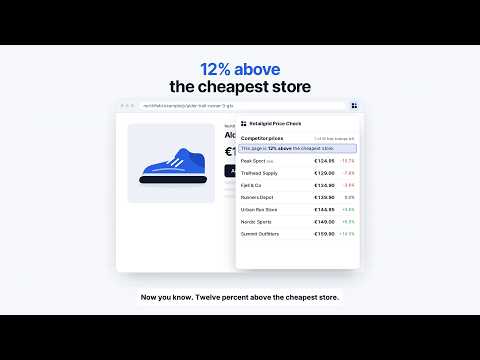
See what competitors charge for any product you're viewing, from Google Shopping. Save prices and export them to CSV.
See what every competitor charges for the product you're looking at, right on the page. Open any product page and click the Retailgrid icon. Price Check finds the stores selling the exact same item on Google Shopping and lists their prices next to yours, cheapest first. What you get - Up to 12 competitor prices for the same product, with links to each store - A clear summary: how far this page is above or below the cheapest store - Price history: a daily record builds every time a product is checked, so you see who cut prices and when - High-confidence matches only. Different sizes, flavours, models and multipacks are left out - Works on store websites in many countries, in local currency Collect prices as you browse - Add any product to your price list in one click - Download the list as a CSV in Retailgrid's competitor price format, ready for Excel or Retailgrid How it works - Sign in with Google once. 10 competitor lookups are free - Price Check reads a page only when you click the icon - Your price list stays in your browser Built by Retailgrid, the AI pricing workspace for mid-market retailers. When you need competitor prices for your whole range, refreshed automatically, Retailgrid monitors them for you and turns them into explainable price decisions.
5 out of 51 rating
Details
- Version1.1.0
- UpdatedOctober 3, 2026
- Size112KiB
- LanguagesEnglish
- DeveloperWebsite
Email
maxim@retailgrid.io - Non-traderThis developer has not identified itself as a trader. For consumers in the European Union, please note that consumer rights do not apply to contracts between you and this developer.
Privacy

Retailgrid Price Check has disclosed the following information regarding the collection and usage of your data. More detailed information can be found in the developer's privacy policy.
Retailgrid Price Check handles the following:
This developer declares that your data is
- Not being sold to third parties, outside of the approved use cases
- Not being used or transferred for purposes that are unrelated to the item's core functionality
- Not being used or transferred to determine creditworthiness or for lending purposes
Support
For help with questions, suggestions, or problems, visit the developer's support site