Item logo image for ReTabber

ReTabber

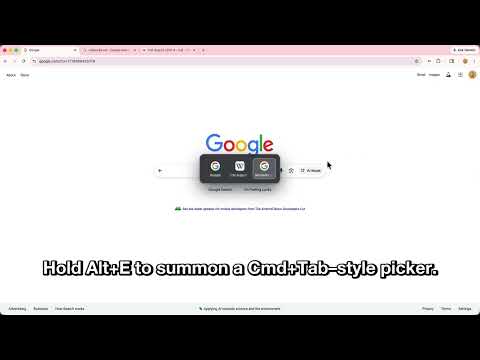
Item media 3 (screenshot) for ReTabber
Item video thumbnail
Item media 2 (screenshot) for ReTabber
Item media 3 (screenshot) for ReTabber
Item video thumbnail
Item media 2 (screenshot) for ReTabber
Item media 3 (screenshot) for ReTabber

Overview

Option+E to jump between tabs. Option+G to cycle thru tabs history. Option+Shift+G to go backwards.

Besides jumping between tabs, with ReTabber you can also cycle through your tab history (or go backwards), and make Close Tab jump to the most recent tab (toggleable). All shortcuts are customizable via Chrome’s extension settings. Tweak them to match your workflow and never waste time hunting for a closed tab again! ReTabber is designed to be simple and lightweight — it uses minimal memory and stays out of your way. That sounds obvious, but we found other tab switchers either broke on newer Chrome versions or crashed multiple times a day. After getting nowhere with their developers, we built ReTabber ourselves — and we love using it every day. A Note on Pro ReTabber occasionally shows a small reminder dialog about upgrading to Pro. This helps support development and unlocks uninterrupted experience.

Details

  • Version
    2.4.3
  • Updated
    October 13, 2025
  • Features
    Offers in-app purchases
  • Size
    98.68KiB
  • Languages
    English
  • Developer
    Website
    Email
    info@lycheeisle.com
  • Non-trader
    This developer has not identified itself as a trader. For consumers in the European Union, please note that consumer rights do not apply to contracts between you and this developer.

Privacy

The developer has disclosed that it will not collect or use your data. To learn more, see the developer’s privacy policy.

This developer declares that your data is

  • Not being sold to third parties, outside of the approved use cases
  • Not being used or transferred for purposes that are unrelated to the item's core functionality
  • Not being used or transferred to determine creditworthiness or for lending purposes

Related

Open Last Tab

4.8

Cycle through last used Chrome tabs using keyboard shortcut (Alt+Q).

Tab Restore

4.1

Tab Restore helps to restore recently closed tabs and window sessions.

Recent Tabs with your browsing history

4.3

Undo closed tabs with your browsing history

Last Tab Back

2.8

Use the back key to close the tab if there are no pages to go back to. When it closes, go to the tab that created it.

Tab Wheel Scroll

2.6

Scroll through tabs with alt + mouse wheel OR right click + mouse wheel.

Ctrl+Tab MRU

3.4

Switch between tabs in the most recently used order, can be configured to use Ctrl+Tab as a shortcut

TabMate

3.9

TabMate helps you manage the tab clutter. Easily switch between tabs, save & restore set of tabs or windows, and more.

Tab Shortcut Tools

4.7

Duplicate Tab, Pop out Tab, and New Tab to the Right - Configurable Shortcuts

Duplicate Tab Shortcut

4.9

Press Alt+Shift+D to duplicate the current tab (Option+Shift+D on Mac). Shortcut is configurable.

Tab Wrangler

4.4

Automatically closes inactive tabs and makes it easy to get them back

Taby

5.0

Quickly move between tabs, bookmarks and history

Recover Closed Tab

4.5

🚀 Recover recently closed tabs with one click! Works in incognito mode. Right-click the icon to show history.

Open Last Tab

4.8

Cycle through last used Chrome tabs using keyboard shortcut (Alt+Q).

Tab Restore

4.1

Tab Restore helps to restore recently closed tabs and window sessions.

Recent Tabs with your browsing history

4.3

Undo closed tabs with your browsing history

Last Tab Back

2.8

Use the back key to close the tab if there are no pages to go back to. When it closes, go to the tab that created it.

Tab Wheel Scroll

2.6

Scroll through tabs with alt + mouse wheel OR right click + mouse wheel.

Ctrl+Tab MRU

3.4

Switch between tabs in the most recently used order, can be configured to use Ctrl+Tab as a shortcut

TabMate

3.9

TabMate helps you manage the tab clutter. Easily switch between tabs, save & restore set of tabs or windows, and more.

Tab Shortcut Tools

4.7

Duplicate Tab, Pop out Tab, and New Tab to the Right - Configurable Shortcuts

Google apps