

ResumeTex - Google Form Auto-Filler
1 rating
)
Overview
Auto-fill Google Forms with your ResumeTex profile data in one click.
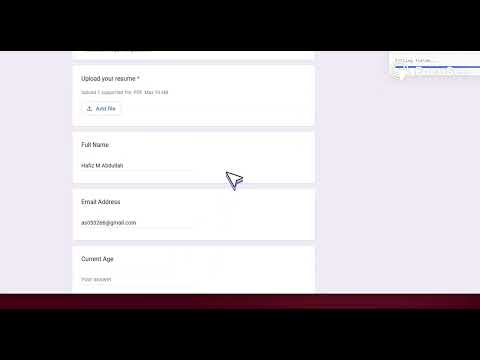
Stop copying and pasting into job application forms. ResumeTex automatically fills Google Forms with your profile data in one click. HOW IT WORKS 1. Create your profile on ResumeTex — upload your resume, add your experience, skills, and saved answers to common interview questions. 2. Install this extension and connect it to your ResumeTex account. 3. Open any Google Form (job applications, surveys, intake forms). 4. Click "Auto-Fill" — ResumeTex matches your data to form fields and fills them for you. 5. Review, edit if needed, and submit. KEY FEATURES • One-click auto-fill — Fill name, email, phone, education, experience, skills, and more from your ResumeTex profile. • Smart field matching — Intelligently maps your data to form questions, even when labels differ. • AI-powered answers — For open-ended questions (e.g., "Why do you want this role?"), AI generates personalized answers based on your resume and the form context. • Resume file upload — Automatically attaches your resume PDF to file upload fields when the form asks for a resume. • Form history — Track which forms you've filled and when. • Secure — Your data stays in your account. Login with Google; your extension secret keeps your connection private. WHO IT'S FOR • Job seekers applying to multiple roles via Google Forms • Anyone filling repetitive forms with the same personal or professional information • Students and professionals who want to save time on applications and surveys REQUIREMENTS • A ResumeTex account (free to start) • Google account for sign-in • An active subscription to use the extension (Basic or Pro plan) Get started at resumetex.live — create your profile, then install this extension to auto-fill any Google Form in seconds.
5 out of 51 rating
Details
- Version1.0.1
- UpdatedApril 8, 2026
- FeaturesOffers in-app purchases
- Offered byResumeTex
- Size910KiB
- LanguagesEnglish
- DeveloperResumeTex
Email
resumetex.convertor@gmail.com - Non-traderThis developer has not identified itself as a trader. For consumers in the European Union, please note that consumer rights do not apply to contracts between you and this developer.
Privacy

ResumeTex - Google Form Auto-Filler has disclosed the following information regarding the collection and usage of your data. More detailed information can be found in the developer's privacy policy.
ResumeTex - Google Form Auto-Filler handles the following:
This developer declares that your data is
- Not being sold to third parties, outside of the approved use cases
- Not being used or transferred for purposes that are unrelated to the item's core functionality
- Not being used or transferred to determine creditworthiness or for lending purposes
Support
For help with questions, suggestions, or problems, visit the developer's support site