

Resume Matcher
3 个评分
)
概述
AI-powered resume matcher extension for job applications.
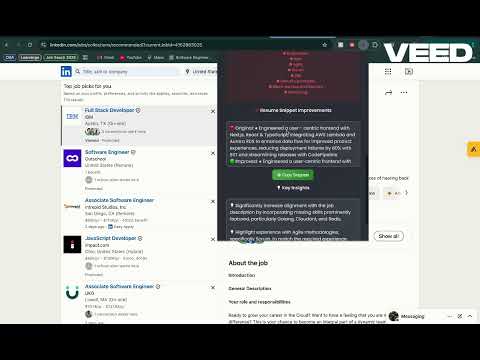
🔍 Struggling to land interviews? Fix your resume in seconds with AI! 📢 Important Catch for Mac Users: How to Enable Resume Upload If you are using Chrome on macOS, you may encounter an issue where the resume upload does not work. This is due to a Chrome security restriction affecting extensions. To enable resume upload, follow the steps mentioned on the bottom 🚀 Resume Match AI is the ultimate Chrome extension that helps job seekers instantly compare their resumes against job descriptions. With AI-powered analysis, it provides a match score, highlights missing skills, and even suggests optimized resume bullet points—so you can apply with confidence! ✨ Features: ✅ Instant Match Score – See how well your resume aligns with a job posting. ✅ Find Missing Keywords – Identify key skills your resume is missing. ✅ Optimized Resume Snippets – AI-generated improvements for stronger work experience bullet points. ✅ AI-Powered Insights – Actionable suggestions to enhance your resume. ✅ User-Friendly Interface – Upload your resume, click ‘Match,’ and let AI do the rest! ✅ Secure & Private – Your resume stays on your device, no data storage required. 🛠️ How It Works: 1️⃣ Install Resume Match AI from the Chrome Web Store. 2️⃣ Visit a job posting on LinkedIn, Indeed, or other job boards. 3️⃣ Upload your resume and click ‘Match.’ 4️⃣ Get instant AI feedback, keyword analysis, and optimized resume points. 🚀 Why Use Resume Match AI? 🔹 Beat the ATS (Applicant Tracking System) by including job-relevant keywords. 🔹 Make your resume recruiter-friendly with data-driven insights. 🔹 Save time & improve applications instantly with AI-powered feedback. 📩 Questions or feedback? Reach out via GitHub Issues! 📌 Install now and boost your resume with AI! 📢 Mac Users: Fix Resume Upload Issue If you're unable to upload your resume on Mac, follow these steps: 1️⃣ Open the Extension: Click the puzzle icon 🧩 in Chrome’s toolbar. Select Resume Match AI to open the extension popup. 2️⃣ Open Developer Tools: Right-click anywhere inside the extension popup (two-finger tap on the trackpad). Click Inspect from the menu. 3️⃣ Return to the Main Screen: Do not close the Inspect panel. Click anywhere outside to return to the main screen. 4️⃣ Upload Your Resume: Go back to the extension popup and try uploading your resume—it should now work! That’s it! 🚀 Your resume upload should now function properly.
4.3 星(5 星制)3 个评分
详情
- 版本2.3
- 上次更新日期2025年4月5日
- 提供方nitishahuja971
- 大小660KiB
- 语言English (United States)
- 开发者
邮箱
nitishahuja971@gmail.com - 非交易者该开发者尚未将自己标识为交易者。欧盟地区消费者须知:消费者权利可能不适用于您与该开发者达成的合约。
隐私权
该开发者已声明,您的数据:
- 不会因未获批准的用途出售给第三方
- 不会为实现与产品核心功能无关的目的而使用或转移
- 不会为确定信用度或放贷目的而使用或转移