

Resumate
평점 2개
)
개요
Resumate is a tool that helps you create a resume.
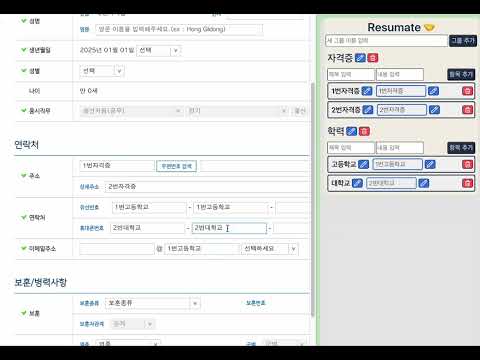
귀찮았던 자소서 내용 기입, 이제 편하게 하세요! :) 주요 기능 상세 설명 1. 그룹별 데이터 관리 사용자는 본인의 필요에 따라 원하는 그룹을 자유롭게 추가할 수 있습니다. 각 그룹 안에는 제목과 내용을 입력하여 데이터를 체계적으로 저장할 수 있습니다. 이를 통해 다양한 정보를 카테고리화하여 효율적으로 관리할 수 있습니다. 예시: "자격증" 그룹: 취득한 자격증 이름, 발급일, 발급기관 등의 세부 정보를 저장. "경력" 그룹: 이전 직장에서 수행했던 업무 내용이나 경력 사항을 상세히 기록. "학력" 그룹: 졸업한 학교, 전공, 학위 및 학업 성과 등을 입력하여 관리. 이렇게 생성된 그룹은 사용자가 원하는 대로 추가, 삭제, 수정이 가능하며, 데이터 관리의 유연성을 제공합니다. 2. 드래그 앤 드롭 기능 사이드 패널에 저장된 데이터를 마우스로 드래그 앤 드롭하여 간편하게 외부의 입력란(예: 자소서 작성 양식)에 추가할 수 있습니다. 사용자는 기존의 복사/붙여넣기 작업을 할 필요 없이 직관적으로 데이터를 활용할 수 있습니다. 예시: 사용자가 저장해둔 "자격증" 그룹의 내용을 드래그하여 자소서의 관련 항목에 추가. "경력" 그룹의 데이터를 드래그하여 면접 준비 자료에 활용. 드래그 앤 드롭 인터페이스는 간단하고 직관적으로 설계되어 사용자가 빠르고 편리하게 데이터를 전송할 수 있습니다. 3. 데이터 저장 입력된 모든 데이터는 브라우저의 IndexedDB를 통해 로컬에 저장됩니다. IndexedDB는 브라우저 내장 데이터베이스로, 대량의 데이터를 안정적으로 저장하고 검색할 수 있는 기능을 제공합니다. 저장된 데이터는 브라우저를 닫거나 컴퓨터를 재시작해도 그대로 유지됩니다. 이를 통해 사용자는 데이터를 지속적으로 관리할 수 있으며, 중요한 정보를 잃어버릴 걱정을 덜 수 있습니다. 추가적인 데이터 관리 기능: 데이터 수정: 저장된 데이터를 언제든 수정하여 최신 상태로 유지. 데이터 삭제: 더 이상 필요하지 않은 데이터는 간단히 삭제 가능. Tired of manually filling out cover letter details? Make it easy now! :) Key Features in Detail Group-Based Data Management Users can freely add groups as needed. Within each group, users can input titles and content to systematically save data. This allows users to categorize and manage various information efficiently. Example: "Certificates" Group: Save detailed information such as the name of the certificate, issue date, and issuing authority. "Career" Group: Record detailed descriptions of tasks performed at previous jobs or career details. "Education" Group: Input and manage information like schools attended, majors, degrees, and academic achievements. The created groups can be added, deleted, or modified as desired, offering flexibility in data management. Drag-and-Drop Feature Saved data in the side panel can be added to external input fields (e.g., cover letter forms) by simply dragging and dropping. Users can intuitively utilize the data without the need for traditional copy-and-paste operations. Example: Drag the saved contents of the "Certificates" Group to the relevant section in a cover letter. Use the "Career" Group data by dragging it into interview preparation documents. The drag-and-drop interface is designed to be simple and intuitive, allowing users to transfer data quickly and conveniently. Data Storage All entered data is stored locally in the browser using IndexedDB. IndexedDB is a built-in database in browsers that provides a reliable way to store and retrieve large amounts of data. Saved data remains intact even if the browser is closed or the computer is restarted. This enables users to manage their data continuously without worrying about losing important information. Additional Data Management Features: Data Editing: Modify saved data anytime to keep it up-to-date. Data Deletion: Easily delete data that is no longer needed.
5점 만점에 5점평점 2개
세부정보
- 버전1.0.1
- 업데이트됨2025년 1월 11일
- 제공leejiho35
- 크기298KiB
- 언어한국어
- 개발자이지호
용구대로 2787번길 9-7 33동 102호 용인시, 경기도 16865 KR이메일
leejiho35@gmail.com - 비판매자판매자로 식별되지 않은 개발자입니다. 유럽 연합에 거주하는 소비자의 경우, 이 개발자와 체결한 계약에 대해서는 소비자 권리가 적용되지 않을 수 있음을 유의해야 합니다.
개인정보 보호
개발자가 사용자 데이터에 관해 다음과 같이 선언했습니다
- 승인된 사용 사례를 제외하고 서드 파티에 판매하지 않음
- 항목의 핵심 기능과 관련 없는 목적으로 사용하거나 전송하지 않음
- 신용도 판단 또는 대출 목적으로 사용하거나 전송하지 않음