

Result Arrange

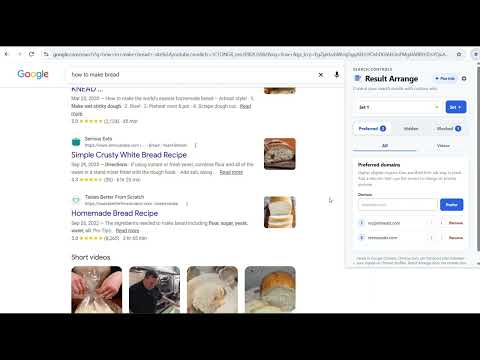
Overview
Automatically detects Google, Brave Search, Bing, and DuckDuckGo, then applies Prefer, Hide, and Block—in Chrome, Brave, and Edge.
Put your preferred sites first on Google, Brave Search, Bing, and DuckDuckGo—in Chrome, Brave, or Microsoft Edge. Result Arrange applies your website rules automatically on supported search pages: • Prefer: choose sites and their priority. Recognized organic results move to the top of the main results column, above ads and other sections. • Hide: remove unwanted supported results and reveal them again when you choose. • Block (Plus): add site exclusions to supported searches and locally suppress identifiable blocked results that still appear, including supported ads. Revealing hidden results does not reveal blocked results. Version 1.2 improves sponsored-result matching and adds support for recognized video tiles beside Brave Search answers. Free works without an account or payment and includes Prefer, Hide, one rule set, and individual search-engine switches. New installations start an automatic 14-day Plus trial without a card or automatic charge. Plus adds Block, named Saved sets, and separate rules for full-length Google Videos. Paid Plus is optional; current pricing and subscription terms are available on our website and at checkout. Supported surfaces: Google All, Brave Search All, Bing web, and DuckDuckGo All, plus full-length Google Videos with Plus. Brave answer-side video tiles are supported within All results; its separate Videos tab is not supported. Some answer, shopping, native, opaque-ad, and other unsupported modules remain unchanged. Result Arrange does not promise to remove every mention of a site. Search queries, result content, and rule lists are not sent to BranchNode. Search-page changes happen locally. Block exclusions go to your chosen search engine as part of your search. The service receives limited installation, trial/access, and optional account information. Rules use browser extension storage; supported browser sync can carry settings within the same browser family. Account rules are encrypted before synchronized storage. Result Arrange has no extension telemetry or advertising trackers. Result Arrange is a product of BranchNode LLC and is not affiliated with or endorsed by browser or search-engine providers.
0 out of 5No ratings
Details
- Version1.2.4
- UpdatedSeptember 28, 2026
- FeaturesOffers in-app purchases
- Offered byBranchNode LLC
- Size815KiB
- LanguagesEnglish (United States)
- DeveloperBranchNode LLC
6545 Market Ave N Ste 100 Canton, OH 44721-2430 USEmail
hello@branchnodeconnect.comPhone
+1 440-859-8187 - TraderThis developer has identified itself as a trader per the definition from the European Union and committed to only offer products or services that comply with EU laws.
- D-U-N-S148152964
Privacy

Result Arrange has disclosed the following information regarding the collection and usage of your data. More detailed information can be found in the developer's privacy policy.
Result Arrange handles the following:
This developer declares that your data is
- Not being sold to third parties, outside of the approved use cases
- Not being used or transferred for purposes that are unrelated to the item's core functionality
- Not being used or transferred to determine creditworthiness or for lending purposes
Support
For help with questions, suggestions, or problems, visit the developer's support site