

Restore Old Classic Search Button & Hide Homepage AI for Google™
2 ratings
)
Overview
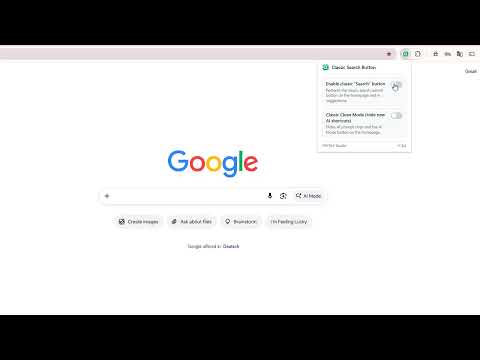
Restores the classic Search button on the Google homepage. Keep new tools or hide homepage AI buttons & AI Mode in one click.
SMART STANDBY NOTICE (GRADUAL ROLLOUT) Because this homepage update is rolling out in waves by account and region, your profile may still display the original submit button today. Whenever the native button is already visible on your screen, this extension stays quietly in Smart Standby — using zero resources and never creating a duplicate button. As soon as your account switches to the new buttonless layout, your classic button appears automatically. TWO WAYS TO CUSTOMIZE YOUR HOMEPAGE 1. Restore the Classic "Search" Button (Default): Brings back one-click web queries at the end of the action row and inside live autocomplete suggestions while keeping new shortcuts intact. 2. Hide Homepage AI Buttons (Classic Clean Mode): Prefer the clean, minimal page you knew for years? Flip the second switch in the toolbar popup to hide new AI prompt chips (Create images, Ask about files, Brainstorm) and the AI Mode button in one click — even if you normally press Enter and simply want a clutter-free homepage. KEY FEATURES • Restores a clean classic submit button on the desktop Google™ homepage and inside open suggestions • Optional 1-click "Classic Clean Mode" removes homepage AI chips and AI Mode instantly • Live toolbar switches apply immediately with zero page reload • Opens standard web results on click (Ctrl/Cmd-click or middle-click opens a new tab) • Matches Light and Dark themes automatically and adapts the button label to 17 page languages (Suche, Rechercher, Buscar, Cerca, Zoeken, Szukaj, Поиск, and more) • Smart Standby duplicate guard: stays inactive whenever a native submit button is already visible HOMEPAGE SCOPE ONLY Works strictly on the desktop homepage ("/" and "/webhp", where the classic button lived from 1998 to 2026). It turns off completely on "/search" and never modifies result pages or result-page summaries. INDEPENDENCE & PRIVACY This utility is an independent browser extension developed by PRYSKY Studio (https://prysky.com) and is not affiliated with, sponsored by, or endorsed by Google LLC (Google™ is a trademark of Google LLC). No tracking, analytics, or data collection: your queries and browsing history are never read, stored, or transmitted. Only your two local toggle switches are saved in your browser profile.
5 out of 52 ratings
Details
- Version1.0.5
- UpdatedNovember 27, 2026
- Offered byprysky.com
- Size31.94KiB
- Languages9 languages
- Developer
Email
contact@prysky.com - Non-traderThis developer has not identified itself as a trader. For consumers in the European Union, please note that consumer rights do not apply to contracts between you and this developer.
Privacy

This developer declares that your data is
- Not being sold to third parties, outside of the approved use cases
- Not being used or transferred for purposes that are unrelated to the item's core functionality
- Not being used or transferred to determine creditworthiness or for lending purposes
Support
For help with questions, suggestions, or problems, please open this page on your desktop browser