

ResponseAI: AI Email Reply Generator in 25 Languages

Overview
Write it in your language, send it in theirs. AI replies for Gmail, Outlook, LinkedIn and Fiverr, with the meaning in yours.
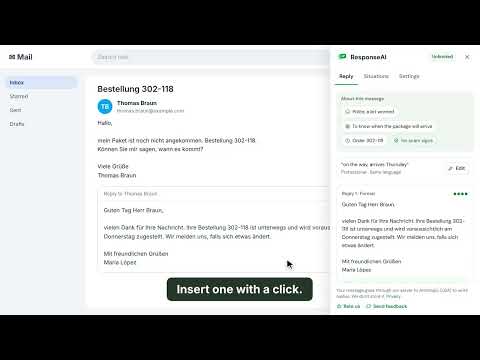
ResponseAI writes three ready replies to any email or message in Gmail, Outlook, LinkedIn and Fiverr, and shows what each one means in your own language. Write it in your language. Send it in theirs. HOW IT WORKS • Open a conversation and get three different answers in one click, in 25 languages. • "Means" line: one short line in your language tells you exactly what you are sending, with its politeness level. • "What do you want to say?" box: type your idea in your own words, even in simple English, like "yes, but next week". It is written properly for the other person. • Pick a tone: Short, Professional, Friendly or Say no. • My style: add your name, sign-off and a note on how you write, so the result sounds like you. • Insert with one click, or copy. Your recent results stay in the panel. • The menus speak your language too. They follow your browser, or you choose in Settings. MESSAGE CHECK • The mood, what they really want and any deadlines, at a glance. • Meeting times shown in your own time zone. • A scam warning when someone asks you to move the chat to another app, pay up front, share bank or ID details, or do unpaid test work, or offers far too much money for a small task. READY-MADE SITUATIONS Start from scratch: pick a situation and add a few words. • Suppliers and customers: request or send a quote, purchase order, order confirmation, shipping notice, invoice, payment reminder, delivery delay, 8D quality complaint, sample request. • Freelance: price negotiation, revision request, sorry for the delay, delivery note. • Students: writing to a professor, asking for more time, internship application, thank-you note. • Follow-ups when nobody answers, plus your own templates. SPECIAL DAYS • Save birthdays and anniversaries. A small number on the toolbar icon reminds you, and the greeting is written for you. • World holidays with business tips, like factory closures in China around Lunar New Year. WHERE IT WORKS • Gmail, Outlook and LinkedIn: a "Reply" button right next to the conversation. • Fiverr: turn it on once in Settings. There, the suggestions keep the chat and the payment on the platform. • Any other website: select the text, right-click and choose "Reply with ResponseAI". It opens in the side panel. • Or paste text into the extension window. Shortcut: Alt+R. Large text option. PRICING The first 3 are free: no sign-in, no card needed. Then $5 a month or $49 a year, unlimited. Cancel anytime. Yearly plan: full refund within 7 days. PRIVACY ResponseAI reads only the conversation you open or the text you select. It never scans your inbox and never sends anything for you. Your text goes through our server to our AI provider and is not stored. Google sign-in is optional (to use one subscription on several computers) and gives us only a one-way code, never your password or your emails. Your settings, templates, style and special days stay in your browser. Privacy policy: https://responseaiapp.com/#privacy Website: https://responseaiapp.com Support: responseaisupport@gmail.com
5 out of 54 ratings
Details
- Version1.0.5
- UpdatedNovember 5, 2026
- FeaturesOffers in-app purchases
- Size234KiB
- Languages27 languages
- DeveloperWebsite
Email
responseaisupport@gmail.com - Non-traderThis developer has not identified itself as a trader. For consumers in the European Union, please note that consumer rights do not apply to contracts between you and this developer.
Privacy

ResponseAI: AI Email Reply Generator in 25 Languages has disclosed the following information regarding the collection and usage of your data. More detailed information can be found in the developer's privacy policy.
ResponseAI: AI Email Reply Generator in 25 Languages handles the following:
This developer declares that your data is
- Not being sold to third parties, outside of the approved use cases
- Not being used or transferred for purposes that are unrelated to the item's core functionality
- Not being used or transferred to determine creditworthiness or for lending purposes
Support
For help with questions, suggestions, or problems, visit the developer's support site