

ResearchBud: Chrome extension for notes while researching

Overview
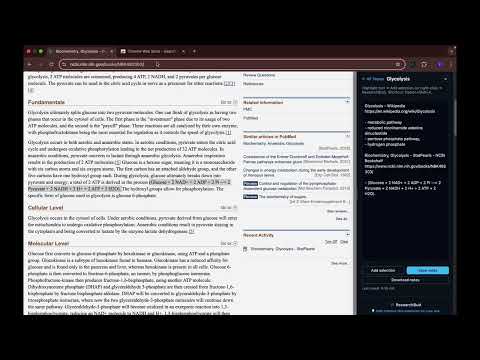
Take research and study notes without leaving your webpage. A simple notes sidebar for saving highlights and ideas, as you browse.
ResearchBud is a lightweight Chrome extension that helps you take research and study notes without leaving your webpage. It opens a clean notes sidebar inside Chrome so you can capture ideas, keywords, highlights, and links while you browse articles and learn online and then you can go on to research those ideas latter on without breaking you research/study flow. How it works: You create topics for what you’re researching (for example, “Glycolysis” or “Marketing ideas”), then write notes inside that topic as you read. You can switch between topics anytime, rename a topic, or delete topics you no longer need. Each topic keeps its own notes and timestamps, which makes ResearchBud useful for online research, study notes, reading notes, project planning, and quick knowledge capture. ResearchBud includes a fast way to save highlighted text from the current page. Select text on any webpage and add it to your active topic. ResearchBud automatically includes the page title and link as a reference, so you always know where your notes came from. You can add selected text using the keyboard shortcut: Option + Shift + A on Mac, or Alt + Shift + A on Windows and Linux. Saving and reliability are a priority. ResearchBud saves your notes when you switch topics, when you hide the sidebar, and before the page unloads. You can also use the Save button any time you want manual control. You can download your notes anytime. Download any topic as a simple text file so you can keep a backup, store it on your device, or upload it anywhere else later. Everything stays on your device. ResearchBud stores notes locally in your browser, with no accounts, no sign-ups, no servers, and no tracking. Your notes should stay intact across refreshes and restarts. Notes may disappear if you clear browser or extension data, uninstall or reinstall the extension, or switch Chrome profiles. To stay extra safe, you can download any topic anytime as a backup. ResearchBud works well as a notes extension, notes Chrome extension, Chrome notes tool, browser notes app, note sidebar, study notes tool, and note taking extension for Chrome. If you’re looking for a simple way to take notes while researching in Chrome, ResearchBud is built for that workflow. ResearchBud is a work in progress and is actively improving based on real user feedback. If something feels off, missing, or could be better, please use the “Help improve this extension for your use” link at the bottom of the sidebar to share feedback.
0 out of 5No ratings
Details
- Version0.1.2
- UpdatedDecember 19, 2025
- Offered byAima
- Size46.51KiB
- LanguagesEnglish
- Developer
Email
aimaaconsults@gmail.com - Non-traderThis developer has not identified itself as a trader. For consumers in the European Union, please note that consumer rights do not apply to contracts between you and this developer.
Privacy

ResearchBud: Chrome extension for notes while researching has disclosed the following information regarding the collection and usage of your data. More detailed information can be found in the developer's privacy policy.
ResearchBud: Chrome extension for notes while researching handles the following:
This developer declares that your data is
- Not being sold to third parties, outside of the approved use cases
- Not being used or transferred for purposes that are unrelated to the item's core functionality
- Not being used or transferred to determine creditworthiness or for lending purposes
Support
For help with questions, suggestions, or problems, please open this page on your desktop browser