

Rescreen - Breakpoints screen capture

Overview
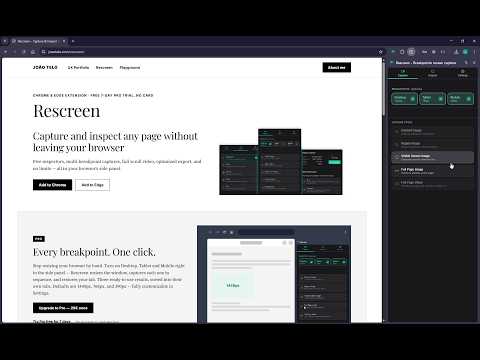
Full-page, full-resolution screenshots and video at every breakpoint — plus a searchable library and five design inspectors.
Rescreen is a full-page screenshot and inspection tool built for UX/UI designers, right in Chrome's side panel. Capture every breakpoint at full resolution in one pass, save the best of what you find to your own library, inspect any element for exact specs, and export straight into organized Figma frames — with nothing lost on the way. Multi-breakpoint capture — select Desktop, Tablet and Mobile with one click, captured in sequence and sorted into their own tabs (PRO) Image capture — element, region, visible-screen or full-page screenshots Video capture — record a scrolling video of a single element, a drawn region, or the full page, at your own recording speed Library — turn captures into your own growing reference of interactions, animations and UI worth remembering, saved straight from the results page into its own browsable tab (free during your trial, read-only after unless you're Pro) Optimized export — slice a tall capture into full-resolution blocks or compress it, to fit Figma, Miro, Slack or email limits Free companion Figma plugin — drops sliced blocks back into place as organized, labeled frames Export images in traditional formats such as PNG and PDF, or as video Five hover-driven inspectors for design QA and handoff — typography, colors, spacing, image and text, with an element's real :hover state revealed via Caps Lock Automatic light/dark theme, matching your browser Your captures and page content stay 100% local — no account, no sign-up. Anonymous usage analytics are entirely opt-in (off by default) and never include your captures, page content, URLs, or domains. Built for designers who need pixel-accurate specs, full-resolution captures across every breakpoint, and a clean path into Figma — without fighting a print dialog or a screenshot tool that blurs on import. Developers get the same precision for handoff and QA. One click gets you a full, high-quality capture in the format you actually need. Available in English, Spanish, and Portuguese (Brazil and Portugal), following your browser's language automatically.
0 out of 5No ratings
Details
- Version1.2.0
- UpdatedOctober 22, 2026
- FeaturesOffers in-app purchases
- Offered byJoão Telo
- Size329KiB
- Languages4 languages
- DeveloperJoão Telo
Av. Mal. Humberto Delgado Vila Nova de Famalicão 4760-012 PTEmail
rescreen.support@joaotelo.com - Non-traderThis developer has not identified itself as a trader. For consumers in the European Union, please note that consumer rights do not apply to contracts between you and this developer.
Privacy

Rescreen - Breakpoints screen capture has disclosed the following information regarding the collection and usage of your data. More detailed information can be found in the developer's privacy policy.
Rescreen - Breakpoints screen capture handles the following:
This developer declares that your data is
- Not being sold to third parties, outside of the approved use cases
- Not being used or transferred for purposes that are unrelated to the item's core functionality
- Not being used or transferred to determine creditworthiness or for lending purposes
Support
For help with questions, suggestions, or problems, please open this page on your desktop browser