

replyai.app - AI for emails
1 个评分
)
概述
AI assisted email replies for gmail
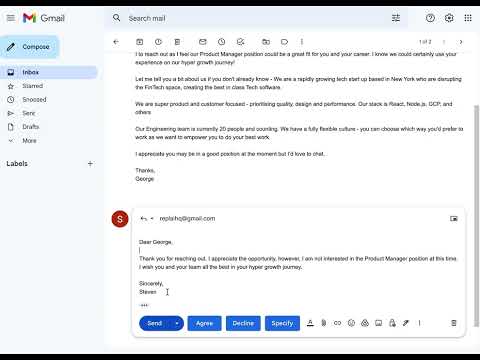
Helps gmail users write email replies extremely fast using AI. How it works: When you compose a reply to an email 4 buttons ("Agree", "Decline", "Specify", "Clear") are added next to the "Send" button that you can use as shown in the screenshot. "Clear" only cleans the response, whereas the other 3 are used as inputs to the AI. When you click "Agree" we feed the AI with the contents of the email and tell it to write a response that agrees to it. When you click "Decline" we feed the AI with the contents of the email and tell it to write a response that declines to it. For "Specify" you need to write a text in the response field of how you want the AI to reply. e.g. "schedule call tomorrow at 17:00", or "decline in a funny way". Then we feed the AI with the contents of the email and how you specified the answer to be and AI writes a response.
1 星(5 星制)1 个评分
详情
- 版本0.2
- 上次更新日期2022年12月14日
- 提供方replaihq
- 大小76.46MiB
- 语言English (United States)
- 开发者
邮箱
replaihq@gmail.com - 非交易者该开发者尚未将自己标识为交易者。欧盟地区消费者须知:消费者权利可能不适用于您与该开发者达成的合约。
隐私权
“replyai.app - AI for emails”已就收集和使用用户数据披露了以下信息。 如需了解详情,请查看开发者的privacy policy。
replyai.app - AI for emails会处理以下数据:
该开发者已声明,您的数据:
- 不会因未获批准的用途出售给第三方
- 不会为实现与产品核心功能无关的目的而使用或转移
- 不会为确定信用度或放贷目的而使用或转移