

Reply Wizard for WhatsApp: AI Replies, Voice to Text & Summaries

Overview
AI replies, voice-to-text & summaries for WhatsApp Web. Free on-device AI with no API key, or ChatGPT, Gemini, Claude and 19 more.
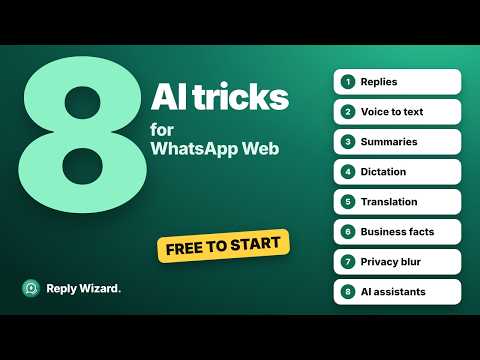
Reply Wizard is a Chrome extension that adds AI to WhatsApp Web. It turns voice notes into text, summarises long chats and groups, translates messages, and drafts reply suggestions straight into the message box. You read it, you edit it, you send it. Free on-device AI with no API key, or bring your own key from ChatGPT, Gemini, Claude and 19 more. ━━━━━━━━━━━━━━━━━━━━━━━━ WHAT IT DOES 🎧 Voice note to text: transcribe WhatsApp voice messages Click Read transcription on any incoming voice message and it becomes text you can read, search and copy. Language is detected automatically, including code-mixed speech such as Hinglish or Tanglish. Transcribe on your own machine with Whisper, with your own key from Groq, OpenAI, Gemini and four more, or with a paid Reply Wizard plan. 💬 AI reply suggestions worth sending Reply Wizard reads the conversation, including the voice notes you have transcribed, understands who said what in one-to-one chats and in groups, and writes a response in the WhatsApp Web message box for you to edit. It never sends anything. 📋 Replies that know your business Add your opening hours, prices and policies as notes, or import a menu or price list from Excel or CSV. Suggested replies answer from them, and say they will check instead of guessing when your facts do not cover a question. Only the rows that match the chat are sent, chosen on your computer. 📝 Summarise a long chat, a group or a voice note Get a chat summary of a group you have ignored for a week, or find out what a five-minute recording actually said. Normal, short, concise or bullet points. 🌐 Translate or transliterate WhatsApp messages Click Read translation under any incoming message and read it in your own language, transliterated into Latin letters, or both at once. Twelve languages, including Hindi, Tamil, Arabic and Spanish. When Chrome already has the language pack, the translation happens on your own machine and the message never leaves the page. You can translate your own draft too, into the language the other person is writing in, before you send it. 🎤 Dictation: speech to text in the message box Hold the microphone and speak. Your speech becomes text in the message box, transcribed by your own provider or by your browser's built-in speech recognition. Switch dictation language from the bar. ✨ Improve a draft you already wrote Rewrite what you typed with five response styles and six tones, from formal to friendly, without losing your meaning. 🕶️ Privacy blur for shared screens On a call, or screen-sharing? Blur the chat list, the messages, or both, with one click on the eye icon. 🔌 Connect Claude, ChatGPT, Cursor and other AI assistants (MCP) Let an AI assistant read your WhatsApp for you over the Model Context Protocol. Desktop assistants such as Claude Desktop, Claude Code and Cursor connect through a bridge on your own computer, so nothing leaves your machine. On a paid Reply Wizard plan, claude.ai and ChatGPT can connect too, through our relay, which passes each request to your browser and keeps no messages. Ask it to summarise a thread, pull out what somebody committed to, or find that address again. It stays off until you pair it or switch it on. Drafting and sending each have their own switch, off by default: with sending on, the assistant's message waits in the chat's message box and goes only when you press Send, only to people you already talk with, at most 10 an hour. ━━━━━━━━━━━━━━━━━━━━━━━━ FREE, AND NO API KEY REQUIRED Choose Chrome Built-in AI (Gemini Nano) and every reply is generated on your own machine at no cost. Requires Chrome 138 or later. No Built-in AI on your computer? Start the free Reply Wizard plan with one click, or sign in with OpenRouter and use your own credits, with no key to copy. Voice transcription can run fully on-device too, with Whisper through WebGPU. The model downloads once and then works offline, with no per-minute cost and no upload. ━━━━━━━━━━━━━━━━━━━━━━━━ OR BRING THE AI YOU ALREADY PAY FOR Free on-device AI, or your own API key from ChatGPT, Gemini, Claude and 19 more cloud AI providers. Running a model yourself? Point Reply Wizard at any OpenAI-compatible server on your own machine, such as Ollama, LM Studio or vLLM. Your keys are encrypted with AES-256-GCM and stored on your device. They are never sent to us, and with your own key your messages go straight to that provider, never through a server of ours. ━━━━━━━━━━━━━━━━━━━━━━━━ OPTIONAL PAID PLANS Prefer not to manage an API key at all? A Reply Wizard plan gives you a key we manage. Start with the free plan: about 10 replies with nothing to set up, and about 30 a month once you add an email. • Pro, $5.99 a month or $59.99 a year • Power, $9.99 a month or $99.99 a year • Studio, $14.99 a month or $149.99 a year, where you choose the model yourself from every major provider All three include a 7-day free trial. Everything above still works free with your own key or with on-device AI; a plan only replaces the key. Payment, invoices and cancellation are handled by Paddle, our merchant of record, on replywizard.app. Pro and Power also transcribe voice notes in the cloud, from the same allowance, charged at what each note actually costs: a 30-second voice note uses about 7,000 tokens. On-device transcription stays free and unlimited on every plan. ━━━━━━━━━━━━━━━━━━━━━━━━ QUESTIONS PEOPLE ASK BEFORE INSTALLING Is Reply Wizard free? Yes. On-device AI and on-device transcription cost nothing and need no account. With your own API key, Reply Wizard is free and your provider bills you directly. The paid plans are optional. How do I transcribe a WhatsApp voice message on my computer? Install Reply Wizard, open web.whatsapp.com in Chrome, and click Read transcription on the voice note. The text appears under it. With on-device Whisper the audio never leaves your computer. Does it send messages for me? Not on its own. Everything is placed in the WhatsApp Web message box for you to read, edit and send yourself. There is no automation, no bulk sending and no scheduling. Out of the box, Reply Wizard never sends a message. If you connect an AI assistant and turn on sending, it can send to people you already talk with, only when you press Send. Does it work in WhatsApp groups? Yes. It keeps track of who said what, so a suggested reply answers from your side of the conversation and a summary credits each point to the right person. Do you see my chats? Not with your own key: only the text or audio you explicitly act on leaves your browser, and it goes straight to the AI provider you chose. On a Reply Wizard plan it passes through our gateway so usage can be metered, and we do not keep it. Can it work with no internet and no account? Yes. Chrome Built-in AI and on-device Whisper both run locally. No account, no sign-up and no email address is needed to use the free version. Does it work on the WhatsApp phone or desktop app? No. Reply Wizard runs on WhatsApp Web at web.whatsapp.com, in Chrome and other Chromium browsers, and nowhere else. Will it work in my language? Transcription detects the language automatically and handles code-mixed speech. Replies are generated in the language of the conversation. And any incoming message can be translated into one of twelve languages, in its own script or in Latin letters, so you can read a chat in a language you do not. Reply Wizard's own buttons and messages inside WhatsApp Web, and its settings page, appear in Portuguese (Brazil), Spanish or Chinese (Simplified, and Traditional for Hong Kong, both beta) when the browser is set to that language. ━━━━━━━━━━━━━━━━━━━━━━━━ WHAT IT DOES NOT DO No bulk messaging. No auto-replies sent without you. No scheduling. No contact scraping. No access to any messaging service other than WhatsApp Web. Nothing is sent that you have not read. ━━━━━━━━━━━━━━━━━━━━━━━━ LINKS Website: https://replywizard.app Privacy policy: https://replywizard.app/privacy-policy Support: https://replywizard.app/support Reply Wizard is an independent extension published by Palworks FZE LLC. It is not affiliated with, endorsed by, or connected to WhatsApp or Meta. WhatsApp is a trademark of Meta Platforms, Inc.
5 out of 53 ratings
Details
- Version3.6.8
- UpdatedOctober 29, 2026
- FeaturesOffers in-app purchases
- Size8.77MiB
- Languages5 languages
- Developer
- TraderThis developer has identified itself as a trader per the definition from the European Union and committed to only offer products or services that comply with EU laws.
Privacy

Reply Wizard for WhatsApp: AI Replies, Voice to Text & Summaries has disclosed the following information regarding the collection and usage of your data. More detailed information can be found in the developer's privacy policy.
Reply Wizard for WhatsApp: AI Replies, Voice to Text & Summaries handles the following:
This developer declares that your data is
- Not being sold to third parties, outside of the approved use cases
- Not being used or transferred for purposes that are unrelated to the item's core functionality
- Not being used or transferred to determine creditworthiness or for lending purposes
Support
For help with questions, suggestions, or problems, visit the developer's support site