


Overview
Your knowledge, available wherever you write. AI that writes with what you know.
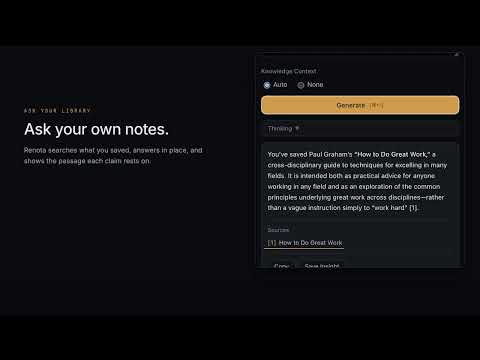
Renota is an AI reading assistant in your browser's side panel. It helps you understand the page in front of you — and keeps what you learn in a knowledge base of your own. Select a passage on any website and ask for it to be explained, analyzed, challenged, connected to what you saved before, or translated. The answer streams into the side panel with numbered citations pointing back to the exact clips and lines it drew on. Keep what is useful: save it as an insight, insert it into the editor you are working in, or replace the selection on the page. WHY INSTALL IT · Reading stops being a dead end. You read far more than you can remember. One action turns a highlighted paragraph into a searchable, quotable note that still makes sense six months later. · You choose the model and pay it directly. Connect OpenAI, DeepSeek, OpenRouter, or any OpenAI-compatible endpoint with your own API key. Keys are stored on your device and sent only to that provider — we never see them, and there is no markup on inference. · Your own notes become the context. Every saved passage is searchable. Ask a question later and the assistant answers from what you actually read, citing the clips it used, instead of generic training data. · Nothing is read in the background. Page content is accessed only after you select text and trigger an action — no passive scanning, no ambient browsing history. WHAT YOU CAN DO WITH A SELECTION · Understand — a plain-language explanation of a dense passage · Analyze — its structure, claims, and evidence · Challenge — counterarguments and unstated assumptions · Translate — into your chosen output language · Ask AI — your own question about the selected text · Save — clip it, with its source URL and surrounding context, into your knowledge base An answer can be copied, used to replace the selection on the page, inserted into the active editor, or kept as an insight. A KNOWLEDGE BASE, NOT A CHAT LOG Saved clips keep the original text, the source, and the context around it. Search them, or open Chat with Knowledge to ask questions across everything you have read. Export to Markdown, HTML, or PDF. If you sign in, the same library syncs to our Zotero plugin and Android app. HOW IT WORKS 1. Select text on any page. 2. Choose an action from the toolbar. 3. Read the cited answer — and keep it if it matters. PRIVACY AND ACCOUNT Generating answers needs no account, only your model key. A free Renota account is required to save clips to the knowledge base and to sync them across devices. Renota does not generate content on its own: it forwards the instruction you wrote to the model provider you configured. We collect anonymous usage counts, which you can switch off in settings; page text, prompts, URLs, and AI output are never collected. Policy: https://www.werenota.com/privacy/ For readers, researchers, and students who would rather keep what they read than lose it across a thousand tabs.
0 out of 5No ratings
Details
- Version1.1.0
- UpdatedNovember 25, 2026
- Size322KiB
- Languages2 languages
- DeveloperZhonghua ZhuWebsite
狮山镇科技西路 6 号 欧浦城市花园 2 座 2703 房 佛山市, 广东省 528200 CNEmail
colin.zhu@werenota.comPhone
+86 134 1612 3995 - TraderThis developer has identified itself as a trader per the definition from the European Union and committed to only offer products or services that comply with EU laws.
Privacy

Renota has disclosed the following information regarding the collection and usage of your data. More detailed information can be found in the developer's privacy policy.
Renota handles the following:
This developer declares that your data is
- Not being sold to third parties, outside of the approved use cases
- Not being used or transferred for purposes that are unrelated to the item's core functionality
- Not being used or transferred to determine creditworthiness or for lending purposes
Support
For help with questions, suggestions, or problems, visit the developer's support site