

Rendry — Full Page Screenshot & PDF Capture
9 ratings
)
Overview
Full page screen capture in one click. Save the entire page as PNG, JPEG, or PDF, free. Private captures stay on your device.
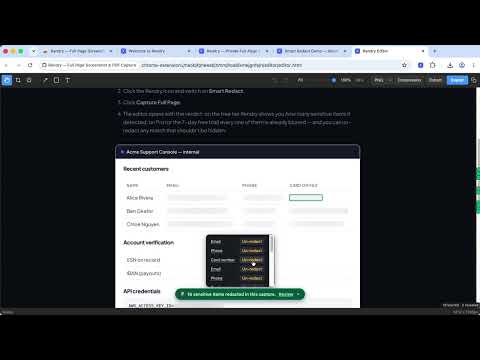
Full page screenshots, private by design. Capture a full webpage, find sensitive values, review them, then share the screenshot safely. Rendry helps QA and support teams prepare bug reports and customer handoffs without uploading page content. Full-page PNG, JPEG, and PDF capture is free. Capture and redaction happen on your device: your screenshots and page content never leave your machine. Pro license verification uses ExtensionPay. ━━━━━━━━━━━━━━━━━━━━━━━━━━ WHY TEAMS USE RENDRY ━━━━━━━━━━━━━━━━━━━━━━━━━━ SMART REDACT (Pro) Smart Redact detects emails, phone numbers, card numbers, SSNs, IBANs, and API keys on-device. The free preview shows what it found and clearly marks the image as unblurred. Start the no-card Pro trial to blur the detected items on that same capture. Review or restore individual matches in the editor before you export or copy. Try it on our demo page: https://rendry.app/demo REAL-TEXT EXTRACT (Pro) Copy the page's actual text, every link, and any table straight from the capture (text or Markdown; links and tables as CSV / TSV / Markdown). Exact, never OCR — no more retyping error messages from pixels. Grab a page's design tokens (colors, type scale, spacing) as CSS variables or JSON. PRIVATE BY ARCHITECTURE Rendry requests access to the active tab you choose to capture (activeTab), without broad all-sites host permission. The extension also runs ExtensionPay's checkout script on extensionpay.com to verify Pro access. Details: https://rendry.app/security ━━━━━━━━━━━━━━━━━━━━━━━━━━ WHAT'S NEW IN 1.4.4 ━━━━━━━━━━━━━━━━━━━━━━━━━━ • Smart Redact now opens a free on-device detection preview in the editor. It clearly marks detected details as unblurred until Pro is active. • Start the no-card 7-day Pro trial to blur detected details on that same open capture, then review or restore individual matches. • Auto-copy pauses during Smart Redact so an unreviewed capture is not copied. The popup and long-capture editor layouts are clearer. • Capture on Chrome Web Store and browser-managed pages now explains Chrome's restriction and points you to a regular website. ━━━━━━━━━━━━━━━━━━━━━━━━━━ FEATURES ━━━━━━━━━━━━━━━━━━━━━━━━━━ ONE-CLICK FULL PAGE SCREEN CAPTURE Click the Rendry icon or press Alt+Shift+R to screenshot the entire page from top to bottom. Rendry automatically scrolls, captures each section, and stitches them into a single seamless image — including modern single-page apps and dashboards that scroll inside a panel. SMART CONTENT LOADING Rendry detects lazy-loaded images and triggers them before capture, so your screenshots include all content — not just placeholder images. NOISE REMOVAL Automatically hides distracting elements before capture: • Cookie consent banners • Chat widgets (Intercom, Drift, Crisp, and more) • Popup overlays and modals • Lightboxes • Floating action buttons (e.g. "Book Now", "Back to top") • Ad containers Toggle noise removal on or off from the popup menu. BUILT-IN EDITOR Captures open in the built-in editor by default, or you can turn it off in the popup for a one-click download. The free Smart Redact preview opens the editor even when direct download is selected. Free tools: crop, copy to clipboard, and PNG/JPEG/PDF export. Pro markup tools — blur, arrows, shapes, and text — sit in the toolbar. EXPORT AS PNG, JPEG, OR PDF Choose your format: • PNG — pixel-perfect image, ideal for sharing and editing • JPEG — smaller files at Rendry's High quality preset, ideal for uploading and sharing • PDF — save any webpage as a PDF document with metadata, great for archiving INFINITE SCROLL DETECTION Rendry detects infinite scroll pages (like social media feeds) and warns you before capture, preventing runaway captures that never end. STICKY ELEMENT HANDLING Headers and footers that follow you as you scroll? Rendry captures them once in their natural position, not repeated in every section. ━━━━━━━━━━━━━━━━━━━━━━━━━━ RENDRY PRO — 7-DAY FREE TRIAL ━━━━━━━━━━━━━━━━━━━━━━━━━━ Try everything free for 7 days, no card required — then $2/month or $20/year: • Smart Redact — blur detected sensitive data on the capture you just made, then review or restore each match before saving; detection and blur run on your device • Copy real page content — pull a page's text, links, and tables from the editor (text or Markdown; links and tables as CSV / TSV / Markdown). Exact, never OCR • Design tokens — a page's color palette, type scale, and spacing as CSS variables or JSON • Element & region capture — capture just one element, including content that scrolls inside it below the fold • Editor markup tools — blur sensitive regions, add arrows, shapes, and text annotations before saving (the editor itself, plus crop and copy, are free for everyone) • WebP export — modern, efficient image files • Compression control — pick from Smaller files, Balanced, High quality, or Maximum quality presets, or fine-tune per export with a live file-size estimate. Applies to JPEG, WebP, and PDF. • Custom filename templates — {domain}, {date}, {time}, {title}, {timestamp} • Resolution control — 0.5×, 1×, 2×, or 3× device pixel ratio • Multi-page PDF — A4 or Letter page sizes (plus full-page default) • Timed capture — 3 / 5 / 10-second countdown for menus, hovers, and tooltips Upgrade, manage, or cancel anytime from inside the extension popup. Billing is handled by ExtensionPay (powered by Stripe). See the privacy policy at https://rendry.app/privacy for what is and isn't collected. ━━━━━━━━━━━━━━━━━━━━━━━━━━ PRIVACY FIRST ━━━━━━━━━━━━━━━━━━━━━━━━━━ Rendry processes everything on your device. Your screenshots never leave your machine — on the free tier and Pro alike. • Captures, redaction, and extraction run 100% locally • No analytics or tracking • No account needed for the free tier • Pro trial and subscription status are verified through ExtensionPay; your captures and browsing data are never sent with the license check We only request the minimum permissions needed: • activeTab — access the current page only when you click • scripting — inject the capture script into the current page • downloads — save your screenshot file • storage — remember your format preference and Pro license • offscreen — stitch images using a canvas (required by Chrome's Manifest V3) • clipboardWrite — copy captures to the clipboard when "Copy to clipboard" is on in the popup, or when you click Copy in the editor Every permission explained in plain English: https://rendry.app/security ━━━━━━━━━━━━━━━━━━━━━━━━━━ KEYBOARD SHORTCUT ━━━━━━━━━━━━━━━━━━━━━━━━━━ Default: Alt+Shift+R (customizable in chrome://extensions/shortcuts) Captures the full page with your last-used format — no popup needed. Learn more at https://rendry.app
5 out of 59 ratings
Details
- Version1.4.4
- UpdatedSeptember 28, 2026
- Offered byMamaOwned LLC
- Size277KiB
- LanguagesEnglish
- DeveloperMamaOwned LLC
2108 N St STE C Sacramento, CA 95816-5712 USEmail
support@rendry.appPhone
+1 650-537-5589 - TraderThis developer has identified itself as a trader per the definition from the European Union and committed to only offer products or services that comply with EU laws.
- D-U-N-S134356343
Privacy

Rendry — Full Page Screenshot & PDF Capture has disclosed the following information regarding the collection and usage of your data. More detailed information can be found in the developer's privacy policy.
Rendry — Full Page Screenshot & PDF Capture handles the following:
This developer declares that your data is
- Not being sold to third parties, outside of the approved use cases
- Not being used or transferred for purposes that are unrelated to the item's core functionality
- Not being used or transferred to determine creditworthiness or for lending purposes
Support
For help with questions, suggestions, or problems, please open this page on your desktop browser