

Rendry — Full Page Screenshot & PDF Capture
9 ratings
)
Overview
Full page screen capture in one click. Save the entire page as PNG, JPEG, or PDF, free. Private — nothing leaves your browser.
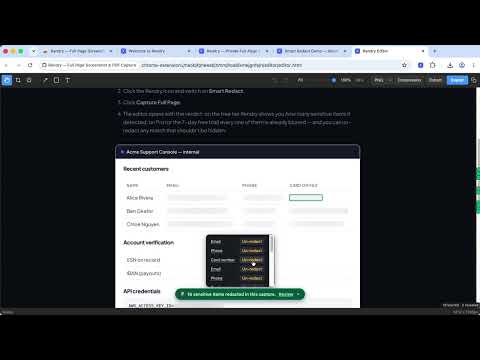
Full page screenshots, private by design. Rendry captures the entire page in one click — a full page screenshot with no scrolling, no stitching, no hassle. Take a scrolling screenshot of any web page and save it as PNG, JPEG, or PDF, free. Perfect for saving receipts and order confirmations, archiving ChatGPT or Claude conversations, capturing long articles, and filing pixel-perfect bug reports. Unlike most screen capture tools, everything happens on your device: your screenshots never leave your machine. ━━━━━━━━━━━━━━━━━━━━━━━━━━ ONLY IN RENDRY ━━━━━━━━━━━━━━━━━━━━━━━━━━ SMART REDACT (Pro) The only screenshot extension that automatically finds and blurs sensitive data before you share: emails, phone numbers, card numbers, SSNs, IBANs, API keys. Detection runs 100% on your device — nothing is uploaded, ever. Un-redact any item in the editor if a match was wrong. Try it on our live demo page: https://rendry.app/demo REAL-TEXT EXTRACT (Pro) Copy the page's actual text, every link, and any table straight from the capture (text or Markdown; links and tables as CSV / TSV / Markdown). Exact, never OCR — no more retyping error messages from pixels. Grab a page's design tokens (colors, type scale, spacing) as CSS variables or JSON. PRIVATE BY ARCHITECTURE Rendry only asks for access to the tab you click on (activeTab). It structurally cannot read pages you didn't capture, and it never shows Chrome's "Read and change all your data on all websites" warning. Details: https://rendry.app/security ━━━━━━━━━━━━━━━━━━━━━━━━━━ WHAT'S NEW IN 1.4 (June–July 2026) ━━━━━━━━━━━━━━━━━━━━━━━━━━ • Smart Redact (Pro) — auto-blur sensitive data before you save, entirely on your device • Extract panel (Pro) — copy real page text, links, tables, and design tokens from a capture • Element & region capture (Pro) — click any element to capture just it, including content that scrolls below the fold inside it • 7-day free trial — try all of Rendry Pro free, no card required, right from the popup or editor • 1.4.1: a welcome guide opens on install, and the free trial is now visible right in the popup • 1.4.2: JPEG export is now free at the High quality preset; WebP and adjustable compression remain Pro Full history at https://rendry.app/changelog ━━━━━━━━━━━━━━━━━━━━━━━━━━ FEATURES ━━━━━━━━━━━━━━━━━━━━━━━━━━ ONE-CLICK FULL PAGE SCREEN CAPTURE Click the Rendry icon or press Alt+Shift+R to screenshot the entire page from top to bottom. Rendry automatically scrolls, captures each section, and stitches them into a single seamless image — including modern single-page apps and dashboards that scroll inside a panel. SMART CONTENT LOADING Rendry detects lazy-loaded images and triggers them before capture, so your screenshots include all content — not just placeholder images. NOISE REMOVAL Automatically hides distracting elements before capture: • Cookie consent banners • Chat widgets (Intercom, Drift, Crisp, and more) • Popup overlays and modals • Lightboxes • Floating action buttons (e.g. "Book Now", "Back to top") • Ad containers Toggle noise removal on or off from the popup menu. BUILT-IN EDITOR Every capture opens in a built-in editor — or turn it off in the popup for a one-click download. Free tools: crop, copy to clipboard, and PNG/JPEG/PDF export. Pro markup tools — blur, arrows, shapes, and text — sit right in the toolbar, one click away when you need them. EXPORT AS PNG, JPEG, OR PDF Choose your format: • PNG — pixel-perfect image, ideal for sharing and editing • JPEG — smaller files at Rendry's High quality preset, ideal for uploading and sharing • PDF — save any webpage as a PDF document with metadata, great for archiving INFINITE SCROLL DETECTION Rendry detects infinite scroll pages (like social media feeds) and warns you before capture, preventing runaway captures that never end. STICKY ELEMENT HANDLING Headers and footers that follow you as you scroll? Rendry captures them once in their natural position, not repeated in every section. ━━━━━━━━━━━━━━━━━━━━━━━━━━ RENDRY PRO — 7-DAY FREE TRIAL ━━━━━━━━━━━━━━━━━━━━━━━━━━ Try everything free for 7 days, no card required — then $2/month or $20/year: • Smart Redact — auto-blur sensitive data (emails, phone numbers, card numbers, SSNs, IBANs, API keys) before you save, all on your device; un-redact any item if a match was wrong • Copy real page content — pull a page's text, links, and tables from the editor (text or Markdown; links and tables as CSV / TSV / Markdown). Exact, never OCR • Design tokens — a page's color palette, type scale, and spacing as CSS variables or JSON • Element & region capture — capture just one element, including content that scrolls inside it below the fold • Editor markup tools — blur sensitive regions, add arrows, shapes, and text annotations before saving (the editor itself, plus crop and copy, are free for everyone) • WebP export — modern, efficient image files • Compression control — pick from Smaller files, Balanced, High quality, or Maximum quality presets, or fine-tune per export with a live file-size estimate. Applies to JPEG, WebP, and PDF. • Custom filename templates — {domain}, {date}, {time}, {title}, {timestamp} • Resolution control — 0.5×, 1×, 2×, or 3× device pixel ratio • Multi-page PDF — A4 or Letter page sizes (plus full-page default) • Timed capture — 3 / 5 / 10-second countdown for menus, hovers, and tooltips Upgrade, manage, or cancel anytime from inside the extension popup. Billing is handled by ExtensionPay (powered by Stripe). See the privacy policy at https://rendry.app/privacy for what is and isn't collected. ━━━━━━━━━━━━━━━━━━━━━━━━━━ PRIVACY FIRST ━━━━━━━━━━━━━━━━━━━━━━━━━━ Rendry processes everything on your device. Your screenshots never leave your machine — on the free tier and Pro alike. • Captures, redaction, and extraction run 100% locally • No analytics or tracking • No account needed for the free tier • If you subscribe to Pro, the only network request Rendry makes is ExtensionPay's license check — your email and subscription status, never your captures or browsing data We only request the minimum permissions needed: • activeTab — access the current page only when you click • scripting — inject the capture script into the current page • downloads — save your screenshot file • storage — remember your format preference and Pro license • offscreen — stitch images using a canvas (required by Chrome's Manifest V3) • clipboardWrite — copy captures to the clipboard when "Copy to clipboard" is on in the popup, or when you click Copy in the editor Every permission explained in plain English: https://rendry.app/security ━━━━━━━━━━━━━━━━━━━━━━━━━━ KEYBOARD SHORTCUT ━━━━━━━━━━━━━━━━━━━━━━━━━━ Default: Alt+Shift+R (customizable in chrome://extensions/shortcuts) Captures the full page with your last-used format — no popup needed. Learn more at https://rendry.app
5 out of 59 ratings
Details
- Version1.4.3
- UpdatedJuly 26, 2026
- Offered byMamaOwned LLC
- Size279KiB
- LanguagesEnglish
- DeveloperMamaOwned LLC
2108 N St STE C Sacramento, CA 95816-5712 USEmail
support@rendry.appPhone
+1 650-537-5589 - TraderThis developer has identified itself as a trader per the definition from the European Union and committed to only offer products or services that comply with EU laws.
- D-U-N-S134356343
Privacy

Rendry — Full Page Screenshot & PDF Capture has disclosed the following information regarding the collection and usage of your data. More detailed information can be found in the developer's privacy policy.
Rendry — Full Page Screenshot & PDF Capture handles the following:
This developer declares that your data is
- Not being sold to third parties, outside of the approved use cases
- Not being used or transferred for purposes that are unrelated to the item's core functionality
- Not being used or transferred to determine creditworthiness or for lending purposes
Support
For help with questions, suggestions, or problems, please open this page on your desktop browser