

Remove From Page
2 lượt xếp hạng
)
Tổng quan
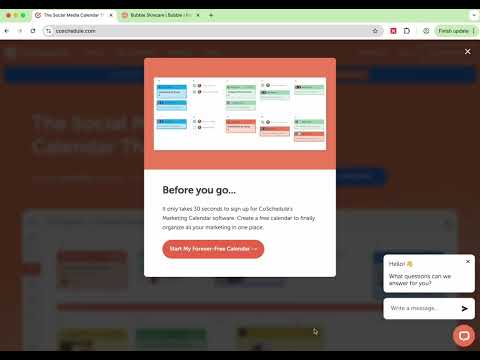
Click the extension icon to highlight and remove elements from the page
Remove From Page — declutter any website in one click Transform noisy pages into clean, focused reading and working spaces. Remove From Page lets you hover and click to temporarily remove anything that’s in your way—popups, sticky headers, banners, cookie notices, chat widgets, overlays, and more. No setup, no lists, no waiting. Just instant calm. Why you’ll love it Remove anything, instantly: Hover to highlight, click to make it disappear with a gentle fade. Stay in flow: Press ESC to exit anytime—refresh restores the original page. Works almost everywhere: Handles nested content and embeds; Alt+Click removes pesky third‑party iframes. Focus on what matters: Clear clutter to read, research, shop, or present without distractions. Private by design: Runs only when you use it, doesn’t collect or send any data anywhere. Key features Smart highlighting: A subtle red overlay and outline show exactly what will be removed. On‑page guidance: A small top‑left tip appears only on the main page (not inside iframes). Gentle removal: Elements fade out for visual clarity before disappearing. Iframe support: Same‑origin frames: Hover and click inside just like the main page. Cross‑origin frames (e.g., chat widgets): Alt+Click anywhere inside the widget to remove the entire embed. Clean exit: Press ESC to stop highlighting mode in all frames at once. How it works Click the extension icon to enter highlighting mode. Hover to preview what will be removed; click to remove it. For embedded widgets in iframes, hold Alt and click inside the widget to remove the whole iframe. Press ESC to exit. Refresh the page to restore everything. Great for Removing sticky headers and footers while reading Hiding modals, interstitials, and cookie banners Clearing overlays during live demos and screen shares Getting rid of chat bubbles and “help” launchers Trimming clutter from documentation, news, or dashboards Privacy and security No tracking, no analytics, no external calls. Runs only on demand when you activate it. Changes are temporary and local to your browser tab (refresh to restore). Required permissions (plain‑English) Active Tab and Scripting: To temporarily inject the highlighter and remove the elements you click. Host access: To allow highlighting inside iframes when you explicitly activate the tool. Tips Missed the right element? Move your mouse slightly to select a different container before clicking. Some sites re‑insert UI automatically; if something reappears, just remove it again (Alt+Click for iframe widgets). If a click opens navigation, you can press ESC to exit, then try again with a more precise hover target. Clear the clutter. Keep the content. Enjoy the web on your terms.
5/52 lượt xếp hạng
Chi tiết
- Phiên bản1.0.0
- Đã cập nhật6 tháng 10, 2025
- Nhà cung cấpkeiaus
- Kích thước8.43KiB
- Ngôn ngữEnglish
- Nhà phát triển
Email
serhii.kotyk@gmail.com - Người bán phi thương mạiNhà phát triển này không tự nhận mình là người bán. Đối với người tiêu dùng ở Liên minh Châu Âu, xin lưu ý rằng các quyền của người tiêu dùng không được áp dụng trong hợp đồng giữa bạn và nhà phát triển này.
Quyền riêng tư

Remove From Page đã công bố thông tin sau đây liên quan đến việc thu thập và sử dụng dữ liệu của bạn. Bạn có thể xem thêm thông tin chi tiết trong privacy policy của nhà phát triển.
Remove From Page xử lý dữ liệu sau:
Nhà phát triển này tuyên bố rằng dữ liệu của bạn
- Không được bán cho bên thứ ba, ngoài những trường hợp sử dụng đã được phê duyệt
- Không được sử dụng hoặc chuyển nhượng cho các mục đích không liên quan đến chức năng chính của mặt hàng
- Không được sử dụng hoặc chuyển nhượng để xác định khả năng thanh toán nợ hoặc phục vụ mục đích cho vay
Hỗ trợ
Nếu bạn có câu hỏi, ý kiến đề xuất hoặc gặp vấn đề, vui lòng mở trang này bằng trình duyệt dành cho máy tính để được trợ giúp