


Overview
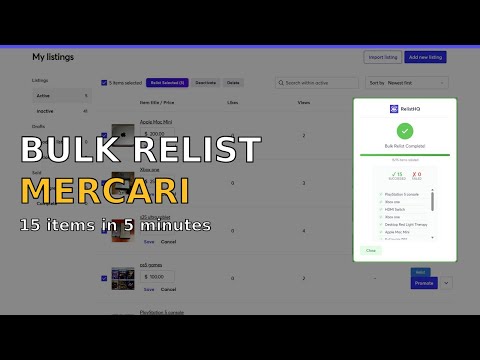
Relist on Mercari in one click. Bulk relist stale listings, auto-deactivate old ones, and boost your Mercari sales instantly.
RelistHQ — The #1 Mercari Relisting Tool Stop wasting hours manually relisting on Mercari. RelistHQ lets you relist your Mercari listings in one click — no more copying titles, re-uploading photos, or re-selecting categories by hand. WHY RELIST ON MERCARI? Mercari's search algorithm favors fresh listings. When your listings sit for weeks without selling, they get buried. Relisting on Mercari pushes your items back to the top of search results, getting more eyes on your products and more sales in your pocket. HOW RELISTHQ WORKS Visit any of your Mercari listings Click the RelistHQ relist button RelistHQ copies everything — title, description, photos, price, category, shipping details — and creates a brand new Mercari listing Your old listing is automatically deactivated (no duplicates) That's it. What used to take 5-10 minutes per listing now takes seconds. FEATURES → One-Click Relist: Relist any Mercari listing instantly from the listing page → Bulk Relist (Pro): Select multiple listings and relist them all at once — perfect for sellers with 50, 100, or 500+ Mercari listings → Auto-Deactivate: Old listings are automatically deactivated so you never have duplicate Mercari listings → Full Listing Copy: Title, description, all photos, price, category, condition, and shipping details are copied to your new listing automatically → Works with Mercari's Current Layout: Built specifically for Mercari and updated to work with the latest Mercari site changes WHO IS RELISTHQ FOR? RelistHQ is built for Mercari sellers who are serious about making sales. Whether you're a casual reseller with 20 listings or a full-time Mercari seller managing hundreds of items, RelistHQ saves you hours every week. If you've ever searched for "how to relist on Mercari," "Mercari relisting tool," or "why aren't my Mercari listings selling" — this is your answer. PRICING Free — forever: → Unlimited single relists (one listing at a time) → Auto-deactivate old listings included → 5 bulk relist operations per month Pro ($15/mo): → Everything in Free → Unlimited bulk relists — relist 50, 100, or 500+ listings at once Pro Annual ($120/yr): → Everything in Pro — save $60/year Lifetime ($149): → One payment, unlimited everything forever (limited availability — only 50 spots) COMPARE TO OTHER OPTIONS Unlike multi-platform crosslisting tools that cost $25-90/month and try to do everything, RelistHQ is built exclusively for Mercari. That means a simpler interface, faster relisting, and a fraction of the price. If you sell on Mercari, you don't need to pay for platforms you don't use. SUPPORT Questions? Feature requests? Bugs? Email us: kenny@relisthq.com We respond within 24 hours.
3.7 out of 53 ratings
Details
- Version1.0.1
- UpdatedFebruary 10, 2026
- Size132KiB
- LanguagesEnglish
- DeveloperWebsite
Email
kennyg1700@gmail.com - Non-traderThis developer has not identified itself as a trader. For consumers in the European Union, please note that consumer rights do not apply to contracts between you and this developer.
Privacy

This developer declares that your data is
- Not being sold to third parties, outside of the approved use cases
- Not being used or transferred for purposes that are unrelated to the item's core functionality
- Not being used or transferred to determine creditworthiness or for lending purposes
Support
For help with questions, suggestions, or problems, please open this page on your desktop browser