

Refine — Hide YouTube distractions

Overview
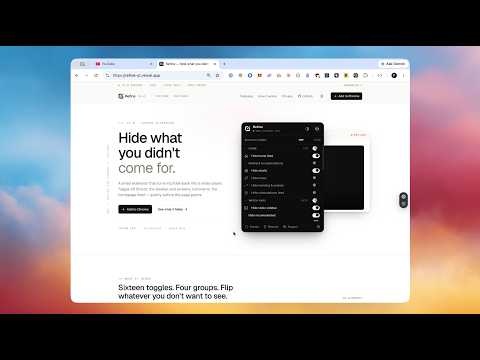
Hide YouTube shorts, recommendations, comments, and other distractions. Reclaim your watch page.
Refine hides the parts of YouTube you didn't come to see. The popup gives you a switch for every distraction YouTube tries to feed you Shorts shelves and tabs, the home feed, recommended videos in the sidebar, the Trending tab, comments, end screens, merch shelves, the "More from YouTube" section in the menu, search-result clutter, even the top header. Flip each one independently, or use the group-level switch in each section header to hide everything in one tap. WHAT YOU CAN HIDE Home • Home feed (with optional redirect to Subscriptions) • Shorts (shelf, tab, reel grid, sidebar entry) • Mixes • Trending & Explore • Subscriptions feed Watch page • Video sidebar (Recommended, Live chat, Playlist as sub-toggles) • End-screen feed and end-screen cards • Fundraiser banners • Merch, tickets, offers • Video info (title, channel, buttons, description each its own toggle) • Disable autoplay (via the player's own API) • Disable annotations Comments • Comments (with profile-photos sub-toggle) YouTube shell • Notifications • Search suggestions • Off-topic search shelves • "More from YouTube" section in the menu • Top header HOW IT WORKS Refine writes your preferences as attributes on the YouTube page before it paints, then a single stylesheet hides whatever you've toggled off. No flicker, no flash of the thing you came here to hide. Per-site pause is one click — flip it off when you actually want to scroll, then back on. Network-layer redirects bounce you off Trending and Explore before they load. The autoplay toggle calls YouTube's own player API directly. PRIVACY Refine collects nothing. No accounts, no telemetry, no remote servers. Your toggle preferences live in your browser's local storage and nowhere else. Full privacy policy: https://refine-yt.vercel.app/privacy OPEN SOURCE Source, issues, and feature requests: https://github.com/PaoloJN/refine MIT licensed. Built by one person. Hope it gives you back the YouTube you wanted.
0 out of 5No ratings
Details
- Version1.0.0
- UpdatedJune 7, 2026
- Offered bypaolo.j.nessim
- Size154KiB
- LanguagesEnglish
- Developer
Email
paolo.j.nessim@gmail.com - Non-traderThis developer has not identified itself as a trader. For consumers in the European Union, please note that consumer rights do not apply to contracts between you and this developer.
Privacy

This developer declares that your data is
- Not being sold to third parties, outside of the approved use cases
- Not being used or transferred for purposes that are unrelated to the item's core functionality
- Not being used or transferred to determine creditworthiness or for lending purposes
Support
For help with questions, suggestions, or problems, visit the developer's support site