

Reepley: AI note taker for Google Meet, Zoom and MS Teams

Overview
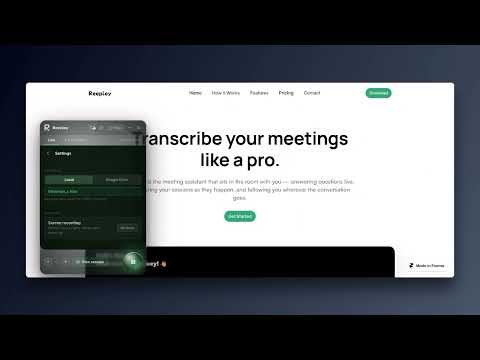
The AI that sits in the room with you; live transcription, real-time AI answers, structured notes, and memory across sessions.
The stealth AI meeting copilot that feels like having a brilliant assistant in the room with you. It takes structured notes, whispers live answers, and remembers every conversation—all without sending a bot to your call. Stop settling for AI tools that only help you after the meeting is over. Reepley is the first active, real-time meeting copilot. Not a passive scribe that forces you to open bulky sidebars that make you break your eye contact. Reepley acts like an invisible teleprompter. It listens to your call, transcribes securely, and floats live AI answers directly on your screen when you need them most. Perfect for high-stakes sales calls, rigorous technical interviews, and client presentations. Reepley gives you the answers you need to win the meeting in the moment, without anyone else knowing it's there. 🚀 Why Reepley Crushes the Competition • Zero-Friction Auto-Start: Never forget to record a meeting again. Reepley automatically detects when you join a Google Meet, Zoom, or Teams call and quietly boots up. No clicking required. • 100% Bot-Free & Local: Never invite an awkward "AI Note Taker" bot to a call again. Reepley processes your audio locally on your own device. Your clients feel respected, and your sensitive conversations stay strictly private. • The Invisible HUD (Heads-Up Display): No distracting sidebars. Reepley floats elegantly over your call, allowing you to read insights while maintaining perfect eye contact with your camera. • Universal Platform Support: Works seamlessly across Google Meet, Zoom Web, and Microsoft Teams. ✨ Main Features • Live Floating AI Answers: Prospect asked a tough pricing question? Interviewer asked a complex technical concept? Reepley whispers the exact answer on your screen in real-time. • Your Private Knowledge Base: Stop relying on generic AI. Point Reepley to a folder on your computer or Google Drive. When a client asks a question, Reepley securely searches your private PDFs and docs to feed you the right answer live. • Live Web Search: Asked about breaking news or current regulations? Reepley searches the web in the background and cites its live sources so you can speak with absolute confidence. • "Presence" (Video Tile Overlay): Want to align the room? Turn on Presence to overlay live decisions and open questions directly onto your video tile for everyone on the call to see, without sharing your screen. • The 3D Session Explorer: Stop losing notes in endless documents. Reepley visually maps out every conversation you’ve ever had in a beautiful 3D galaxy so you can explore past meetings by connected topics. • Real-Time Structured Notes: Watch your meeting automatically organize itself into a clean outline (Decisions, Open Questions, Next Steps) as you speak. 💼 Who Uses Reepley? • Sales & Account Executives: Handle objections live. Reepley floats the perfect talk-track sourced from your own battle-cards the second a competitor is mentioned. • Freelancers & Consultants: Navigate strict NDAs. Because Reepley transcribes locally on your device, you get perfect notes without ever violating client privacy or adding a third-party bot. • Job Seekers & Candidates: Navigate grueling technical or behavioral interviews with live AI nudges to structure your answers perfectly. • Product Managers: Run flawless user interviews with live context and suggested follow-up questions floating on-screen. 🔧 How It Works Install the Reepley Chrome extension (Absolutely FREE to use). Join your Google Meet, Zoom Web, or MS Teams call. Reepley auto-starts. It instantly begins transcribing and structuring your notes in the background. When a tough question is asked, Reepley processes your local files or the web, and floats the answer onto your screen instantly. Open the 3D Explorer anytime to chat with your notes and review your meeting history. 🔒 Enterprise-Grade Privacy & Security • No Bots: Reepley never joins your meetings as a participant. • Local By Default: We utilize advanced WebAssembly to transcribe your audio locally on your machine. Your audio never hits a cloud server. • Data Protection: We do not sell your data or use your private meeting transcripts to train third-party AI models. Experience the future of meetings. Stop waiting for email summaries and start getting the answers you need, the second you need them. Add Reepley to Chrome today and get your ultimate meeting advantage.
0 out of 5No ratings
Details
- Version3.7.9
- UpdatedJuly 27, 2026
- Offered byreepley.agent
- Size3.37MiB
- LanguagesEnglish
- Developer
Email
reepley.agent@gmail.com - Non-traderThis developer has not identified itself as a trader. For consumers in the European Union, please note that consumer rights do not apply to contracts between you and this developer.
Privacy

Reepley: AI note taker for Google Meet, Zoom and MS Teams has disclosed the following information regarding the collection and usage of your data. More detailed information can be found in the developer's privacy policy.
Reepley: AI note taker for Google Meet, Zoom and MS Teams handles the following:
This developer declares that your data is
- Not being sold to third parties, outside of the approved use cases
- Not being used or transferred for purposes that are unrelated to the item's core functionality
- Not being used or transferred to determine creditworthiness or for lending purposes