

ReelSlider - Instagram Reels Speed, Seek & Volume Controls
6 ratings
)
Overview
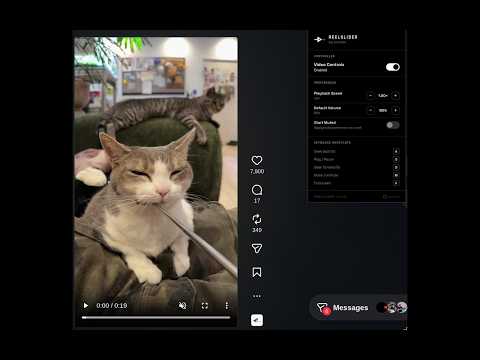
Add real seek, speed, volume & loop controls to Instagram Reels, Stories & Feed. Free & open-source.
========================================= ReelSlider — Seek, Speed & Volume Controls for Instagram Reels ========================================= Instagram gives you no way to seek, skip, slow down, or loop a Reel — ReelSlider fixes that. Add a real seek bar, playback speed control, volume memory, and section looping to every Reel, Story, Feed post, and video Post on Instagram. Whether you want to speed up a slow Reel, slow down a fast talker, skip ahead on a long Story, or repeat one part of a tutorial or dance clip, ReelSlider gives Instagram Reels the same controls YouTube and Netflix already have — completely free, with no account and no data collection. ✦ WHY PEOPLE INSTALL REELSLIDER ----------------------------------------- - Can't seek or skip on Instagram Reels? Click or drag the timeline to jump anywhere in the video. - Want to speed up or slow down an Instagram Reel? Set playback speed anywhere from 0.25x to 2.0x — remembered automatically next time. - Tired of Instagram resetting your volume every time you scroll Reels? Set a custom default volume that sticks across sessions. - Need to replay one part of a Reel, tutorial, or recipe video? Section Looping lets you mark a start and end point and repeat it on loop. - Annoyed by sound turning back on as you scroll Reels? Mute Memory keeps your mute/unmute choice as you move between videos. ✦ KEY FEATURES ----------------------------------------- - Seek & Scrub — click or drag the timeline on any Instagram Reel, Story, Feed post, or Profile video. - Playback Speed Control — slow down or speed up Instagram Reels from 0.25x to 2.0x, saved automatically. - Custom Default Volume — set your preferred volume once; it persists across every session. - Mute Memory — your mute/unmute preference carries over as you scroll Reels. - Section Looping — set a loop start and end point to repeat any part of a Reel. - Works Everywhere — Reels, Stories, Feed, Posts, and Profile tabs, all with the same controls. ✦ POWER-USER KEYBOARD SHORTCUTS ----------------------------------------- - [S] Play / Pause - [A] Seek backward 5 seconds - [D] Seek forward 5 seconds - [M] Mute / Unmute - [F] Toggle fullscreen - [[] Set loop start - []] Set loop end - [\] Clear loop ✦ 100% FREE & OPEN SOURCE — ZERO DATA COLLECTED ----------------------------------------- ReelSlider runs entirely in your browser. No data is collected, stored, or sent anywhere. No account, no sign-up, no tracking, no Pro tier — every feature is free, forever. The full source code is public on GitHub. ----------------------------------------- If you've ever wanted a seek bar, speed control, volume control, or loop button on Instagram Reels — ReelSlider is built for exactly that. Developed by Sumedh Vats • Portfolio: https://svats.me/ • GitHub: https://github.com/Sumedhvats/reelSlider =========================================
5 out of 56 ratings
Details
- Version1.1.0
- UpdatedJuly 27, 2026
- Offered bySumedh Vats
- Size77.2KiB
- Languages6 languages
- DeveloperSumedh Vats
ROHINI, DELHI New Delhi, Delhi 110085 INEmail
sumedhvats2004@gmail.com - Non-traderThis developer has not identified itself as a trader. For consumers in the European Union, please note that consumer rights do not apply to contracts between you and this developer.
Privacy

This developer declares that your data is
- Not being sold to third parties, outside of the approved use cases
- Not being used or transferred for purposes that are unrelated to the item's core functionality
- Not being used or transferred to determine creditworthiness or for lending purposes
Support
For help with questions, suggestions, or problems, visit the developer's support site