Item logo image for reeLm

reeLm

Item media 6 (screenshot) for reeLm
Item video thumbnail
Item media 2 (screenshot) for reeLm
Item media 3 (screenshot) for reeLm
Item media 4 (screenshot) for reeLm
Item media 5 (screenshot) for reeLm
Item media 6 (screenshot) for reeLm
Item video thumbnail
Item media 2 (screenshot) for reeLm
Item media 3 (screenshot) for reeLm
Item media 4 (screenshot) for reeLm
Item media 5 (screenshot) for reeLm
Item media 6 (screenshot) for reeLm

Overview

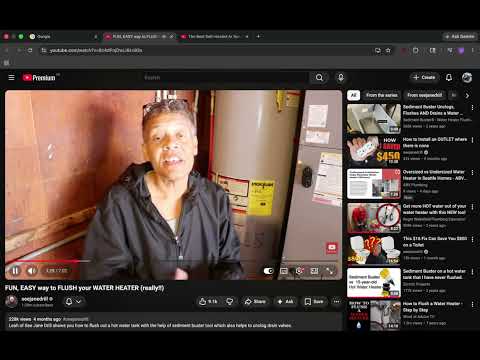
Press Shift+Y while watching to save video for keyword search

reeLm is external memory for the YouTube videos you've already chosen to keep. You watch a great tutorial. Six months later, you're standing at the problem it solved — but you can't remember which video had the answer. You remember a fragment: "anode rod." A phrase. A name. A specific word that stuck. reeLm finds that moment. Press Shift+Y while watching to save a video. reeLm indexes the full transcript locally. Later, click the icon and type the fragment you remember — every video where it was mentioned comes back, with the exact timestamps. Click one, and you're at the second the speaker said it. How it works 1. Watch YouTube normally. When something's worth keeping, press Shift+Y. 2. reeLm pulls the transcript and stores it on your machine — never uploaded anywhere. 3. Anytime later, click the icon and type a word or phrase you remember. 4. See every saved video where it appears, with timestamps. Click to jump. Why reeLm • Built for the moment you remember the fragment but not the source • Searches across every video in your library, not just the one you're watching • 100% local: transcripts stay on your machine, never leave your device • Text-only storage: no video files. About 50 MB for 1,000 saves. • No account, no API key, no subscription • Scales the way your memory can't: works the same with 50 saves or 5,000 • Free and open source reeLm requires a small local Python server, installable via Homebrew: brew install woodman11/reelm/reelm brew services start reelm Source: https://github.com/Woodman11/reelm

Details

  • Version
    1.5
  • Updated
    June 3, 2026
  • Size
    19.3KiB
  • Languages
    English
  • Developer
    Website
    Email
    kohphayam@gmail.com
  • Non-trader
    This developer has not identified itself as a trader. For consumers in the European Union, please note that consumer rights do not apply to contracts between you and this developer.

Privacy

Manage extensions and learn how they're being used in your organization
The developer has disclosed that it will not collect or use your data.

This developer declares that your data is

  • Not being sold to third parties, outside of the approved use cases
  • Not being used or transferred for purposes that are unrelated to the item's core functionality
  • Not being used or transferred to determine creditworthiness or for lending purposes

Support

For help with questions, suggestions, or problems, visit the developer's support site

Related

YT Marker - YouTube Timestamp & Notes

4.6

Sauvegardez, annotez et organisez les moments clés des vidéos YouTube. Transformez votre visionnage en savoir.

CueBack — YouTube Scroll Seek

0.0

Seek YouTube videos with your scroll wheel. Hold a key or toggle seeking, then replay your saved position instantly.

Clip Catcher - Save YouTube Quotes & Moments

0.0

Press Alt+C while watching to save the moment and the words spoken. Search your clips later and jump straight back.

YouTube Resume Position – Continue Watching

4.2

Resume YouTube videos where you left off. Automatically saves and restores your playback position.

BeeNotes

5.0

Bookmark any moment in a YouTube video with one click or Shift+A, then export every screenshot as a timestamped PDF.

ShortsRecall

0.0

Your Second Brain for short-form video. Automatically save and search closed captions for YouTube Shorts and TikTok.

Kayt — timestamped notes for YouTube

0.0

Take timestamped notes on YouTube without pausing. Press Alt+N, type, press Enter. Notes stay in your browser.

Cuelio — Transcript Search & AI for YouTube™

5.0

Find moments in YouTubeâ„¢ videos with transcript search, AI answers, and one-click timestamp jumps.

Watch Later Enhanced: Save YouTube Videos & Mini Player

5.0

Save any YouTube video with Alt + left click or its link. Tag it, sort it, back it up, and watch in a floating mini player.

ClipChase: YouTube channel transcript search

5.0

Ctrl+F for YouTube channels. Search every video and stream VOD for a word, then jump to the exact second it was said.

YouTube Transcript & Summary with Timestamps -- TubeNotes

0.0

AI-powered transcription and summarization of YouTube videos with clickable links that take you to the moment in the video.

Recall - YouTube Video Organizer

4.4

Quickly save YouTube videos to your Recall folders while browsing

YT Marker - YouTube Timestamp & Notes

4.6

Sauvegardez, annotez et organisez les moments clés des vidéos YouTube. Transformez votre visionnage en savoir.

CueBack — YouTube Scroll Seek

0.0

Seek YouTube videos with your scroll wheel. Hold a key or toggle seeking, then replay your saved position instantly.

Clip Catcher - Save YouTube Quotes & Moments

0.0

Press Alt+C while watching to save the moment and the words spoken. Search your clips later and jump straight back.

YouTube Resume Position – Continue Watching

4.2

Resume YouTube videos where you left off. Automatically saves and restores your playback position.

BeeNotes

5.0

Bookmark any moment in a YouTube video with one click or Shift+A, then export every screenshot as a timestamped PDF.

ShortsRecall

0.0

Your Second Brain for short-form video. Automatically save and search closed captions for YouTube Shorts and TikTok.

Kayt — timestamped notes for YouTube

0.0

Take timestamped notes on YouTube without pausing. Press Alt+N, type, press Enter. Notes stay in your browser.

Cuelio — Transcript Search & AI for YouTube™

5.0

Find moments in YouTubeâ„¢ videos with transcript search, AI answers, and one-click timestamp jumps.

Search
Clear search
Close search
Google apps
Main menu