

Reelaya – Screen & Camera Recorder
1 rating
)
Overview
Record your screen, a tab or your camera, edit it, and share it with a short link. Recordings stay on your device until you share.
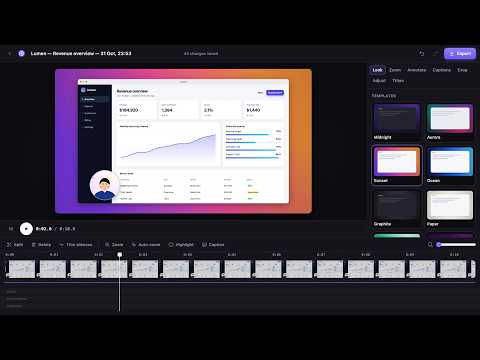
Record your screen, a tab or your camera, polish the video in a built-in editor, share it with a short link, and turn screenshots into clear images, all inside Chrome. Your recordings stay on your computer until you share them. A free Reelaya account is needed: create it on reelaya.com when you install. RECORD • Your whole screen, a single tab, or just your camera • Your face in a camera bubble you can drag anywhere, and it follows you between tabs • Click highlights and a pen to draw on the page while you talk • The controls live on the Reelaya icon with a running timer, so they never appear in a tab recording • Sharp text: records at your screen's real resolution as MP4 (up to 1080p free, up to 4K with Pro) • Live captions from your voice, made on your device • Optional console and network logs for bug reports EDIT • 12 templates: gradient backgrounds, window frames, shadows and rounded corners • Smooth zooms you aim by dragging, or automatic zooms on your clicks • Cut, trim silences, crop, highlight, blur, arrows, text, intro and outro cards • Captions in five styles, burned in or saved as SRT or VTT • Export MP4 or WebM up to 4K SHARE • Share link uploads a streaming copy and copies a short link like v.reelaya.com/k7Qm2xPa • Anyone with the link can watch in their browser, no account needed • See views for each link, and stop sharing at any time: the uploaded copy is deleted SCREENSHOTS • The visible area or the whole page, stitched for you (even apps that scroll inside a panel) • Arrows, boxes, text, numbered steps, highlighter, blur, pixelate, erase and spotlight • Add a logo or picture, apply filters and frame it with a template • Copy to the clipboard or download as PNG or JPG FREE AND PRO Free: 10 videos a month up to 5 minutes each at up to 1080p, 30 screenshots a month and 10 share links, with the full editor and no watermark. Pro: unlimited videos of any length up to 4K, unlimited screenshots and unlimited share links. Monthly, yearly or lifetime, paid with bKash at reelaya.com. PRIVATE BY DESIGN Recordings and screenshots are stored in your browser. Only a video you share by link is uploaded, and stopping the link deletes it. Your account holds your email, your plan and your monthly counts. No analytics, no ads, no tracking. Guide: https://reelaya.com/docs.html Privacy: https://reelaya.com/privacy.html Developed by Shakawat Hridoy
5 out of 51 rating
Details
- Version1.6.0
- UpdatedNovember 4, 2026
- Offered byShakawat Hridoy
- Size345KiB
- LanguagesEnglish
- DeveloperMd Shakawat Ullah Hridoy
Laxmipur, Ward No 05 Kaishalla, Darbeser Hat, Daganbhuiyan Feni 3900 BDEmail
hridoy@shakawathridoy.comPhone
+880 1883-559190 - TraderThis developer has identified itself as a trader per the definition from the European Union and committed to only offer products or services that comply with EU laws.
Privacy

Reelaya – Screen & Camera Recorder has disclosed the following information regarding the collection and usage of your data. More detailed information can be found in the developer's privacy policy.
Reelaya – Screen & Camera Recorder handles the following:
This developer declares that your data is
- Not being sold to third parties, outside of the approved use cases
- Not being used or transferred for purposes that are unrelated to the item's core functionality
- Not being used or transferred to determine creditworthiness or for lending purposes
Support
For help with questions, suggestions, or problems, please open this page on your desktop browser